
Order Holds
Contents
1. Use Cases
Quick links: Pause an order before it ships | See which orders are stuck | Release orders after the issue is fixed
Scenario 1: A customer changes their mind and you need to stop the order before it ships
Situation: After placing an order, your customer messages you wanting to add items, change the address, or even cancel. The goods are already in the warehouse waiting to ship, and cancelling the order outright is wasteful — the inventory allocation and order contents would all be torn down and rebuilt.
How this helps: On the order side, place a hold on that order, and it will be paused — it won't move on to picking or shipping. Held orders are collected in this list, where you can review them and release them at any time. A hold is just a pause flag; the order contents and the inventory already reserved stay exactly as they are.
Outcome: The order waits in place for you. Once you've confirmed things with the customer, release it — no need to recreate the order.
Scenario 2: You want to know which orders are stuck and why
Situation: A customer reports they still haven't received their goods, and you suspect the order was stopped on the warehouse side. Warehouse staff and the system can both hold an order for reasons such as an incomplete address, a wrong convenience-store number, or a platform cancellation. These "exception orders" are scattered among many normal orders and are hard to spot.
How this helps: This list gathers every order currently on hold, each one labeled with its hold reason and note and who (or what system) placed it. Use the hold reason filter to review one type of issue at a time — for example, all the orders with an "Address Issue".
Outcome: You get a clear picture of which orders are stuck and why, so you can reply to customers or arrange follow-up.
Scenario 3: Resume shipping once the issue is resolved
Situation: A batch of orders previously held for wrong addresses, customer changes, and similar reasons have all had their issues confirmed resolved, and you need to let them ship.
How this helps: Select these orders in the list and use batch release to clear them all at once, adding a resolution note for the record. Once released, the orders return to their previous progress and continue through the fulfillment flow.
Outcome: Problem orders are released in one go and return to the normal fulfillment flow, with a note on each for future reference.
2. Features
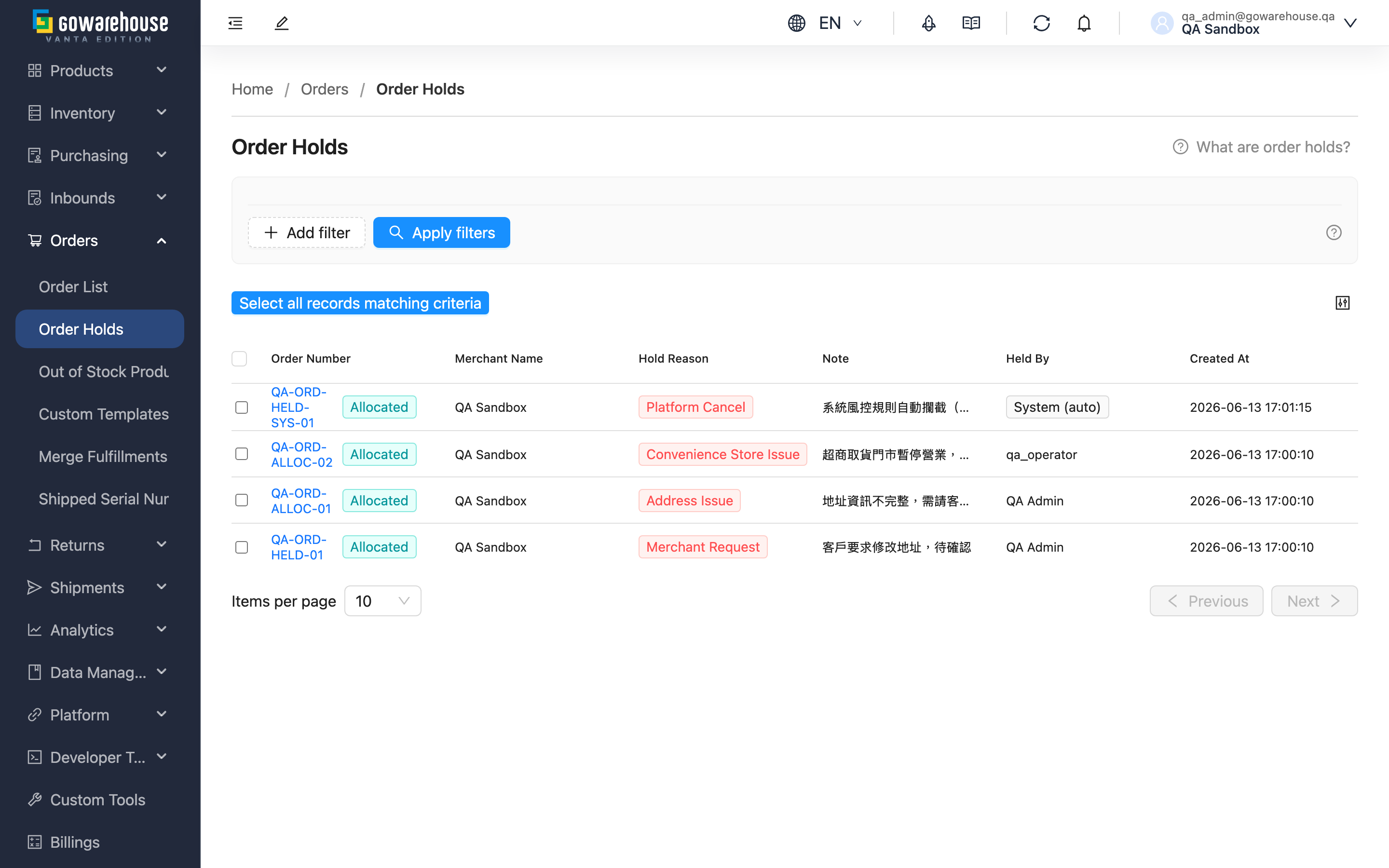
When an order runs into a problem — a last-minute customer change, a faulty shipping address, a platform-side cancellation — and it hasn't shipped yet, you can "hold" it to pause shipping instead of cancelling it outright. A held order does not enter the warehouse's picking and fulfillment work, and both the order contents and the inventory already reserved are preserved. Once the issue is resolved, release the hold and it continues — no need to rebuild the order. This list gathers all of your orders currently on hold, so you can review each one and release them in batch.
Quick jump: Filters | List columns | Batch actions
💡 Tip: Click the question-mark icon next to the page title to open the concept guide for holds.
2.1 Filters
| Filter | Description |
|---|---|
| Hold Reason | Filter by hold reason category, e.g. show only "Address Issue" or "Merchant Request" orders |
| Created At | Filter by the date range in which the hold occurred |
2.2 List Columns
| Column | Description |
|---|---|
| Order Number | The held order; click to go to the order detail. The current Status is shown alongside it |
| Merchant Name | The merchant the order belongs to |
| Hold Reason | The hold reason category; see the hold reasons FAQ |
| Note | The detailed note entered when the hold was placed |
| Held By | Who placed the hold; shows "System (auto)" for holds created automatically by the system |
| Created At | When the hold was placed |
This list only shows orders that are currently on hold; once a hold is released, that entry is removed from the list.
2.3 Batch Actions
| Action | Description |
|---|---|
| Release Holds | Select one or more hold records and click to release them all at once. You may add a resolution note (optional), which is recorded in the order's activity history |
Preconditions and effects of releasing a hold:
| Item | Description |
|---|---|
| When it can run | Orders in this list are all on hold; select them and release |
| Effect on the order | The order returns to its progress before the hold and can re-enter picking and fulfillment; its Status is not changed |
| Effect on inventory | Inventory reserved during the hold stays unchanged and carries over after release |
| Reversibility | After release, the hold ends and disappears from the list. To pause again, you must re-apply a hold from the order |
3. FAQ
3.1 FAQ
▪ What happens after an order is held?
A held order is paused from shipping — it does not enter the warehouse's picking, packing, or fulfillment work until the hold is released. The order contents and reserved inventory are kept untouched. In the order list and detail page, a held order is clearly marked in red so it's easy to spot.
▪ What hold reasons are there?
| Reason | Description |
|---|---|
| Merchant Request | The merchant asked to pause shipping |
| Platform Cancel | The e-commerce platform reported the order as cancelled |
| Fraud Suspect | A potentially risky order needs to be checked first |
| Address Issue | The shipping address is incomplete or malformed |
| Convenience Store Issue | The convenience-store pickup location is invalid (closed, wrong store number, etc.) |
| Inventory Discrepancy | Actual inventory does not match the system record |
| Other Reason | Other reasons; a note is recommended |
▪ Who places holds, and why do some show "System (auto)" as the holder?
A hold can come from a warehouse operator acting manually, or be created automatically by the system after it detects an anomaly (such as a platform cancellation or a failed convenience-store validation). For holds created by the system, the Held By column shows "System (auto)".
▪ After a hold is released, what status does the order return to?
The order returns to its progress before the hold and continues through fulfillment — a hold is just a pause flag, so releasing it does not change the Status, and there's no need to recreate the order. See the effects described under Batch Actions.
▪ After a hold is released, where does the record go? Can I see the history?
This list only shows orders that are currently on hold; once released, the entry is removed. Every hold and release is recorded in that order's activity history (including the resolution note), so you can review the full hold-and-release record on the order detail page.
▪ If I leave a held order alone, will it cancel automatically?
No. A held order stays on hold until someone manually releases it or cancels the order. We recommend reviewing this list regularly so problem orders don't pile up and delay shipping.
3.2 Notices
⚠️ Important
- A hold only pauses orders that haven't shipped; orders already shipped or completed can no longer be held.
- Confirm the issue is truly resolved before releasing a hold, or the order will continue into fulfillment carrying the problem.
- Releasing a hold cannot be undone; to pause again, you must re-apply a hold from the order.
💡 Tip: Add a resolution note when releasing a hold to record what you did, making it easier to reconcile and trace with the customer or warehouse later.
4. Related Features
| Feature | Description | Link |
|---|---|---|
| Order List | View all orders, and place holds on orders here | Go |
| Order Detail | View a single order's hold warning and activity history | Go |