
Flexible Product Detail
Table of Contents
1. Features
View a flexible product's full configuration here: which allocation mechanism it uses and which interchangeable products it contains, with entry points to edit or delete. Reviewing contained products' stock regularly helps you avoid orders getting stuck when everything runs out.
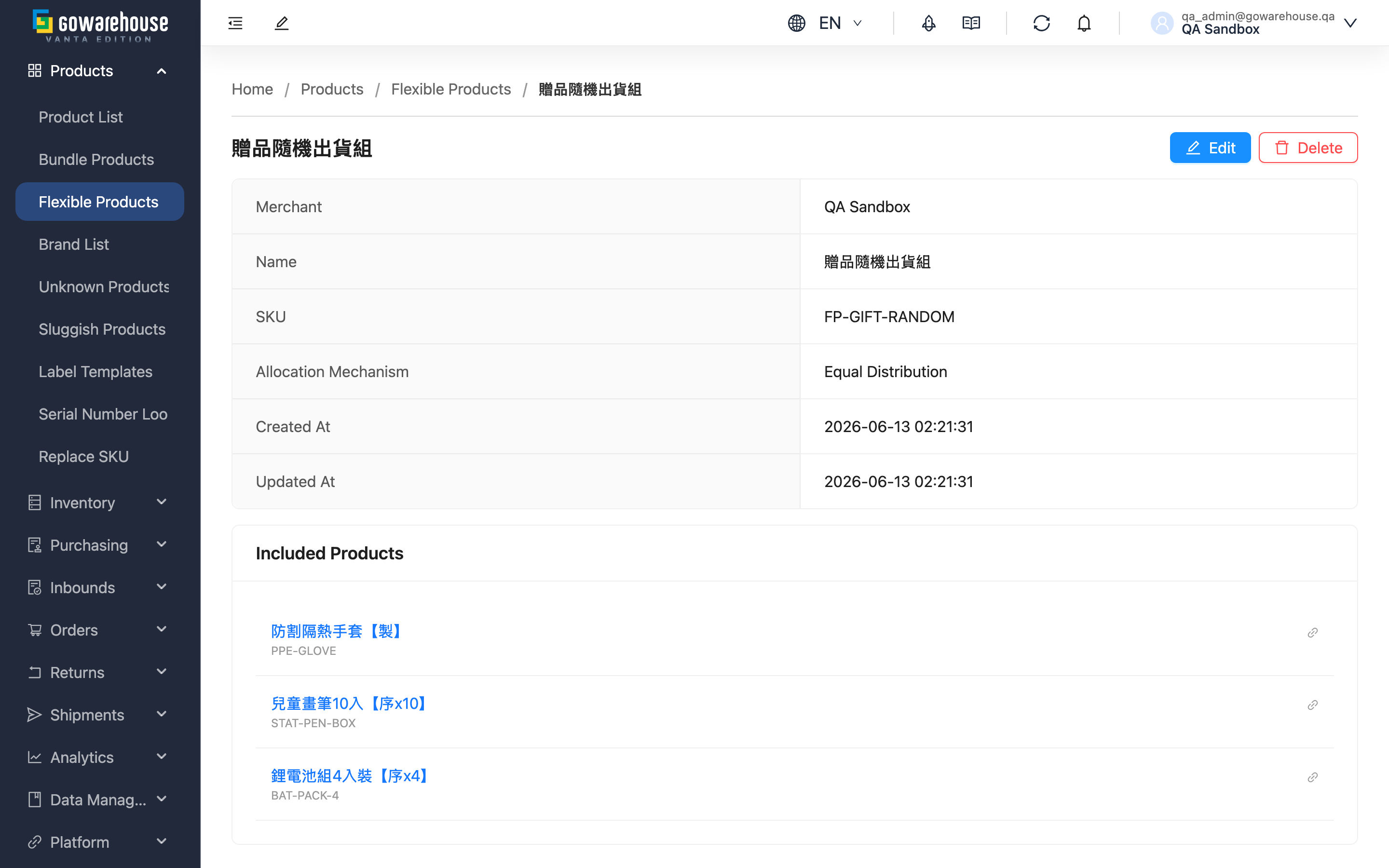
Quick jump: Basic Info | Contained Products | Action Buttons
1.1 Basic Info
Shows "Name", "SKU", "Allocation Mechanism", "Created At" and "Updated At". For what each mechanism means for shipping, see Allocation Mechanism.
1.2 Contained Products
Lists all interchangeable products with their name and SKU:
- Click a product name to open that product's detail page, then click "Inventory" to view its stock.
- Click the link icon next to it to open in a new window — handy for comparing several products' stock at once.
1.3 Action Buttons
Two buttons sit at the top right of the page; they appear only with product management permission:
- Edit: Opens the edit page.
- Delete: Deletes this flexible product after a confirmation dialog.
- It can be deleted at any time; there are no status restrictions.
- Only the substitution rule itself is removed: the contained products, their stock, and existing orders are all unaffected.
- Deletion cannot be undone. If the SKU is still listed on a sales channel, later orders won't map to any product and will come in as unknown products — delist or replace the SKU on the channel first.
2. FAQ
Quick jump: FAQ | Important Notes
2.1 FAQ
▪ Can I edit directly on the detail page?
No. The detail page is view-only; click "Edit" at the top right to open the edit page.
▪ Where do I check each contained product's stock?
Click the product name in the contained products list, then click "Inventory" on that product's detail page.
▪ Does deleting a flexible product affect the products themselves?
No. Only the substitution rule is deleted; the contained products and their stock are untouched.
▪ After deletion, can I still find orders that used it?
Yes, and they are completely unaffected. Order items were already the actual products from the moment each order was created.
▪ Why can't I see the "Edit" or "Delete" buttons?
If you can't see this feature, please contact your administrator to check your permissions.
2.2 Important Notes
⚠️ Important
- Deletion cannot be undone; the only way back is to recreate it
- Before deleting, make sure the SKU is delisted from your sales channels, or later orders will come in as unknown products
3. Related Features
| Feature | Description | Link |
|---|---|---|
| Flexible Product List | Overview and allocation mechanism | Go |
| Edit Flexible Product | Adjust mechanism and products | Go |
| Create Flexible Product | Set up a new substitution rule | Go |