
Return Receipt
Table of Contents
1. Features
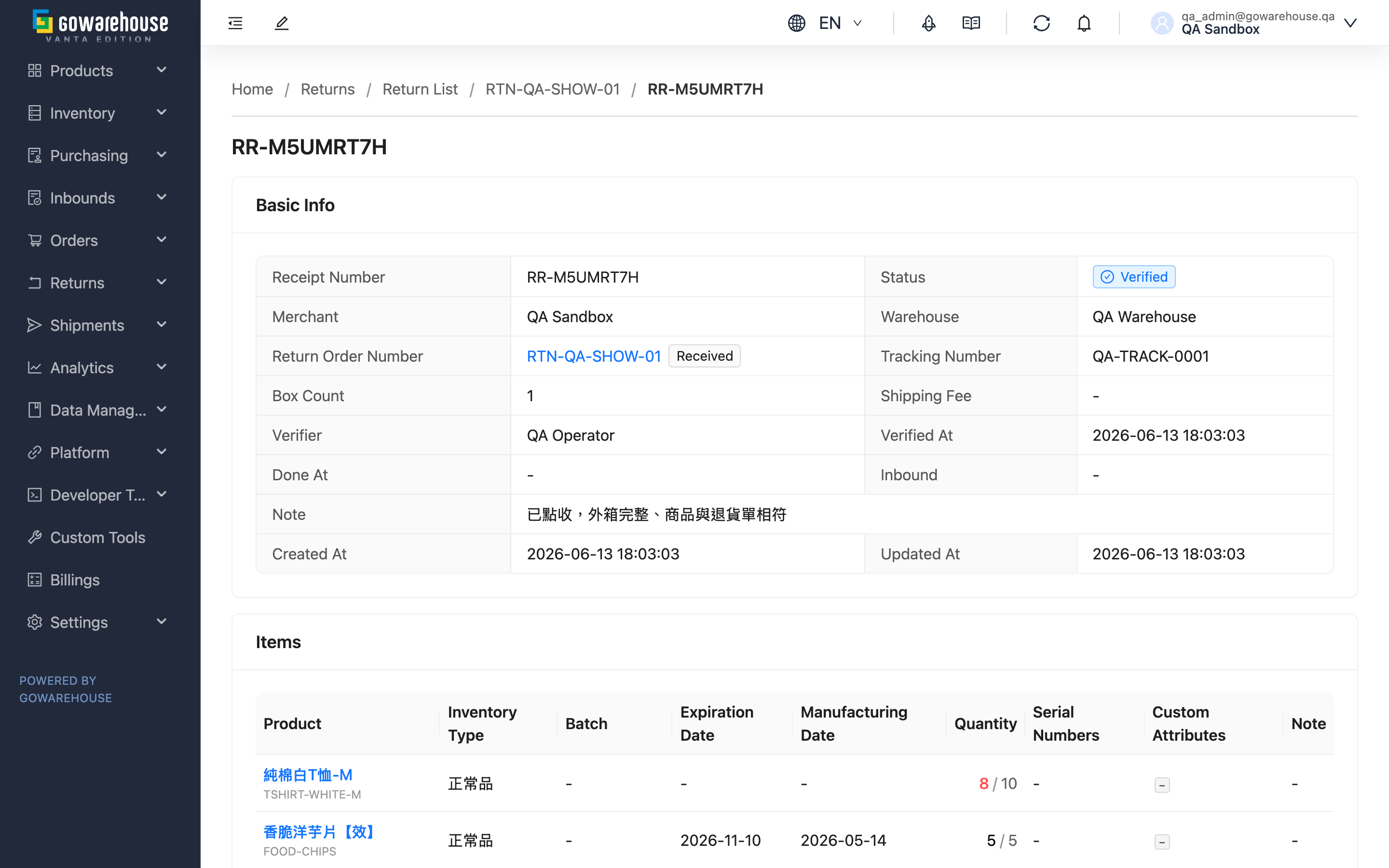
A Receipt Number records the result of the warehouse physically counting your returned goods. When a customer sends an item back to the warehouse, warehouse staff count each item, record an inspection video, and log the actual quantity received, batch, expiration date, and serial numbers on the receipt. One return order may correspond to multiple receipts (each shipment inspected separately). This page lets you drill into a single receipt to see its full contents — confirming what the warehouse received, how much, and whether it has been put back into your inventory. This page is read-only; all inspection and inbound operations are performed on the warehouse side.
Quick Jump: Basic Info | Received Items | Inspection Videos
1.1 Basic Info
The top of the page shows the overall status and source of this receipt. Most fields are self-explanatory; the ones worth noting are below:
| Field | Description |
|---|---|
| Status | The receipt's progress, with five values: Pending (counting not yet started), In Progress (counting saved midway), Verified (warehouse confirmed inspection complete), Stored (goods put back into your inventory), Canceled (this inspection voided) |
| Return Order Number | The return order this receipt belongs to; click to go back to the return order for the full picture of the whole return; the tag beside it is the return order's own status |
| Verifier and Verified At | Who in the warehouse confirmed the inspection, and when; empty until inspection is complete |
| Inbound and Done At | Once the inspected goods are turned into an inbound and put back into inventory, an inbound link and inbound time appear here; click the link to view the put-back details |
1.2 Received Items
Lists each item the warehouse counted, one row per returned item:
| Field | Description |
|---|---|
| Product | The returned product; click to go to the product page. The gray text below is the SKU |
| Quantity | Shown as "received / expected". Expected is the quantity the return order originally planned to receive; received is the quantity the warehouse actually counted. When they differ, the received number is shown in red, meaning the quantity the customer returned does not match what was registered |
| Serial Numbers | For serial-tracked products, lists each returned serial number scanned by the warehouse |
| Batch, Expiration Date, Manufacturing Date | The batch and dates recorded during counting, which determine which inventory batch the returned goods rejoin |
1.3 Inspection Videos
Links to videos the warehouse recorded during inspection, used as evidence of the returned goods' actual condition (e.g. damaged appearance, quantity mismatch). Click a link to open the video in a new tab. If the warehouse recorded none, this section shows "No videos uploaded".
2. FAQ
2.1 FAQ
▪ What is the difference between a receipt and a return order?
A return order is the document where you register "which goods are expected to be returned"; a receipt is the result of the warehouse counting the goods after they actually arrive. One return order can correspond to multiple receipts — when a customer ships items back in batches, each arriving batch is inspected once, so you may see several receipts under the same return order, each recording part of the goods.
▪ Why does the received quantity differ from the expected quantity?
Expected is the quantity registered on the return order; received is the quantity the warehouse actually counted. A mismatch (received shown in red) usually means the quantity the customer actually returned differs from what was originally stated, or that unregistered items were mixed into the return. This is the warehouse's faithful record, and you can use it to clarify matters with the customer.
▪ When does a receipt put goods back into my inventory?
Once the receipt reaches Verified (warehouse confirmed inspection complete), the warehouse side turns the inspection result into an inbound, and only then are the goods formally put back into your inventory; the receipt status then becomes Stored and an inbound link appears in Basic Info. Only an inspection-complete receipt can be converted to an inbound; a receipt still being counted (In Progress) or canceled will not put goods back. Conversion happens only once — a receipt already turned into an inbound will not put goods back again.
▪ How do serial number statuses change for returned goods?
For serial-tracked products, serial numbers scanned during inspection first enter a "return pending" status, meaning the customer has returned them but it has not yet been decided whether to restock them. Only after the receipt is converted to an inbound and the goods are put back into inventory do these serial numbers become in-stock and available, bound to a new inventory batch.
▪ Why are there no action buttons on this page?
Return inspection is a physical operation on the warehouse side — counting, inspecting, and converting to inbound are all done by warehouse staff. This page is provided for you to drill into a single receipt and confirm what the warehouse received and which stage it has reached, so it is read-only.
▪ A receipt has been stuck at "In Progress" for a long time — what does that mean?
In Progress means warehouse staff counted partway and saved without declaring the inspection complete. The goods in this receipt are not yet put back into your inventory. If it stays in this status for a long time, you can check with the warehouse whether goods are still in transit or whether the inspection was interrupted.
2.2 Notices
⚠️ Important Reminders
- The quantities under received items reflect the warehouse's actual counting result, which may differ from the expected quantity originally registered on the return order. Use the received quantity as the basis for what is actually returned to inventory.
- Only a receipt that is inspection-complete and not yet converted to an inbound can be put back into inventory; a canceled receipt will not and cannot be put back.
💡 Tip: When received and expected differ (red number) or an inspection video shows an item is abnormal, click the return order link above to go back to the return order and review the handling status of the whole return.
3. Related Features
| Feature | Description | Link |
|---|---|---|
| Return Order Detail | View the full return order and all receipts under it | Go |
| Return List | Browse and manage all return orders | Go |