
Bundle Details
Table of Contents
1. Features
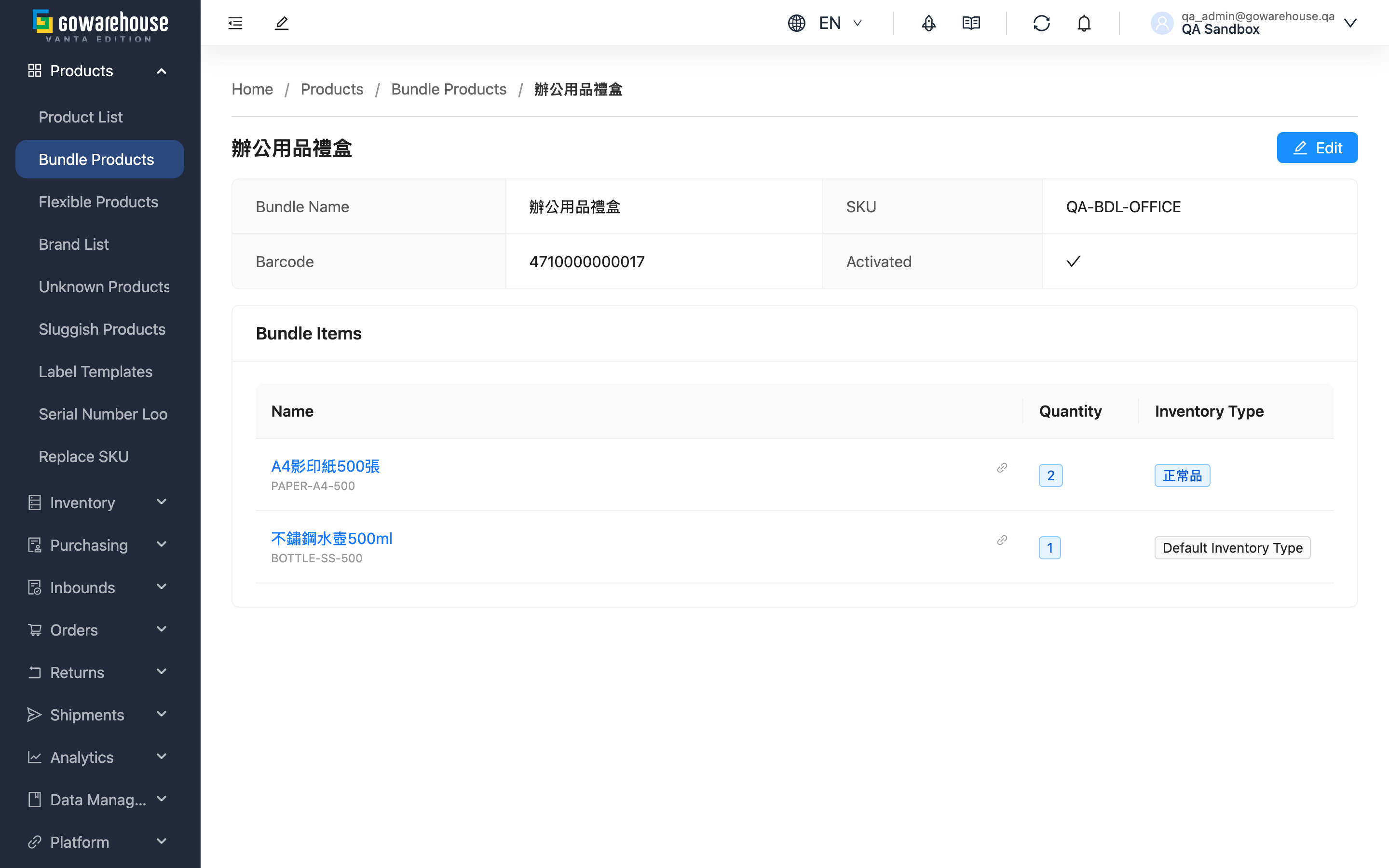
When you need to confirm what a bundle actually contains — for example a customer reports the gift set doesn't match the website description, or you're double-checking quantities before a campaign — this page shows the full configuration. This page is read-only; click "Edit" to make changes.
Quick links: Information Sections | Action Buttons
1.1 Information Sections
Basic information card: Shows the bundle's "Bundle Name", "SKU", "Barcode", and "Activated".
Bundle products card: Lists every product in the bundle.
| Field | Description |
|---|---|
| Name | Click to jump to that product's detail page |
| Quantity | How many of this product each set requires |
| Inventory Type | When specified, shipping only uses that inventory type; "Default Inventory Type" means none is specified, and shipping follows the inventory type set on the order or sales channel |
1.2 Action Buttons
- Edit: In the top-right corner; opens the edit page. If you can't see this button, contact your administrator to check your permissions.
2. FAQ
Quick links: FAQ | Important Notes
2.1 FAQ
▪ Why do some products show "Default Inventory Type"?
No inventory type was specified when the bundle was set up. At shipping time the system follows the inventory type set on the order or the sales channel. If you want this product to always ship from a specific inventory type (e.g. sellable stock only), specify it on the edit page.
▪ Can I edit the bundle directly on this page?
No. The detail page is read-only; click "Edit" to open the edit page.
▪ Does the detail page show available sets?
No. Check available sets on the Bundle List.
▪ Why can't I see the "Edit" button?
Your account may not have edit permission. Contact your administrator to check your permission settings.
▪ Does editing a bundle affect existing orders?
No. The system records the bundle's contents at the moment an order is created, so later changes don't affect orders that already exist.
2.2 Important Notes
⚠️ Important
- The detail page is view-only; no changes can be made here
- Editing a bundle only affects future orders; existing orders ship with the original contents
3. Related Features
| Feature | Description | Link |
|---|---|---|
| Bundle List | Browse and search bundles | Go |
| Edit Bundle | Modify bundle settings | Go |
| Create Bundle | Create a new bundle | Go |