
Shipped Serial Numbers
Table of Contents
1. Use Cases
Quick Links: Customer warranty inquiry | Recalling a faulty batch | Verifying a returned item is the one you shipped
A serial number represents the unique identity of one physical unit — a single serial always maps to one real item you can hold in your hand, answering "which one is this, and who did it ship to?". When your products have serial numbers scanned at shipment, this record lets you take the serial in a customer's hand and trace it back to the matching order, product, and ship date. The three scenarios below are all real uses of that capability.
Scenario 1: A customer reports a fault and you need to confirm warranty
Situation: A customer calls saying their item is broken and quotes the serial number on the back, but all you have is a string of digits — you don't know which order it came from or when it shipped.
Use this feature: Enter the customer's serial in the serial filter. The list returns the matching order and ship date; the ship date is what warranty is calculated from.
Result: You can immediately tell whether the item is still under warranty and which order shipped it, then reply to the customer or arrange a repair.
Scenario 2: A faulty batch needs every shipped serial found for a recall
Situation: A supplier notifies you that a batch of a product has defective components, and you must find every shipped serial of that product to contact each customer for recall.
Use this feature: Use the product filter by SKU or product name to narrow to that product. The list shows every shipped serial, each linked to its order.
Result: You get a complete list of serials to recall with their matching orders, so you can contact customers order by order without missing any unit that went out.
Scenario 3: A customer returns an item and you need to verify it's the one you shipped
Situation: A customer sends back a return, and you suspect it may be swapped or not the same unit they originally bought from you, so you need to compare serials.
Use this feature: Enter the serial on the returned item in the serial filter to find which order the system originally recorded this serial against.
Result: If the serial is found and the order matches, it really is the unit you shipped; if it can't be found or doesn't match, that's a red flag for a swap or substitution and can guide your follow-up.
2. Feature Guide
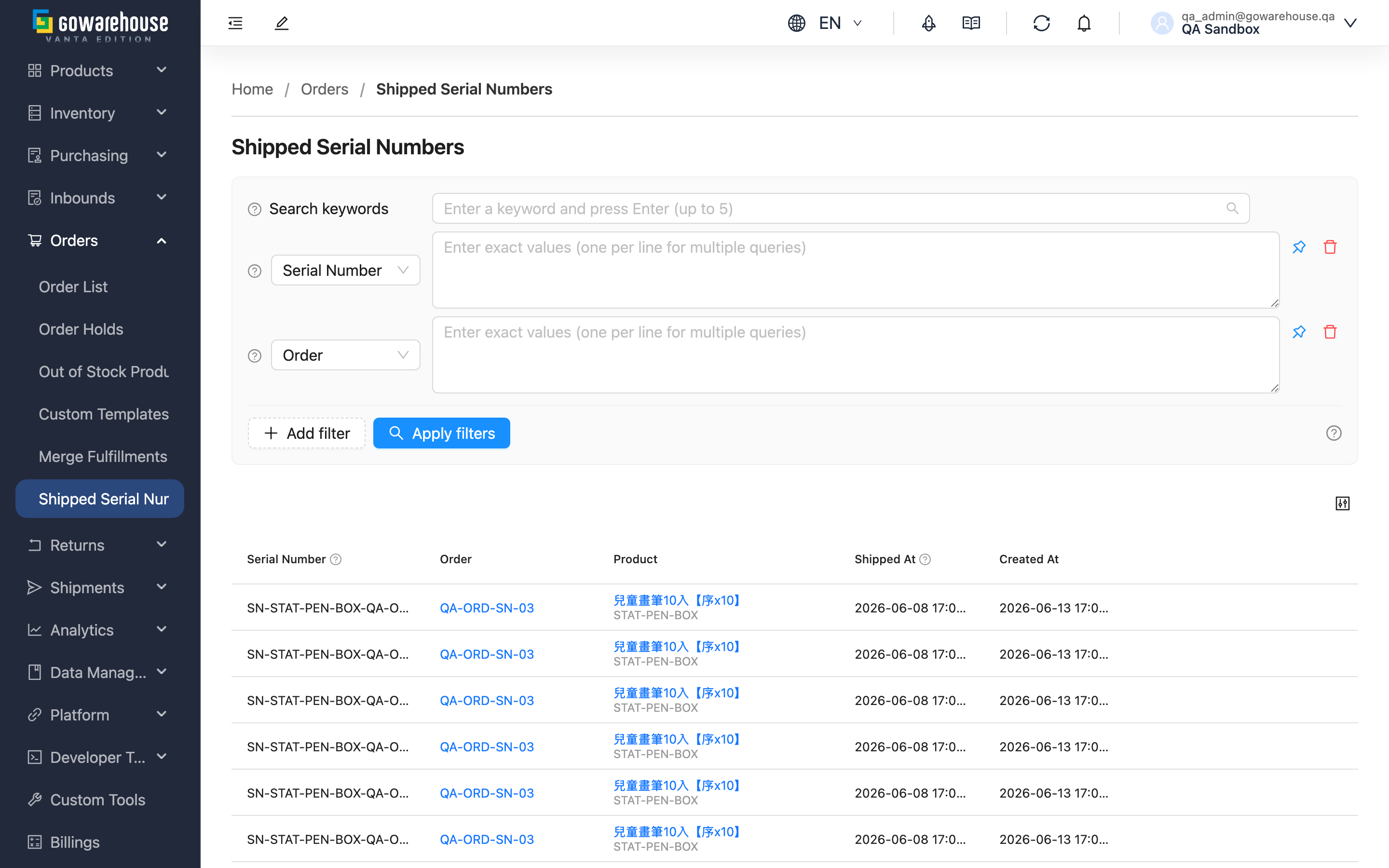
This list contains the product serial numbers scanned unit by unit at shipment time. Only products with "Track Serial Numbers" enabled in their settings have serials scanned and recorded when the warehouse ships them; products without serial control never appear here. Each record binds the serial, order, product, and ship time together, so that even after shipment you can use a serial to trace back to the matching order and customer. This is a query-only page; serials are not created or edited here.
Quick Links: Search and Filter | List Columns | Export Serial Number Records
2.1 Search and Filter
The search box at the top of the page matches both "Serial Number" and "Order" with a fuzzy search. For exact matching, use the filter conditions below — each supports pasting multiple entries at once (one per line), so you can look up a whole batch of serials or orders in one go:
| Filter | How to Use |
|---|---|
| Serial Number | Paste the serials provided by the customer or that you want to trace, one per line, exact match |
| Order | Enter an order name to find every serial recorded when that order shipped |
| SKU | Enter a product SKU to find every shipped serial of that product |
| Name | Enter a product name; same effect as SKU filter, useful when you're unsure of the SKU |
| Sales Channel | Pick one or more sales channels from the dropdown to see only serials shipped through them |
| Shipped At | Pick a shipping date range; both the start and end dates are covered in full |
2.2 List Columns
| Column | Description |
|---|---|
| Serial Number | The serial scanned at shipment, representing the unique identity of that one physical unit |
| Order | The order this serial shipped with; click to open order details and verify recipient and contents |
| Product | Product name and SKU; click the name to open product details |
| Sales Channel | Which sales channel the order this serial belongs to came from |
| Shipped At | The ship time of the order this serial belongs to, the basis for the warranty start date |
| Created At | When this serial record was created (i.e. when the warehouse scanned and registered it) |
Records are sorted by "Created At" from newest to oldest by default; serial, order, product, ship time, and created time columns can each be sorted by clicking the column header (the sales channel column is not sortable).
2.3 Export Serial Number Records
"Export" at the top right turns every serial number under your current filters into an Excel file — not just the current page, and with nothing to tick row by row. After submitting, check progress under "Background Jobs" and download it when it finishes.
The file has a single worksheet, one row per serial number, with the same columns as List Columns (Serial Number, Order, Name, SKU, Sales Channel, Shipped At, Created At) — ready for warranty lookups, recall lists, or reconciliation with your brand partners.
What lands in the file is decided entirely by the search and filters you have applied: narrow by product, channel, or shipping time first, then export, and you get exactly that range. The file only contains your own company's data.
Two situations produce no file, and the system tells you on the spot rather than handing you something that looks complete: nothing matches your filters, and more than 50,000 records match (narrow the conditions and export again). If the export button is disabled, your account lacks the order export permission — ask your company's administrator to adjust it.
3. FAQ
Quick Links: FAQ | Important Notes
3.1 FAQ
▪ When are serial numbers recorded?
Serials are scanned unit by unit by warehouse operators at shipment time, so this page only shows serials that have already shipped. Products still in the warehouse and not yet shipped do not appear here.
▪ Why can't I find a certain serial?
There are three common reasons: the order the serial belongs to hasn't shipped yet (the record is created at the moment of shipment); the product doesn't have "Track Serial Numbers" enabled, so no serial was scanned at shipment; or the serial was entered incorrectly — check the case and format. If you've confirmed all of these and still can't find it, that is itself a red flag worth investigating (see Scenario 3).
▪ How do I make a product start recording serials at shipment?
Go to "Products" → "Product List", enable "Track Serial Numbers" on that product, and set how many serials to record per unit. After this, the warehouse will require scanning the corresponding number of serials at both inbound and shipment. Orders already shipped will not have serials added retroactively.
▪ How do I take away every serial shipped in a period through one channel?
Narrow the range with the "Sales Channel" and "Shipped At" filters — they apply together, and you can stack product or order conditions on top. Once the conditions look right, hit Export and you get an Excel file identical to what's on screen.
▪ Can I look up many serials at once?
Yes. In the "Serial Number" filter, paste one serial per line and the system returns them all at once, which is handy for batch recalls or reconciliation.
▪ Why does the same serial appear in more than one order?
This page records each shipment event. If a unit was shipped, returned, and shipped again, every shipment leaves a record, so the same serial may map to multiple rows. To see the full history of which orders a unit went through, simply list them all.
▪ How is a product with two serials (e.g. a phone's two codes) displayed?
If the product is set to record multiple serials per unit, each code leaves its own record at shipment. They appear as separate rows under their own serials, linked through the same order, so filtering by either code finds the same order.
3.2 Important Notes
⚠️ Important Reminders
- This page only shows serial records from shipped orders; products still in the warehouse and not yet shipped will have no data.
- Serial records reflect real shipment events and cannot be created, modified, or deleted on this page. If a record looks wrong, contact the warehouse to confirm the scan at shipment.
- Only products with "Track Serial Numbers" enabled leave serial records; products without it have nothing here even after shipping.
- Exporting needs the order export permission; with read access only, the button appears disabled. Exports cover exactly the same scope you can see on screen.
💡 Tip: For high-value products or those needing warranty, anti-counterfeiting, or recall traceability, enable serial control when you first list the product. Configuring it only after shipment means the units already shipped cannot have serials created retroactively.
4. Related Features
| Feature | Description | Link |
|---|---|---|
| Order List | View and manage all orders; click into an order from a serial to verify recipient and contents | Go |
| Product List | Manage product data and enable serial control settings here | Go |