
Consumable Details
Table of Contents
1. Features
The consumable detail page gives you a clear view of a single consumable's full specifications, including its name, barcode, length/width/height, volume, current quantity, weight, and cost information. When you need to verify that a registered material matches the specifications your supplier provided, or confirm a carton's dimensions fit your product, you can find the complete data here. Consumables are maintained by the warehouse, so this page is read-only with no edit or delete buttons.
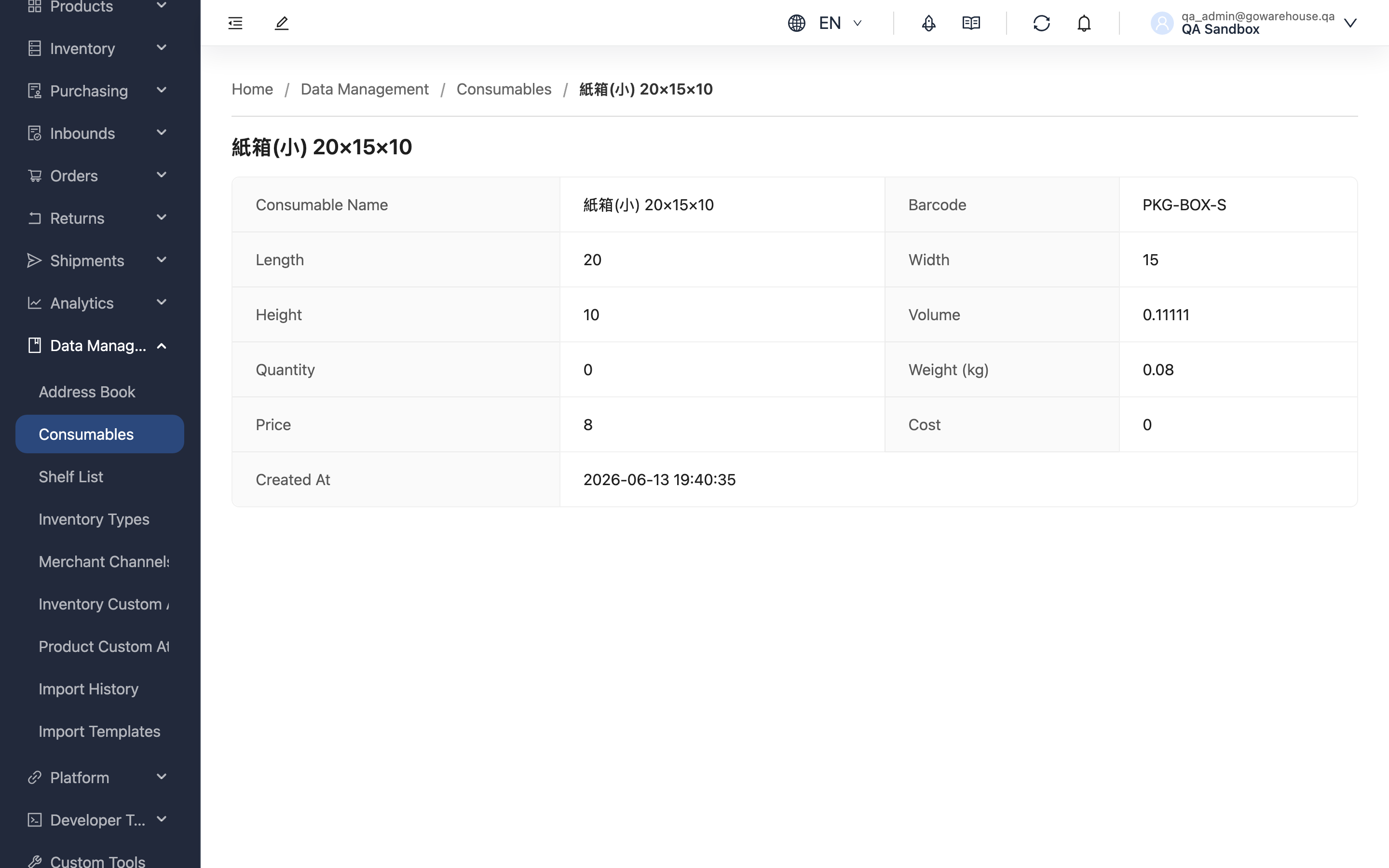
Quick jump: Information fields
1.1 Information Fields
| Field | Description |
|---|---|
| Consumable Name | The name of this consumable |
| Barcode | The barcode or internal code the warehouse scans to identify this material |
| Length | In centimeters; shows "-" when there is no fixed size |
| Width | In centimeters; shows "-" when there is no fixed size |
| Height | In centimeters; shows "-" when there is no fixed size |
| Volume | Calculated automatically from length, width, and height; affects shipping estimate accuracy |
| Use as Shipping Volume Basis | Whether this material is the outer carton used for shipping. If so, shipping uses its length, width, and height directly as the parcel's volume instead of summing product dimensions |
| Quantity | The current stock quantity registered by the warehouse; automatically deducted when used in shipping |
| Weight (kg) | Consumable weight, in kilograms |
| Price | The selling price of the consumable |
| Cost | The cost of the consumable |
| Created At | When this consumable was created in the system |
This page is read-only, with no edit or delete buttons. Click "Consumables" in the path at the top of the page to return to the consumable list.
2. FAQ
2.1 FAQ
▪ Why is there no "Edit" button?
Consumable data is maintained by the warehouse — the warehouse is the one that actually purchases, stores, and uses the materials, and centralized registration keeps the system data consistent with the materials on hand. The admin portal's consumable page is read-only, so there is no edit button. To make changes, please contact the warehouse.
▪ How is Volume calculated?
Volume is converted automatically from length, width, and height, with the unit shown as "cubic feet (cuft)" or "cubic meters" depending on your company's volume unit setting. For cubic feet, the calculation is "length × width × height (cm) ÷ 27000". This value affects the shipping estimate; without dimensions it cannot be calculated and shows "-".
▪ Does Quantity change automatically?
Yes. Each time the warehouse ships using this consumable, the system automatically deducts the amount used; if that shipment is later returned or rebuilt, the used amount is automatically restored.
▪ What if the data doesn't match the actual material?
Provide the correct specifications or barcode to the warehouse and ask them to update it. After the warehouse corrects it, this page will show the latest data, and the volume will be recalculated automatically from the new dimensions.
▪ Can a consumable's barcode be the same as a product's barcode?
Yes. Consumables and products are managed separately, so the same barcode causes no conflict.
2.2 Notices
⚠️ Important Notes
- This page is read-only; adding, editing, and deleting consumables is always handled by the warehouse
- If a specification or barcode does not match the actual material, contact the warehouse to correct it as early as possible to avoid inaccurate volume and shipping estimates
3. Related Features
| Feature | Description | Link |
|---|---|---|
| Consumable List | View all consumables | Go |
| Order List | View order and shipping information | Go |