
Edit EC Account
Table of Contents
Section 1: Features
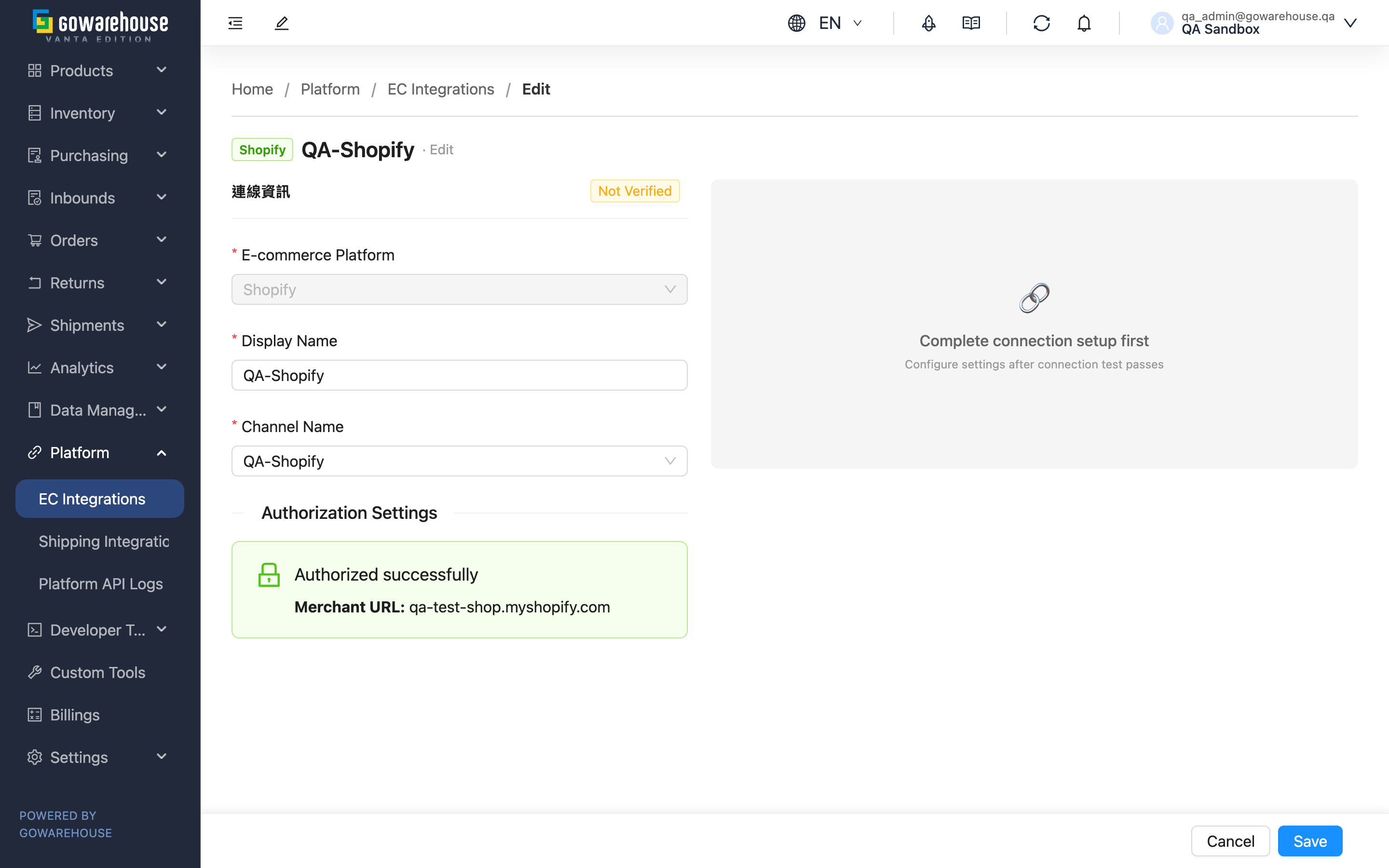
Editing an EC account is for adjusting the settings of an existing account. The screen is the same as the create page, split into the left "Connection" and the right "Settings". The biggest difference from the create page: the connected e-commerce platform cannot be changed; everything else can be updated.
Quick Jump: Adjustable Items | Updating Credentials | Revoking Authorization
1.1 Adjustable Items
| Item | Changeable | Description |
|---|---|---|
| E-commerce Platform | No | The platform is locked after creation and cannot be changed |
| Display Name | Yes | Rename anytime |
| Channel Name | Yes | Can be re-bound to a different sales channel |
| Authorization Settings | Yes | See Updating Credentials |
| Order Fetching / Inbound Push / Shipping Code Mapping | Yes | Right-half function settings, all adjustable while the connection is healthy |
The fetch time slots, push percentage, and shipping code mapping are filled the same way as on the create page; see Create EC Account.
1.2 Updating Credentials
Update credentials here when a platform key expires or you re-issue credentials. To protect secrets, existing credentials are shown masked. Once you enter a new credential value, the connection status automatically returns to "Not Verified" to remind you to re-test. After updating, click "Test Connection" again to confirm the connection is healthy, then save.
1.3 Revoking Authorization
For authorization-based platforms (e.g. Shopee, Shopify) in a connected state, a "Revoke Authorization" button appears on the left half. Clicking it redirects to the platform's authorization-revocation page. After revoking, the account disconnects and stops fetching, and must be re-authorized to recover. If you only want to pause certain functions, turn off "Fetch Orders" on the right half instead of revoking authorization.
Section 2: FAQ
2.1 FAQ
▪ Why is "E-commerce Platform" locked?
The platform is fixed when the account is created and cannot be changed. If you picked the wrong platform, you can only delete this account and create a new one with the correct platform.
▪ Is it normal for the status to become "Not Verified" after updating credentials?
Yes. As soon as you enter a new credential value, the system resets the status to never-tested to remind you to re-test. Click "Test Connection" to confirm a successful connection before saving, or orders may fail to import because the credentials are unverified.
▪ I want to pause fetching for this platform without breaking the integration — how?
Turn off "Fetch Orders" on the right half; the connection is kept. Don't use "Revoke Authorization" — revoking disconnects the account and requires re-authorization to recover.
▪ Shopee orders are not arriving during the fetch slots I set?
Shopee accounts have "Realtime New Order Fetch" on by default, so a new-order notification from the platform schedules an extra fetch instead of waiting for the slots. To make new orders arrive only during the slots you set, turn this switch off on the right half. Status sync for existing orders (cancellation, shipment) still runs as usual.
▪ Does changing the push percentage take effect immediately?
It takes effect on save, and the next inbound push applies the new percentage. If the adjusted total across platforms reaches 100%, the system warns you about the overselling risk on save.
▪ Can I run "Sync Mapped Products" or "Manual Stock Sync" on the Edit page?
No. These two batch sync actions are on the Detail page. The Edit page only adjusts settings.
2.2 Notes
⚠️ Important
- After updating credentials the status resets to "Not Verified" — be sure to re-test and save, or orders stop importing
- "Revoke Authorization" disconnects the account and stops fetching; it requires re-authorization to recover
- The platform (E-commerce Platform) cannot be changed; a wrong pick means delete and recreate
💡 Tip: To pause some functions, use the function-setting toggles (Order Fetching, Inbound Push) — no need to revoke authorization or delete the account.
Section 3: Related Features
| Feature | Description | Link |
|---|---|---|
| EC Integrations (Detail) | View the full account setup; run Sync Mapped Products and Manual Stock Sync | Go |
| EC Integrations (List) | View and manage all EC accounts | Go |
| Platform API Logs | View this account's order-fetch and stock-push call records and failure reasons | Go |