
Inventory Holds
Table of Contents
1. Use Cases
Quick links: Scenario 1: Reserving stock for a key client | Scenario 2: Freezing a batch with quality concerns | Scenario 3: Locking stock ahead of a campaign
Scenario 1: Reserving stock for a key client
Situation: A corporate client has agreed to a large purchase. The order isn't formally placed yet, but you must keep this stock for them — it can't be sold off by retail orders from your website or marketplace first.
With this feature: Create a hold for this stock (see New Inventory Hold) with the reason "Customer Reserve".
Result: The held quantity is deducted from available stock, so the sellable quantity shown on your sales channels drops accordingly and retail orders no longer get allocated this stock. Once the client places and ships their order, simply release the hold.
Scenario 2: Freezing a batch with quality concerns
Situation: A supplier reports a possible defect in a batch, or a customer complaint makes you suspect a batch — and until it's cleared, this stock absolutely must not keep shipping to customers.
With this feature: Create a hold on that batch's stock with the reason "Quality Issue", "Damage", or "Recall".
Result: The stock is frozen out of available inventory immediately — it won't be allocated to any new order nor synced as sellable on your channels. Release it once the investigation clears it; if there's a real issue, proceed with scrapping or returns.
Scenario 3: Locking stock ahead of a campaign
Situation: A limited promotion or pre-order campaign starts next week, and you want to lock the quantity it needs now so it isn't eaten up by everyday orders before the campaign begins.
With this feature: Create a hold on the stock to reserve, with the reason "Customer Reserve" or "Other", and set "Expires On" to the campaign start date.
Result: Before the campaign, the stock is locked and won't be consumed by everyday orders; on the expiry date the system releases the hold automatically, so the stock returns to available just in time for the campaign.
2. Features
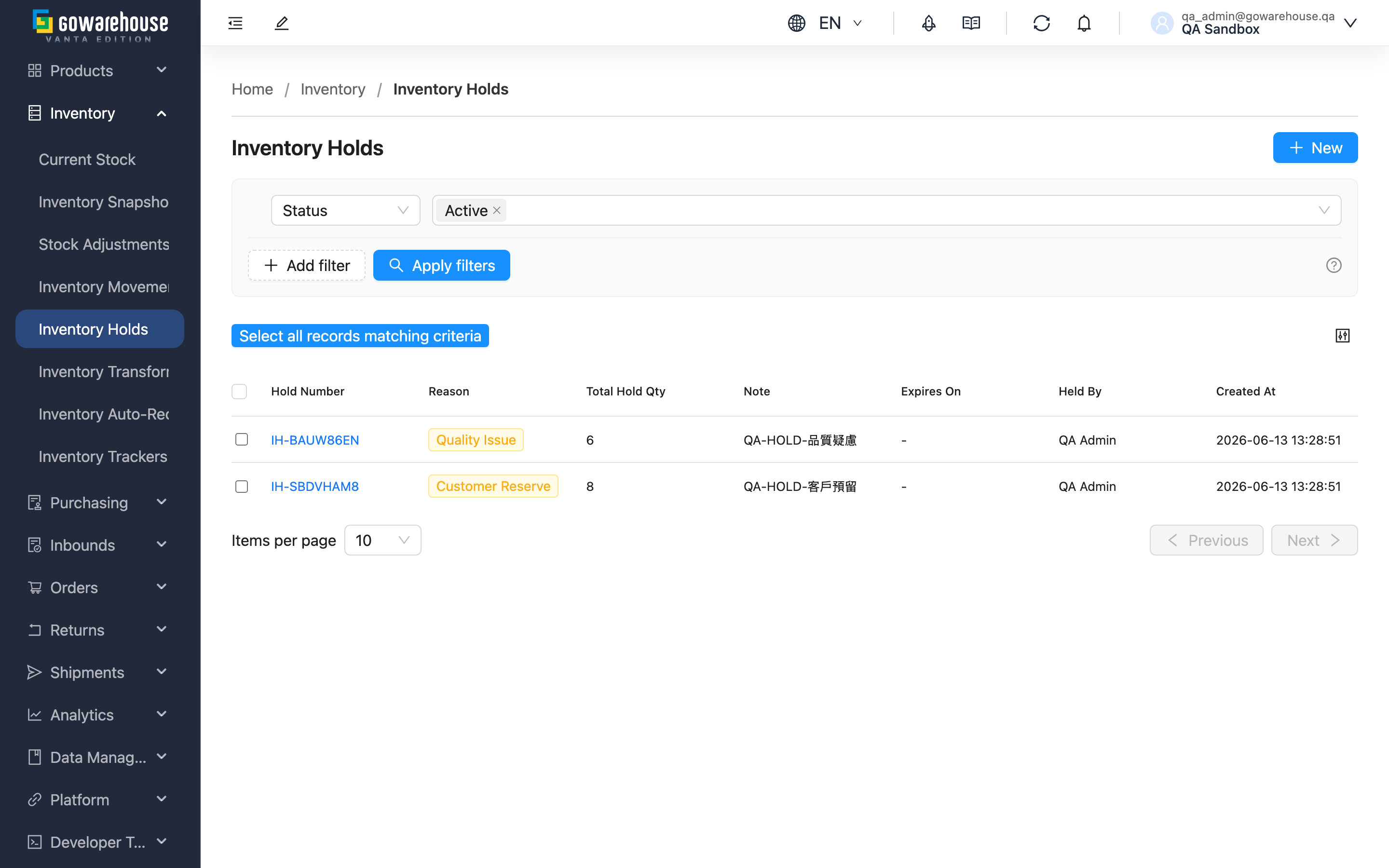
Inventory Holds let you "lock" specific stock so it is temporarily not allocated to new orders nor synced as sellable on your sales channels — commonly used to reserve for a key client, freeze a batch for quality, or lock stock before a campaign. The held quantity is deducted directly from available stock; a hold stays in effect until you release it manually, or until the expiry date you set, when the system releases it automatically and the stock returns to available. This page is the overview of all holds — view active and released holds, create new ones, and release in batches from here.
Quick links: Search & Filter | List Columns | Batch Release
2.1 Search & Filter
The filter panel offers the following conditions; "Status" defaults to showing only "Active":
| Filter | Description |
|---|---|
| Status | "Active" (not yet released) or "Released" (released, stock back to available) |
| Reason | Filter by hold reason — six in total: Customer Reserve, Quality Issue, Regulatory, Damage, Recall, Other |
| Created At | Filter by the hold's creation date range |
2.2 List Columns
| Column | Description |
|---|---|
| Hold Number | The system-generated hold number; click to open Hold Details |
| Reason | The reason for this hold |
| Total Hold Qty | Total quantity held by this hold |
| Expires On | Expiry date; on this day the system releases the hold automatically. If unset, it stays in effect until released manually |
The remaining columns (Note, Held By, Created At) show by name; the creation time column header is sortable.
2.3 Batch Release
Releasing returns the held quantity of all stock on the hold, bringing it back to available inventory.
Prerequisite: Only "Active" holds can be released; released holds don't appear in the selectable set.
How to do it: Select one or more holds, and the "Batch Release" button appears above the list. Click it to optionally fill in a "Release Note", then confirm. To release just one, you can also open its Hold Details and click "Release".
Side effects & reversibility: After release, the available quantity of this stock is restored immediately and can be allocated to new orders and synced back to your sales channels. Release is irreversible — once released, the hold becomes "Released" and cannot be reactivated; if you still need to hold the stock, create a new hold.
3. FAQ
Quick links: FAQ | Important Notes
3.1 FAQ
▪ What happens to the stock after I hold it?
The held quantity is deducted from available stock: the sellable quantity drops, new orders won't be allocated this stock, and the quantity synced to your sales channels falls accordingly. The actual physical stock in the warehouse is unchanged — it's just marked as held and temporarily unusable.
▪ Can I edit the quantity or items after holding?
No. A hold can't be edited once created. To adjust, release the original hold and create a new one with the correct quantity.
▪ What happens when the expiry date arrives?
On the "Expires On" date, the system releases the hold automatically and the held stock returns to available — no manual action needed. Holds without an expiry date stay held until you release them manually.
▪ Can I undo a release?
No. Release is irreversible, and the hold becomes "Released". If you still need to hold the stock, create a new hold — see Batch Release.
▪ Why do I get "Exceeds available quantity (available: {{available}})" when creating a hold?
Because the quantity you want to hold exceeds the stock's current available quantity. Available quantity already excludes what's been allocated to other orders and what other holds have locked, so you can only hold what's left available.
▪ Do the different hold reasons behave differently?
The reason only records why you're holding the stock (reserve for a customer, quality issue, regulatory, damage, recall, other), for later tracking and filtering. Whichever reason you pick, the effect on stock is the same — it locks the stock out of available inventory.
▪ I can't see "Inventory Holds" or can't create a hold?
If you can't see this feature, or there's no create/release button, contact your administrator to confirm your permissions.
3.2 Important Notes
⚠️ Important Reminders
- Release is irreversible; a released hold can't be reactivated — create a new hold when needed
- A hold can't be edited once created; to change the quantity, release and recreate
- A hold with an expiry date is released automatically on that day, and the stock returns to available
💡 Tip: Setting "Expires On" when creating a hold means you don't have to remember to release it manually — ideal for campaign locks and short-term reservations with a clear deadline.
4. Related Features
| Feature | Description | Link |
|---|---|---|
| New Inventory Hold | Create a new hold | Go |
| Hold Details | View a single hold's full content and release it | Go |
| Current Stock | View current available and held quantities | Go |
| Inventory Movements | View the reason and source of each stock change | Go |