
Address Book Details
Table of Contents
1. Features
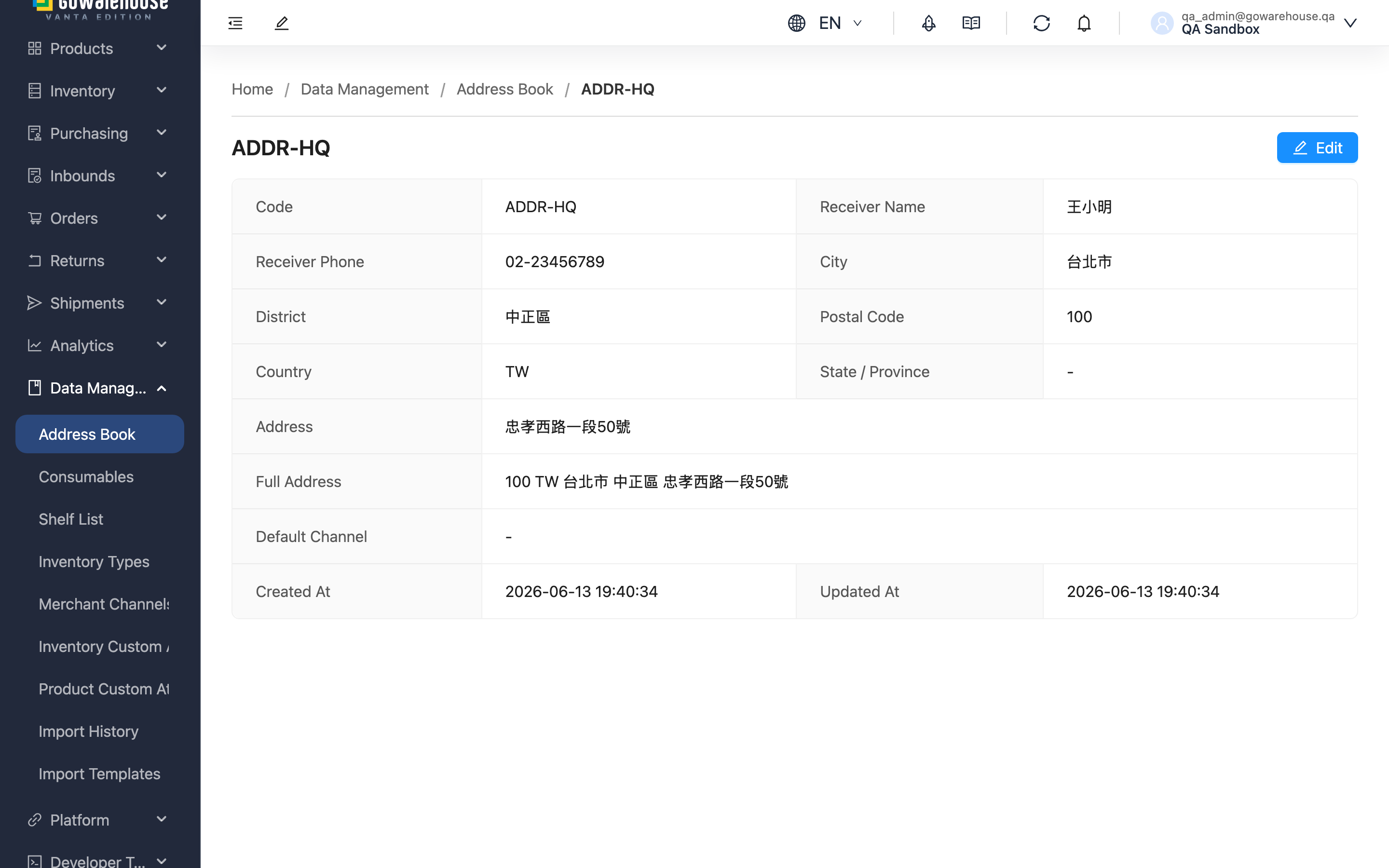
The details page shows the full content of a single recipient address — Code, recipient, phone, location, Default Merchant Channel, and the system-composed Full Address. Whenever you need to verify an address is correct, confirm which channel it's marked for, or review the original data before editing, check it here.
Quick links: Detail Fields | How to Use
1.1 Detail Fields
Most fields are self-explanatory; only those needing a note are listed:
| Field | Notes |
|---|---|
| Country | Filled only for overseas addresses; shows "-" when empty |
| State / Province | Used for overseas addresses; shows "-" when empty |
| Full Address | The system composes postal code, country, state/province, city, district, and the detailed address into one line, skipping empty fields. Chinese addresses run largest-to-smallest, English addresses smallest-to-largest |
| Default Merchant Channel | Shows "-" when not set |
1.2 How to Use
Click "Edit" at the top right to open the edit page and modify the content; if you lack edit permission, this button won't appear.
Click "Address Book" in the breadcrumb at the top to return to the Address Book list.
2. FAQ
2.1 FAQ
▪ How is the Full Address composed?
The system joins Postal Code, Country, State / Province, City, District, and Address into one line, skipping empty fields. Chinese addresses run largest-to-smallest (e.g. 106 台北市 大安區 復興南路一段 390 號), English addresses smallest-to-largest.
▪ Can I edit the Full Address directly?
No, it's a system-composed field. To change it, go to the edit page and modify City, District, Address, etc.; the Full Address recomposes accordingly.
▪ Does modifying this address affect existing orders?
No. When an order is created or imported, the recipient data at that moment is copied onto the order itself; later edits to the address book affect only newly created orders, not existing ones.
▪ Why does the Default Merchant Channel show "-"?
It means this address has no Default Merchant Channel set. The field is optional, and shared addresses can be left without one.
▪ Why can't I see the "Edit" button?
The button appears based on permission. If your account lacks edit permission for the address book, it won't show; contact your administrator to confirm permission settings.
2.2 Notices
⚠️ Important
- The Full Address is composed by the system and can't be edited directly; to adjust it, modify the individual address fields.
3. Related Features
| Feature | Description | Link |
|---|---|---|
| Address Book | View the full address list | Go |
| Add Address | Create a new recipient address | Go |
| Edit Address | Modify an existing address | Go |