
Shipping Types
Table of Contents
1. Use Cases
Quick links: Confirm a shipping code before creating orders via API | Confirm a delivery method is enabled before launching a new channel
Case 1: Confirm a shipping code before creating orders via API
Situation: You (or your engineering team) create orders automatically through the API, and each order needs a shipping_type value. If the code is wrong, or the shipping type hasn't been enabled for you by the warehouse yet, order creation fails.
How to use it: Go to Shipping Types to view the shipping types currently enabled for you by the warehouse (see List Columns), and copy the value from the Code column directly into your order-creation request.
Result: The code used for order creation is guaranteed to be one the warehouse recognizes and can currently handle, avoiding order-creation failures from typos or shipping types that aren't enabled yet.
Case 2: Confirm a delivery method is enabled before launching a new channel
Situation: You're about to launch a new sales channel or connect a new order source, and its orders may need a specific delivery method (such as a carrier's cold-chain service, or an EC platform's store pickup). Before going live, you want to confirm the warehouse has it enabled and whether it supports cash on delivery.
How to use it: Check the shipping types list to see whether that delivery method exists, and confirm its Source and whether it supports Supports COD. If it's not on the list, the warehouse hasn't enabled it yet — contact the warehouse first.
Result: You confirm the available delivery methods and their cash-on-delivery support before launch, avoiding a situation where orders come in with no matching shipping type.
2. Features
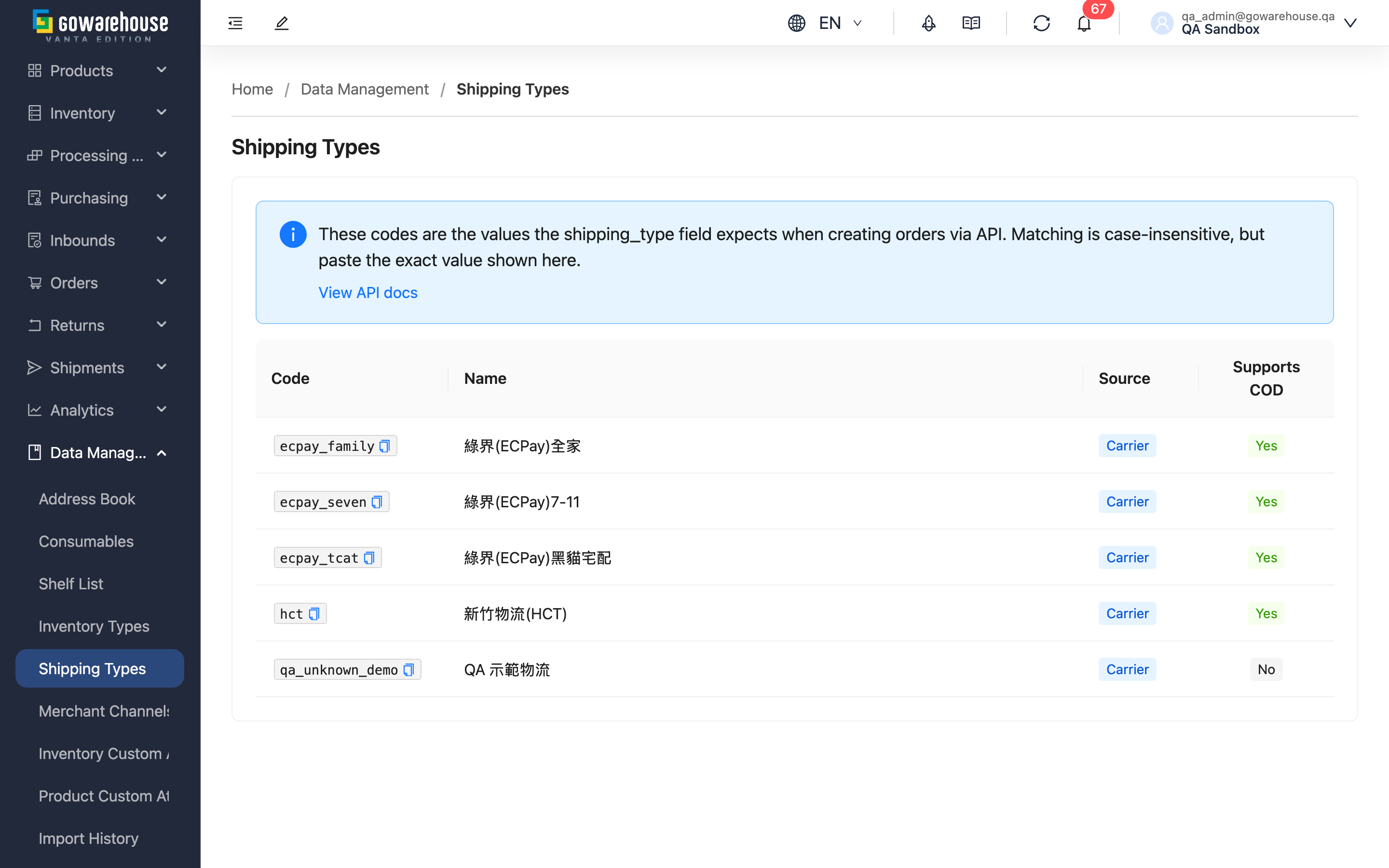
Shipping Types lists every delivery method the warehouse currently has enabled for you. The Code for each entry is the value your API request should pass in the shipping_type field when creating an order. This list is view-only — you cannot add or modify delivery methods here; contact the warehouse to add or change one.
Quick jump: List Columns
2.1 List Columns
| Column | Description |
|---|---|
| Code | The value your API request should pass in the shipping_type field when creating an order. Matching is case-insensitive, but copy the exact value shown here — system shipping types always use lowercase codes (e.g. tcat), and warehouse-created custom shipping types always have a custom_ prefix |
| Name | The display name of the shipping type in the system |
| Source | The source category of this shipping type (see below) |
| Supports COD | "Yes" means this shipping type supports cash on delivery. This is a capability of the shipping type itself; whether a specific order actually collects payment on delivery is decided by the order's own settings, not by this column |
Source categories:
- Carrier: Carriers the system integrates with directly, such as T-Cat, HCT, or Pelican
- Marketplace: Shipping methods collected on your behalf through an EC platform you've connected (such as Shopee or MoMo)
- Custom: A delivery method the warehouse created at your request, such as warehouse pickup or driver delivery; it doesn't correspond to any carrier, and its code always has a
custom_prefix - None: A delivery method with no tracking number
This list shows only shipping types that are currently enabled; disabled shipping types do not appear here.
3. FAQ
3.1 FAQ
▪ Can I add or modify shipping types here?
No. This list is view-only; shipping types are always created and managed by the warehouse. To add a delivery method (a new carrier, or a custom type like warehouse pickup), contact the warehouse.
▪ When creating an order via API, does shipping_type have to match the code shown here exactly?
Matching is case-insensitive — for example, if the code is tcat, passing TCAT still resolves to the same shipping type. Even so, copy the exact value shown here rather than typing it manually, to avoid typos.
▪ Why does the code start with custom_?
That means it's a shipping type the warehouse created at your request and that doesn't correspond to any carrier (for example, warehouse pickup). The system automatically adds a custom_ prefix to these codes to avoid clashing with system shipping type codes — you don't need to add it yourself.
▪ If Supports COD is checked, does that mean every order using this shipping type collects payment on delivery?
No. This column shows whether the shipping type has the capability to support cash on delivery — it doesn't mean every order shipped with it collects payment. Whether a specific order actually collects payment on delivery is decided by the order's own settings.
▪ Why don't I see a delivery method I expect here?
There are two possible reasons: the warehouse hasn't enabled that shipping type for you yet, or it's currently disabled — this list only shows shipping types that are enabled. If you need that delivery method, contact the warehouse to confirm it's enabled.
▪ What does the "View API docs" link on the page do?
Clicking it opens the API documentation in a new tab, where you can find the full order-creation parameter reference, including the shipping_type field.
3.2 Notes
⚠️ Important
- Matching is case-insensitive, but if you type the code manually and mistype a character (missing or extra), the API still won't find a matching shipping type and order creation will fail.
💡 Tip: Before creating orders via API, copy the Code value shown here directly instead of typing it manually, to avoid typos.
4. Related Features
| Feature | Description | Link |
|---|---|---|
| Shipping Integrations | System and EC platform shipping types are installed into this list automatically when you connect a shipping account or an EC platform | Go |
| Inventory Type Settings | Another view-only list whose code column is referenced by the API the same way | Go |