
API Integrations
Contents
1. Use Cases
Quick links: Let your storefront or ERP submit orders automatically | Revoke an external vendor's access | Check your headroom before a campaign
Case 1: Let your storefront or ERP submit orders automatically
Situation: Your storefront takes hundreds of orders a day and you currently export them to Excel and send the file to the warehouse. As volume grows the handoff falls behind, and when a customer asks "has my order shipped?", support can only dig through files.
Use this feature: Create a set of API credentials here for your storefront or ERP and hand them to the engineer or vendor who builds the connection. Their system can then submit orders directly and query stock and shipping status in real time. See Create Integration for how credentials are issued.
Result: Orders flow straight into warehouse operations, stock and fulfilment progress live in one system, and the intermediate spreadsheet disappears.
Case 2: Revoke access when you change vendors or suspect a leak
Situation: The vendor you worked with has changed hands, or you discover the credentials may have reached someone who should not hold them. Those credentials can read your orders and stock, so this cannot wait.
Use this feature: Disable that integration directly from the list, or open its detail page and regenerate the access token. The difference between the two and their side effects are covered in the FAQ.
Result: The old credentials stop working immediately and that system can no longer call in. The integration's webhook also stops delivering, so your data is not pushed to the other party's endpoint either.
Case 3: Confirm you have enough headroom before a big campaign
Situation: A major sale is coming up and your vendor says they will re-sync the full product catalogue before it opens. You want to know whether that will exhaust the day's allowance and block the actual orders.
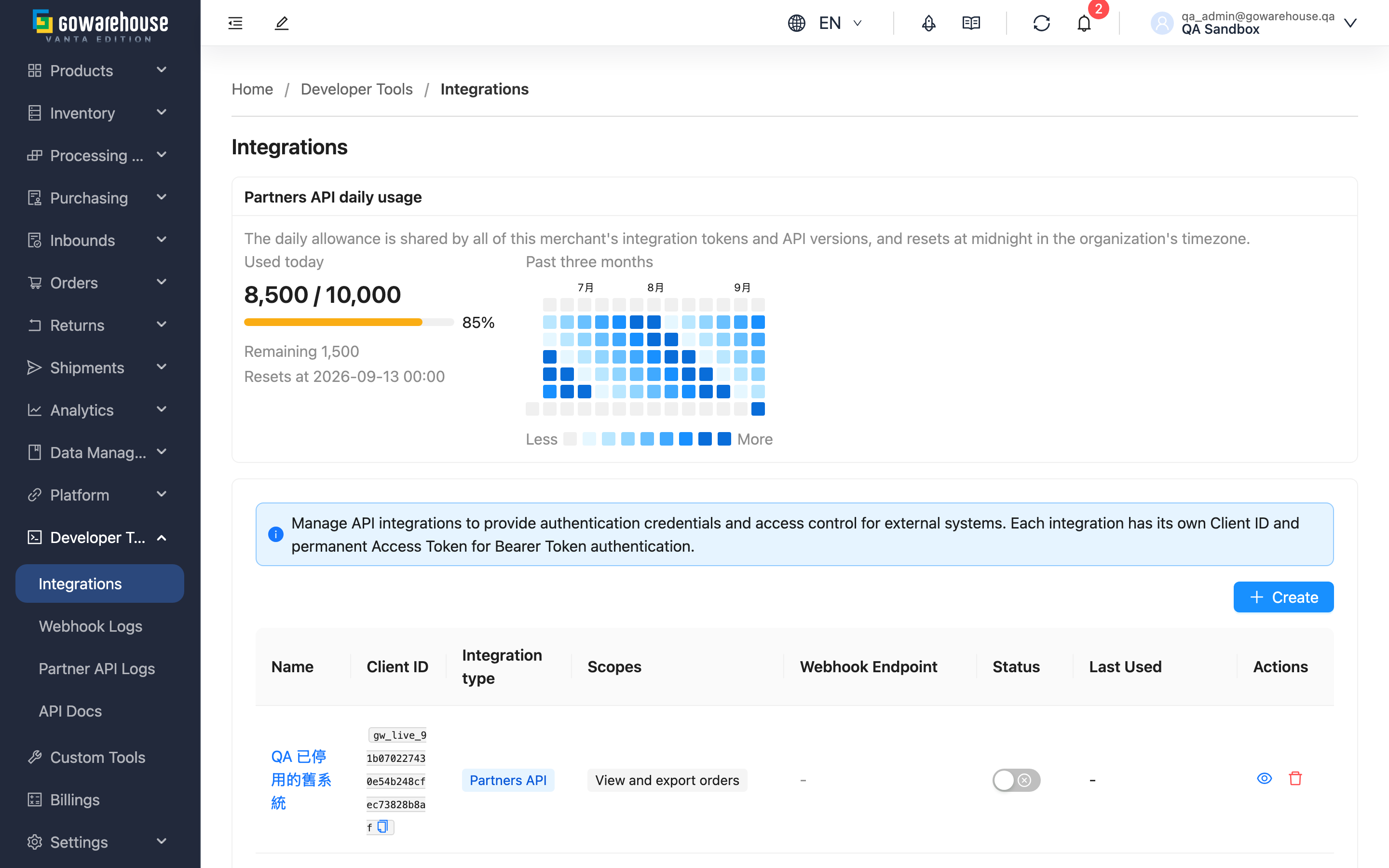
Use this feature: The Partners API daily usage card at the top of the list shows how much has been used today and the usage rhythm over the past three months.
Result: You can see the normal usage level and where the peaks fall, then decide whether to ask the vendor to reschedule, sync in batches, or contact us in advance about the allowance.
2. Features
API Integrations is where you connect GoWarehouse to your own systems. You create one set of credentials per system that needs to connect — storefront, ERP, support tool — and that system uses them to call our API to submit orders, query stock and receive fulfilment events. One set of credentials per system means you can revoke one without affecting the others.
Jump to: Daily usage | Integration list | Creating and managing
2.1 Partners API daily usage
The card at the top of the page shows this merchant's API usage. The allowance is shared across the whole merchant: no matter how many sets of credentials you create or which API version each one uses, everything counts against the same allowance.
| Item | Description |
|---|---|
| Used today | Requests counted today and the allowance for the day. The bar is green below 80%, turns amber from 80%, and red once the allowance is exhausted |
| Remaining | How many requests are left today |
| Resets at | When the count returns to zero, using the timezone configured for your organization |
| Past three months | Each square is one day; the darker the square, the higher that day's usage. Hover a square to see the actual count and its share of the allowance |
The default allowance is 10,000 requests per day. Requests rejected for invalid credentials, a disallowed IP or a version mismatch are not counted; everything that passes authentication is counted, including requests that then fail on permissions or invalid data.
Once the allowance is exhausted, further requests receive 429 with a retry time until the allowance resets at local midnight. Contact us for a temporary or permanent increase.
💡 Tip: Usage figures are approximate fair-use protection, not an exact billing ledger. If the counting service is briefly unreadable the card shows "Unavailable" rather than 0 — and during that time the allowance does not block requests.
2.2 Integration list
| Column | Description |
|---|---|
| Name | The name you gave this integration; click to open its detail page |
| Client ID | The identifier for this integration, shared with the other party's engineer; click to copy |
| Integration type | Creation-time compatibility identifier; formal dated upgrades do not require new credentials |
| Scopes | What these credentials are allowed to do; up to 3 are shown and the rest are collapsed into a count |
| Webhook | Whether an event delivery URL is configured; the dot shows whether delivery is currently enabled |
| Status | Toggle enabled/disabled without opening the detail page |
| Last Used | The last successful call, useful for judging whether the credentials are still in use |
Legacy API versions have no concept of permission scopes, so that column shows "—".
2.3 Creating and managing
| Action | Prerequisites and side effects |
|---|---|
| Create | Opens Create Integration. Completing it issues a client ID and an access token |
| Enable / Disable | While disabled, every call is rejected at authentication. Disabling also disables the integration's webhook; re-enabling does not restore it — turn it back on from Integration Detail |
| View | Opens Integration Detail to inspect credentials, scopes and webhook settings |
| Delete | Permanently removes the credentials. Cannot be undone. The webhook is disabled first so deliveries stop reaching the other party's endpoint |
3. FAQ
Jump to: FAQ | Important notes
3.1 FAQ
▪ What is the difference between disabling and deleting? Which should I use?
Disabling is reversible: the credentials remain, the other party cannot call in, and you can switch it back on later. Use it for a temporary pause or while investigating a problem.
Deleting is permanent: the credentials and their record are gone, cannot be recovered, and any token the other party kept stops working. Use it when the relationship has definitely ended.
Both stop the integration's webhook. The difference is that after re-enabling a disabled integration, the webhook does not come back automatically — you turn it back on from Integration Detail. That is deliberate, so events from the paused period are not delivered the moment service resumes.
▪ The credentials may have leaked but I still need this vendor connected. What now?
Open the detail page and regenerate the access token. The moment the new token is issued, the old one stops working — there is no overlap period — so agree a switchover time with the vendor first. The client ID does not change.
▪ Why can't the API version be changed after creation?
Creation selects a formal or legacy credential type, which cannot be changed. Formal credentials work with v1 and supported dated releases, with 2026-09 as the current default and 2026-10 retained for compatibility. Have the engineer test and switch the requested version; no new credentials are needed. Moving between formal and legacy types requires a new integration.
▪ The usage card does not match the call count recorded by my own system. Why?
Several reasons are normal: requests blocked by the per-second or per-minute throttle do not count against the daily allowance, and neither do requests that fail authentication, IP or version checks. Usage figures are also approximate protection and may undercount if the counting service restarts. Use them for trends and fair use, not for reconciliation.
▪ I have several systems to connect. How many sets of credentials should I create?
One per system. That way you can revoke one party's access without affecting the others, and when usage looks wrong you can tell from the client ID who made the calls. Note that the daily allowance is shared across the merchant — creating more credentials does not increase the total.
▪ I can't see the API Integrations menu.
It requires the integrations:read permission. Ask your account administrator to check the settings in User Management.
3.2 Important notes
⚠️ Important
- Deleting an integration cannot be undone and also detaches its webhook configuration. Delete only when the relationship has ended; otherwise disable it.
- Regenerating the access token invalidates the old one immediately, and the other party's system starts failing on its next call. Always agree a switchover time first.
- After re-enabling a disabled integration, the webhook stays off until you turn it back on from Integration Detail — otherwise the other party assumes the connection is restored but receives no events.
- Formal and legacy credential types cannot be interchanged. See API versions for dated upgrades.
💡 Tip: Last Used is a good basis for clearing out unused credentials — an integration with no recent calls is usually left over from an old arrangement, and keeping it only adds exposure.
4. Related Features
| Feature | Description | Link |
|---|---|---|
| Create Integration | Issue a new set of API credentials and set its scopes | Go |
| Integration Detail | Inspect credentials, scopes and webhook settings | Go |
| Edit Integration | Adjust name, scopes, IP restrictions and webhook | Go |
| User Management | Control who can view and manage integrations | Go |