
Integration Detail
Contents
1. Features
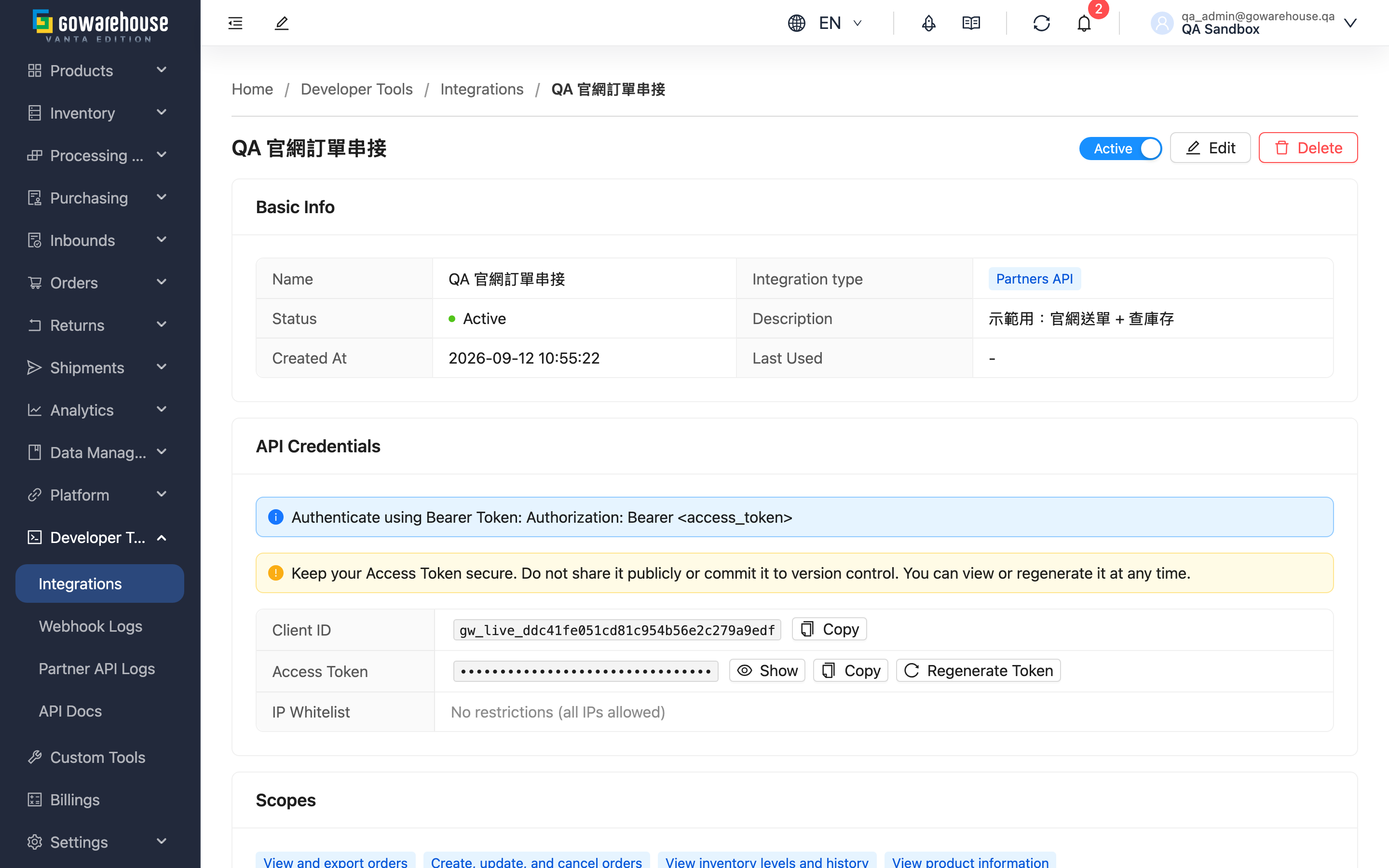
Review everything about one integration: what it is authorised to do, what its credentials are, when it was last called, and how webhook delivery is going. Start here whenever the other party reports "we can't connect" or you need to revoke access.
Jump to: Basic information | Credentials | Permission scopes | Webhook
1.1 Basic information
| Field | Description |
|---|---|
| Name | The name of this integration |
| Integration type | Creation-time compatibility identifier; formal dated upgrades do not require new credentials |
| Status | Whether it is currently usable. While disabled, calls are rejected at authentication |
| Description | The purpose noted at creation |
| Created At | When it was created |
| Last Used | The last successful call. Long empty means the other party never connected, or stopped using it |
1.2 Credentials
| Item | Description |
|---|---|
| Client ID | The identifier for this integration; safe to share with the other party's engineer |
| Access Token | The secret used to call the API, equivalent to a password. Copy it to hand over |
This section also offers regenerate access token. The new token takes effect immediately and the old one stops working at the same moment — there is no overlap; the client ID does not change. The other party's system starts failing on its next call until they switch, so agree a time first.
⚠️ Anyone who can open this page can see the access token. Make sure only the right colleagues hold the integration permissions in User Management.
1.3 Permission scopes
What these credentials are allowed to do. To add or remove scopes, go to Edit Integration.
Legacy API versions have no concept of scopes, so this section does not appear — those credentials can reach everything the legacy version exposes.
1.4 Webhook
If this integration has event delivery configured, this section shows:
| Item | Description |
|---|---|
| URL | The endpoint events are delivered to |
| Webhook version | The payload format version, independent of the integration's API version |
| Subscribed Events | Which events are currently delivered |
| Signature Verification | Used by the other party to verify the delivery came from us. The value here is masked (only the head and tail are shown). There is a Regenerate Secret button next to it, but pressing it here never reveals the new key — see the warning below |
| Deliveries | How many deliveries this webhook has accumulated |
The enabled switch sits at the right of this section's title bar (a tick/cross icon with no label). You toggle it here, not on the edit page. Turning it off stops delivery while keeping the configuration, and you can turn it back on at any time; events that occur while it is off are not replayed afterwards.
⚠️ Do not press Regenerate Secret on this page. It rotates the key and invalidates the old one immediately, but this page never shows you the new key — it just displays another masked value. The result is that the other party's signature checks start failing while you have no new key to hand over. Regenerate from the Webhooks page instead, which reveals the full key at the moment it is generated so you can copy it.
To change the URL, version or subscribed events, go to Edit Integration.
Test: this actually sends a delivery to the URL above — the other party really receives a test event, it is not a simulation. The dialog that follows shows the status, response code and duration, which you can use to confirm their endpoint is reachable and the signature is configured correctly. The response code tells you whether their server returned an error (5xx) or the URL or signature is misconfigured (4xx); an unreachable endpoint or a timeout has no response code at all and shows as N/A.
Side effects to be aware of: the test is recorded as a real delivery, so Deliveries increases by one and it appears in Webhook Logs (flagged as manually triggered, separate from automatic deliveries). A failed test is not retried automatically.
Disabling the whole integration also disables its webhook; re-enabling the integration does not restore the webhook automatically — turn it back on with the switch above.
1.5 Delete
Removes these credentials. Cannot be undone. Any token the other party kept stops working immediately, and the webhook is disabled before being detached. If you are only pausing the relationship, disable it instead.
2. FAQ
Jump to: FAQ | Important notes
2.1 FAQ
▪ The other party keeps getting 401 / authentication failures. Where do I look?
Check three things in order: whether Status on this page has been turned off; whether they are using the current token (if it was ever regenerated, the old one is dead); and whether the IP restrictions on the edit page exclude their source address.
▪ They are getting 403 / insufficient permissions.
That is not a credentials problem — the permission scopes do not cover what they are trying to do. Tick the matching scope on the edit page; there is no need to regenerate the token.
▪ They are getting 429.
They have hit a usage limit. It may be calls bunched too closely together, or the daily allowance being exhausted. Check the daily usage card on API Integrations to tell which.
▪ Last Used is still empty. Does that mean the integration failed?
It means there has never been a successful call. They may not have started yet, or there may be a mismatch in credentials, IP or version. Ask them for the exact error they receive and work through the questions above.
▪ Webhook delivery keeps failing. Does that affect the orders themselves?
No. Webhooks are an additional notification channel; failed delivery does not affect order or stock data, and the other party can still query the API directly. Do fix it promptly, though, or their system will keep working from stale status.
▪ Can the other party still look up stock after a product is deleted?
Inventory lists in formal versions v1, 2026-09, and 2026-10 exclude deleted products by default. For historical reconciliation, ask the other party's engineer to explicitly include deleted products. Existing inventory details remain accessible, and deleting a product does not remove physical stock. Depleted and blocked batches of live products remain queryable; filters can limit the results to normal batches.
To synchronize product deletions, the integration also needs product read access and must retrieve deletion times from the product list with deleted products included. Inventory change notifications alone do not report product deletion. A new product can reuse the same SKU, so distinguish old and new products by their product identifiers to avoid combining their stock. Refer to the integration documentation for the selected version for parameters and fields.
2.2 Important notes
⚠️ Important
- Regenerating the access token has no overlap period — the old token dies the instant the new one is issued.
- Deletion cannot be undone and also detaches the webhook configuration. Use disable for a temporary pause.
- This page shows the full access token. Control who has permission to open it.
3. Related Features
| Feature | Description | Link |
|---|---|---|
| API Integrations | View all integrations and daily usage | Go |
| Edit Integration | Adjust scopes, IP restrictions and webhook | Go |
| Create Integration | Issue another set of credentials | Go |