
Create Integration
Contents
1. Features
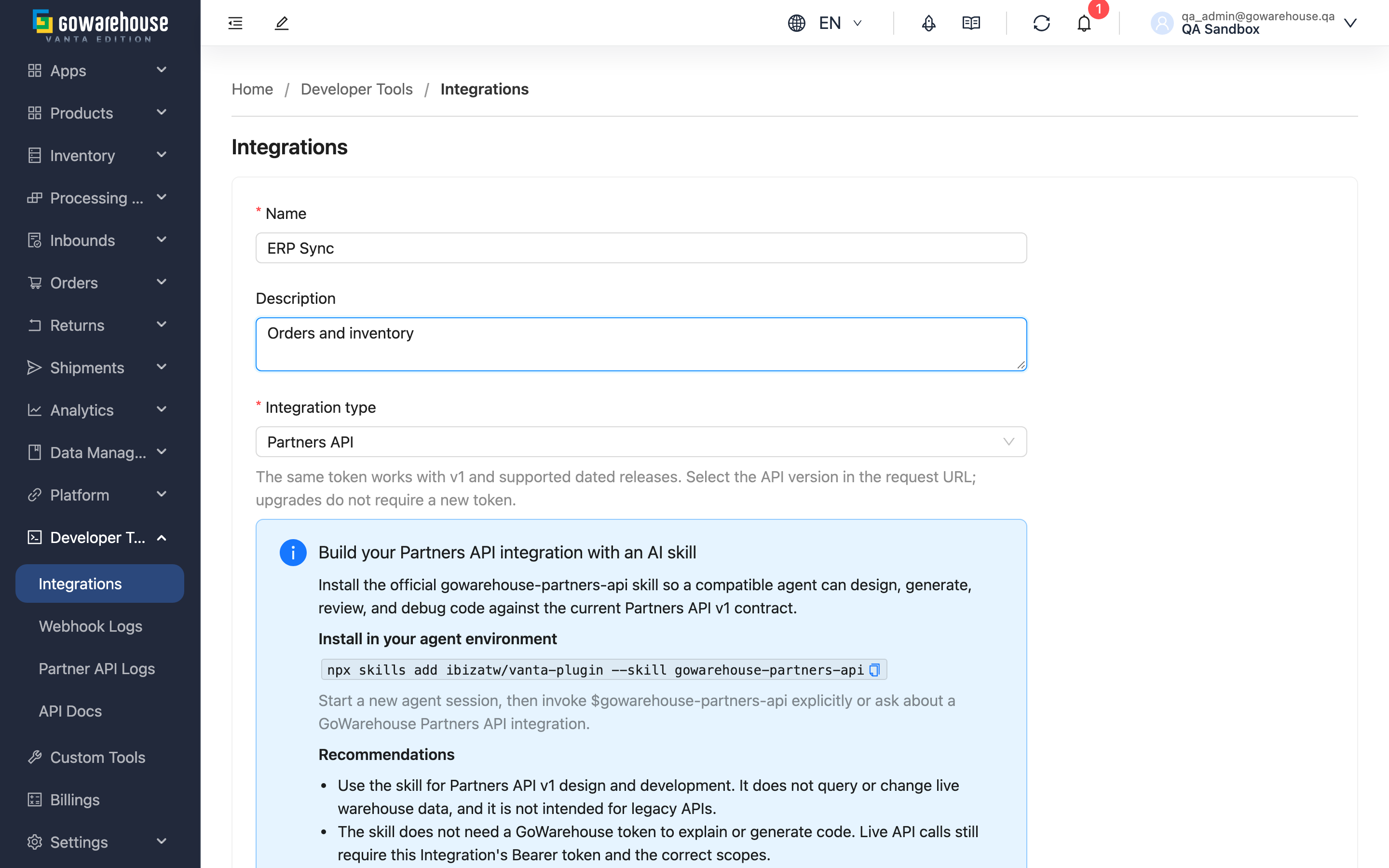
Every external system that connects to GoWarehouse gets its own set of credentials here. Creating one decides three things that stay with the integration long term: whether it uses formal or legacy credentials, what it is allowed to do, and which IP addresses may use it. Once saved, the system issues a client ID and an access token for you to hand to the other party's engineer.
Jump to: Basic information | API version | Permission scopes | IP restrictions | Webhook
1.1 Basic information
Fields marked with * are required
| Field | How to fill it in | Notes |
|---|---|---|
| *Name | The name of the connecting system, e.g. "Storefront order system" or "XX Systems ERP" | This is how you identify it in the list and when investigating usage, so be specific |
| Description | Purpose, contact person or contract reference | Optional, but valuable at handover |
1.2 API version
By default, only formal integrations are available, supporting v1 and published dated versions. Legacy v1/v2 choices appear only in environments where legacy compatibility is enabled. When that compatibility is disabled, existing legacy credentials can no longer call legacy APIs. Existing integration records remain available to inspect, deactivate or delete; toggling an integration back on does not restore legacy API access.
Creation selects a formal or legacy credential type, which cannot be changed. Formal credentials work with v1 and supported dated releases, including 2026-10. Have the engineer test and switch the requested version; no new credentials are needed. Moving between formal and legacy types requires a new integration.
| Version type | When to use it |
|---|---|
| Current versions (v1 and dated versions) | Always choose this for new integrations. Supports permission scopes and continues to gain features |
| Legacy | Only for systems already built against the older contract. No concept of permission scopes; the credentials can reach everything that version exposes |
Confirm the target version with the other party's engineer before creating.
1.3 Permission scopes
Select what these credentials are allowed to do. Grant only what the other party actually needs — scopes are the main limit on the damage a leaked token can do.
| Category | Available scopes | What it covers |
|---|---|---|
| Orders | Read, Write | Orders, plus the shipments and tracking of those orders |
| Products | Read, Write | Product data and custom attribute definitions |
| Inbounds | Read, Write | Inbound receipts |
| Inventory | Read | Inventory batches, per-warehouse levels, and custom attribute definitions |
| Contact addresses | Read, Write | The saved receiver addresses that contact_address_code matches when creating an order |
| Return orders | Read | Return orders |
| Webhooks | Read, Write | Read = view the subscription and send tests; Write = create, change, delete it and regenerate the secret |
Click a category heading to select or clear the whole group. Current versions require at least one scope before they can be created; legacy versions do not use scopes and the section does not appear.
Contact addresses are their own category. Granting "Orders" does not include the address book — to read or change your saved receiver addresses, the other party needs "Contact addresses" as well.
💡 Tip: A system that only submits orders and does not need to change product data usually needs just "Orders – Write" and "Inventory – Read". Adding more later in Edit Integration is far safer than granting everything up front.
1.4 IP restrictions
Restrict these credentials to specific source addresses. Leave it empty to allow any source.
| Format | Example |
|---|---|
| Single IP | 203.0.113.10 |
| IP range (CIDR block) | 203.0.113.0/24 |
One entry per line. Invalid formats are rejected on save and the offending entry is named. If the other party's system uses dynamic IPs or a cloud service, confirm their fixed outbound address first — otherwise you will block legitimate calls.
1.5 Webhook (optional)
If the other party needs to be notified the moment an order ships or stock changes, enter their receiving URL and version here. Leaving it empty means they will poll the API instead.
The webhook's Signature Verification and Subscribed Events can be adjusted in Edit Integration after creation. Subscribed events need the matching read permission in Scopes (for example, order events need Orders: read); see the table in Edit Integration.
1.6 After creation
Saving immediately issues a client ID and an access token. Hand both to the other party's engineer — the token is equivalent to a password, so send it through a secure channel and do not paste it into a public chat or ticket.
2. FAQ
Jump to: FAQ | Important notes
2.1 FAQ
▪ I don't know which API version they need. Can I create it now and change it later?
Creation selects a formal or legacy credential type, which cannot be changed. Formal credentials work with v1 and supported dated releases, including 2026-10. Have the engineer test and switch the requested version; no new credentials are needed. Moving between formal and legacy types requires a new integration.
▪ Isn't it simpler to just tick every scope?
It is more dangerous. Once credentials leak, scopes are the only thing limiting what the holder can do. Granting everything means a leaked token can change your products and your orders. Grant what they actually need and add more later.
▪ Should I fill in IP restrictions?
If the other party has a fixed outbound address, yes — it is an effective second line of defence, because even a leaked token is useless from anywhere else. If they run on a cloud service with changing addresses, restricting IPs will block legitimate calls instead; leave it empty and rely on scopes and periodic token rotation.
▪ Can one system have two sets of credentials?
Yes, commonly to separate their test and production environments. Note that the daily allowance is shared across the merchant, so extra credentials do not grant extra allowance.
▪ Can I still see the access token after creation?
Yes — it can be viewed again in Integration Detail. Even so, hand it over and store it safely at creation time: anyone who can see the token can use the integration.
2.2 Important notes
⚠️ Important
- Formal and legacy credential types cannot be interchanged. See API versions for dated upgrades.
- The access token is equivalent to a password. Deliver it through a secure channel, not in a public conversation or ticket attachment.
- An incorrect IP restriction blocks legitimate calls outright, and the other party sees a rejection rather than a format error. Have them test once before going live.
3. Related Features
| Feature | Description | Link |
|---|---|---|
| API Integrations | View all integrations and daily usage | Go |
| Integration Detail | Inspect credentials and settings | Go |
| Edit Integration | Adjust scopes, IP restrictions and webhook | Go |