
Picking Wave Detail
Table of Contents
1. Features
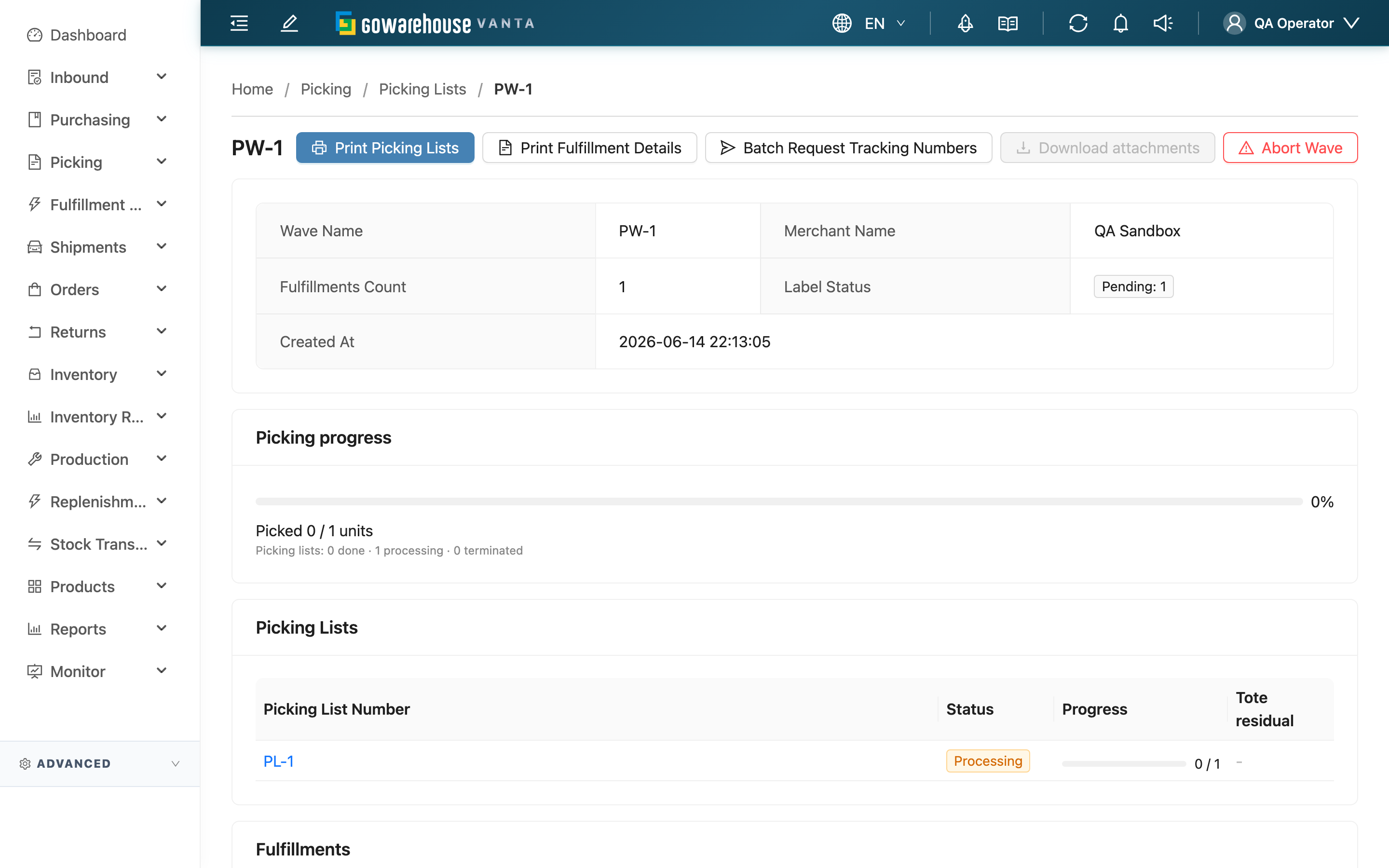
A wave is a batch of fulfillments and picking lists worked together. This page shows the whole wave's picking progress and its fulfillment list, and provides wave-level actions: print picking lists and fulfillment details, request tracking numbers from the carrier, return an individual fulfillment, or abort the entire wave in one step when it was built by mistake. In most cases you reach this page from the wave column on the Picking List List or from the Picking List Detail.
Quick Jump: Wave Info & Progress | Picking Lists & Fulfillments | Printing & Documents | Batch Complete Shipments | Return Fulfillment | Abort Wave
1.1 Wave Info & Progress
The top shows the Wave Name, Fulfillments Count, and Picking progress (items already picked, plus the completed / in-progress / terminated counts per picking list). If every fulfillment in the wave is closed and all totes are empty, a Closable tag appears to indicate the wave can be wrapped up — this is only a hint and does not change any data.
If all picking lists have ended but some fulfillments are still unhandled, the page shows the notice "All picking lists in this wave are finished, but some fulfillments remain unresolved". Please return each one or confirm what to do next.
1.2 Picking Lists & Fulfillments
The page lists this wave's Picking Lists (each with its own picking progress and residual totes), along with the Fulfillments. The fulfillment list shows all fulfillments, including shipped, canceled, and terminated ones, distinguished by status color:
| Column | Description |
|---|---|
| Fulfillment Name | Fulfillment number |
| Status | Fulfillment status; fulfillments in a terminal state (shipped / canceled / terminated) are shown but cannot be acted on |
| Order Number / Receiver Name | The corresponding order and recipient |
| Sales Channel | Source sales channel |
1.3 Printing & Documents
| Action | Function |
|---|---|
| Print Picking Lists | Print this wave's picking lists (you can choose which ones to print) |
| Print Fulfillment Details | Print the fulfillment details for the fulfillments in the wave |
| Download TO Label | Download the packing slip for the entire wave |
| Batch Request Tracking Numbers | Request tracking numbers from the carrier in batch |
| Download attachments | Download the documents attached to the wave's fulfillments |
1.4 Batch Complete Shipments
Select several allocated or in-progress fulfillments and use "Batch Complete Shipment ({{count}})" to complete them all at once, without going through the QC station one at a time.
| Item | Description |
|---|---|
| When available | The fulfillment status is allocated or in progress; work-order fulfillments are not batch-completable even if selected — close those from the work order page instead |
| What the system does | Each fulfillment is completed independently, and this action itself runs no QC step. The outbound QC fee follows whether the fulfillment was actually packed earlier: fulfillments already packed at the outbound QC station are still charged, fulfillments that were never packed are not. If a fulfillment has never been packed at all, the system automatically creates one parcel with the products actually shipped — that parcel is a system record, it does not count as QC and incurs no QC fee; if it has already been packed but some picked products are still not in any parcel, that fulfillment fails without affecting the rest of the batch — a fulfillment that was short-picked but fully packed is not affected and ships normally |
| Result | The dialog shows how many succeeded and how many were skipped, listing the reason for each skipped fulfillment (e.g. order canceled, fulfillment status not eligible, insufficient tote stock, some items not fully packed) |
| Reversibility | Fulfillments that shipped successfully cannot be undone here; skipped ones are left unchanged — fix the issue and reselect them for batch complete, or handle them individually |
1.5 Return Fulfillment
When a fulfillment will no longer be picked (intercepted by the platform, canceled by the customer, out of stock, rescheduled, etc.), use the Return on each row to pull it out of the wave; for several at once, select them and use Batch Return ({{count}}).
| Item | Description |
|---|---|
| When available | The fulfillment is not in a terminal state (not shipped / canceled / terminated). Terminal-state fulfillments are shown but cannot be returned |
| Precondition | If this fulfillment already has picked stock in a tote, you must first specify a Return Shelf to put the stock back when returning; if there is no stock for it in any tote, you can return it directly |
| Effect | The system puts the picked stock back to the specified shelf, unbinds this fulfillment from the wave, and recalculates the fulfillment status; if its corresponding order has no other fulfillments left in the wave, the order reverts to pending; if a picking list becomes empty as a result, that picking list is terminated automatically. Only this fulfillment is affected — the other fulfillments in the wave are not |
| Reversibility | After being returned, the fulfillment goes back to an unallocated state and can be brought into a new picking list to be picked again; the earlier picking records are kept |
Batch return runs the full return flow (including put-back) once for each fulfillment; if even one of them does not meet the conditions, none of the batch runs — fix the issue per the error message and submit again.
1.6 Abort Wave
When the whole wave was built by mistake (e.g. a test order, wrong conditions), use Abort Wave to return all unclosed fulfillments in the wave at once.
| Item | Description |
|---|---|
| Scope | The system first puts the picked stock in the totes back, then unbinds all unclosed fulfillments from the wave. Shipped / canceled / terminated fulfillments are not affected |
| Permission required | Requires the Orders - Write permission; with read-only permission the button is still shown but locked and not clickable |
| Confirmation | You must enter the wave number to proceed |
| Reversibility | Irreversible. Make sure the entire wave really should be aborted before proceeding |
2. FAQ
Quick Jump: FAQ | Important Notes
2.1 FAQ
▪ After returning a fulfillment, where does it go?
It leaves this wave and goes back to an unallocated state, so it can be brought into a new picking list and picked again. Returning does not delete it, and the earlier picking records are all kept.
▪ Why does returning sometimes ask for a Return Shelf and sometimes not?
It depends on whether the tote holds stock already picked for this fulfillment. If there is picked stock, you must first specify a shelf to put it back (so the stock isn't left ownerless in the tote); when there is no stock for it in the tote, you can return it directly.
▪ What is the difference between Batch Return ({{count}}) and returning one at a time?
Batch return handles several at once, but each one still goes through the full return flow (including put-back confirmation) — put-back is not skipped. If even one of them does not meet the conditions, none of the batch runs.
▪ What is the difference between Abort Wave and returning a fulfillment?
Returning targets an individual fulfillment; aborting a wave returns all unclosed fulfillments in the wave at once, for when the entire wave was built by mistake and needs to be undone completely. Aborting is irreversible and requires entering the wave number to confirm.
▪ Can a shipped or canceled fulfillment still be returned?
No. Terminal-state fulfillments (shipped / canceled / terminated) are shown in the list for reference but cannot be returned.
▪ What does Closable mean?
It means all the wave's fulfillments are closed and all totes are empty, so the wave can be wrapped up. This is only an on-screen hint and does not automatically change the wave or any data.
▪ The page says "all picking lists have ended but some fulfillments are still unhandled" — what should I do?
It means the picking lists are all wrapped up, but some fulfillments are still stuck, neither shipped nor returned. Check these fulfillments one by one: arrange shipment for the ones to ship, and use return to pull the others out of the wave.
▪ Batch complete shows "Some items are not fully packed" — what do I do?
It means that fulfillment has already been packed, but some picked products are still not in any parcel; the batch result lists the items and how many are short. Return to the QC station and pack the remaining products, or put the unpacked products back, then reselect that fulfillment for batch complete. That one fulfillment being skipped does not affect the rest of the batch — the others complete normally.
▪ Will a short-picked fulfillment be blocked by batch complete?
No. As long as the short-picked quantity is already fully packed (packed everything that was actually picked), it ships normally; the system only blocks fulfillments that are already packed but where the packed quantity is less than what was actually picked.
2.2 Important Notes
⚠️ Important Reminders
- Abort Wave is irreversible and returns all unclosed fulfillments in the wave; be sure before entering the wave number to proceed.
- If returning a fulfillment requires put-back, it is a physical move: physically move the stock back to the shelf first, then choose the put-back shelf and confirm, otherwise the books won't match the floor.
- Returning affects only the fulfillment being returned and does not affect the other fulfillments and picking lists in the wave.
💡 Tip: To clear the residual totes of a single picking list, go to the Picking List Detail and use put-back tote there — there's no need to return the whole fulfillment.
3. Related Features
| Feature | Description | Link |
|---|---|---|
| Picking Lists | Go back to the list of all picking lists | Go |
| Picking List Detail | View a single picking list in the wave and handle residual totes | Go |
| Tote residual | Find picking lists that have ended but still have residual totes | Go |