
Edit Shipping Rate Card
目錄
一、功能介紹
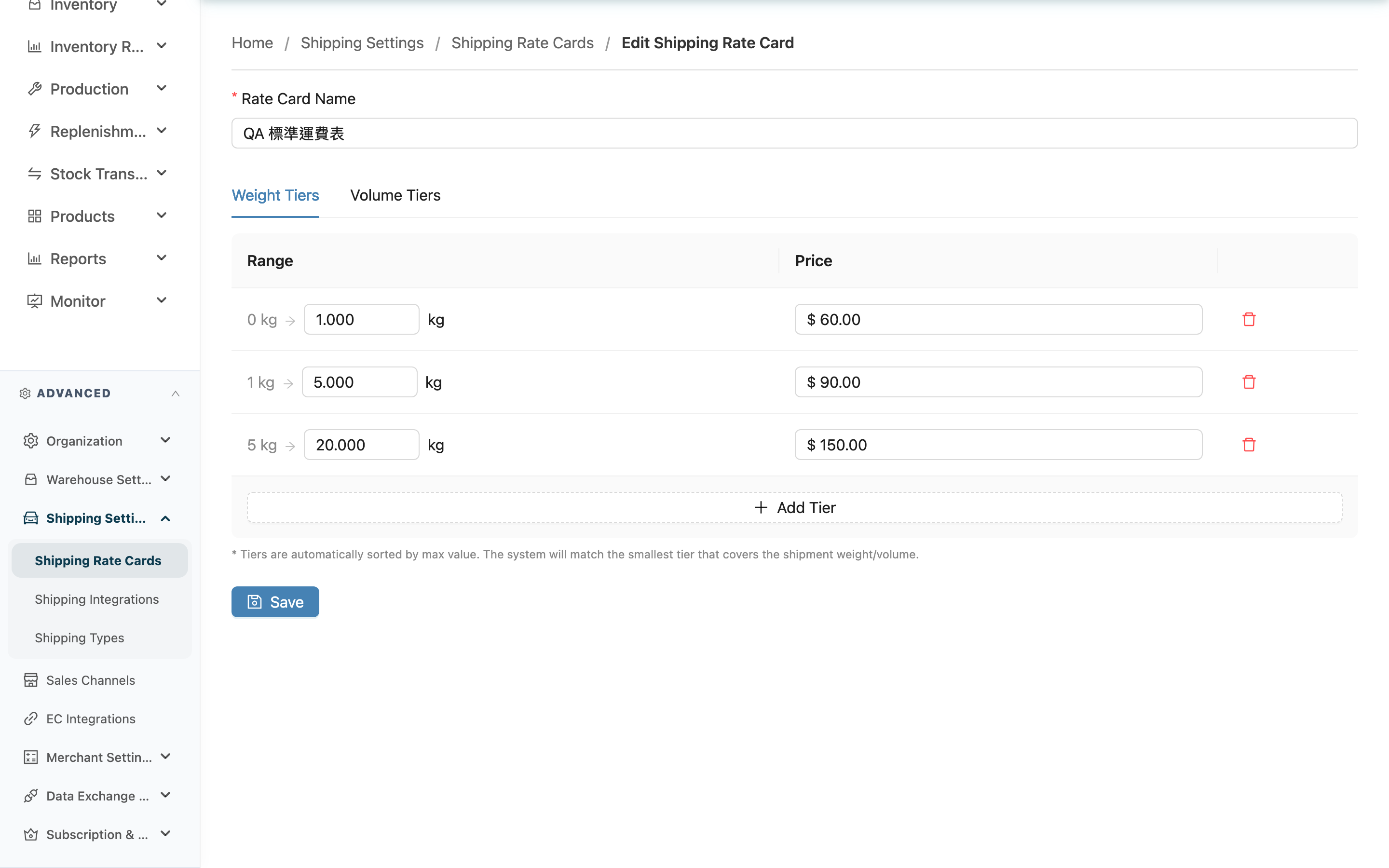
Edit an existing Shipping Rate Cards on this page: you can adjust the name, and add, remove, or modify the individual tiers in Weight Tiers and Volume Tiers. Changes apply immediately after saving, so every merchant shipping setting using this rate card will calculate the shipping fee per parcel from the new settings at shipping time. ⚠️ The same rate card can be shared by multiple merchants; changing one affects every merchant using it.
快速跳轉:Basic Fields | Adjust Tiers | Save
1.1 Basic Fields
標示 * 的欄位為必填項目
| 欄位名稱 | 如何填寫 | 注意事項 |
|---|---|---|
| *Rate Card Name | Re-enter the rate card name | Required |
1.2 Adjust Tiers
Weight Tiers (in kg) and Volume Tiers (in cm³) are split into two tabs. When opened, existing tiers are restored into a "start value" list: the first row always starts at 0, the last row is always "and above", and the rows in between keep their original coverage order from small to large. Each tier has the following adjustable fields:
標示 * 的欄位為必填項目
| 欄位名稱 | 如何填寫 | 注意事項 |
|---|---|---|
| Start value | For every row except the first, enter this tier's start value (kg in the weight tab, cm³ in the volume tab), up to three decimal places | The first row always starts at 0 and cannot be edited; every other row is required and must be greater than the previous row's start value, or the save is rejected |
| *Price | The fee charged when the shipment falls in this tier, up to two decimal places | Required, cannot be less than 0 |
- Click Add Tier to add a tier; the new row is added at the end and becomes the new "and above" row.
- Click the delete button on a row; after confirming, the tier is removed and deleted together when you save. The remaining rows shift up, and their ranges and which row is "and above" are recalculated automatically (for example, deleting the previous last row makes the new last row automatically unbounded).
1.3 Save
Click Save to apply all changes. After a successful save you stay on the edit page to confirm the result or keep adjusting. The tier additions, modifications, and deletions made on this page are submitted together when you save.
二、常見問題
2.1 FAQ
▪ After I change the tiers, will the fee on old shipments change too?
No. A rate card is looked up to calculate the fee at the moment of shipping. Shipments already calculated are not recalculated when the rate card is changed afterward. Changes only affect shipments calculated after saving.
▪ If I delete a tier, can I recover it after saving?
No. A tier deleted on this page is removed when you save and cannot be recovered. If you only want to temporarily stop charging for that band, set the price to 0 instead of deleting it.
▪ Can I save with all tiers deleted, keeping only the name?
Yes. The rate card itself only needs a name to be saved. But with no tiers, the system cannot find a price, and shipping types using this card cannot be billed by tier.
▪ Does changing the name affect the merchant shipping settings already attached?
No. A merchant shipping setting is attached to the rate card itself, so renaming does not break the attachment; only the displayed name updates.
▪ Which merchants are using this rate card? Who is affected by a change?
Rate cards are organization-level, and the same card can be attached to several merchants and several shipping types, so changing one affects every merchant using it. To see who is using it, go to Merchant Shipping Types and check merchant by merchant. To adjust the price for just one merchant, create a separate rate card and re-attach it.
▪ Does the order of the tiers matter? Can I rearrange them freely?
Yes, it matters. Each row's position determines its range — the first row always starts at 0, the last row is always "and above", and the rows in between must be arranged with strictly increasing start values. The system does not reorder them for you; if the start values are not strictly increasing, the save is rejected.
▪ I made changes but don't see the fee change?
Confirm that this rate card is actually attached to that merchant's shipping type (see Merchant Shipping Types), and that the shipment uses that shipping type. An unattached rate card is not applied to any shipment. The place to attach it is merchant shipping settings, not Shipping Types — shipping types themselves have no rate fields.
2.2 注意事項
⚠️ 重要提醒
- A tier deleted on this page cannot be recovered after saving.
- The fee on existing shipments is not recalculated when the rate card is changed afterward; changes only take effect on shipments calculated later.
- Tier start values must strictly increase with no duplicates; the save is rejected with an error if this is violated.
💡 提示:If you only want to pause charging for a certain weight/volume band, set that tier's price to 0 rather than deleting it, so you don't have to re-enter the start value to restore it later.
三、相關功能
| 功能 | 說明 | 連結 |
|---|---|---|
| Shipping Rate Cards | Back to the list of all shipping rate cards | 前往 |
| New Shipping Rate Card | Create a new shipping rate card | 前往 |
| Merchant Shipping Types | Attach a rate card to a merchant's shipping type to make the fee take effect | 前往 |