
Sales Channels Details
Table of Contents
1. Features
This page is where you review the complete set of fulfillment rules for a single Sales Channels on behalf of a merchant. A Sales Channels (e.g. a specific Shopee store or an official website) carries a whole rule set: how imported orders are matched to system products, which inventory type is used to lock stock, how strictly expiration is enforced, how shortages are handled, and the picking/inspection fees for this channel. When the warehouse allocates stock, checks expiration, or decides a shortage, it is reading from the settings here. Whenever you are unsure why an order was allocated a certain way or why a batch was skipped, come back to this page to check the settings.
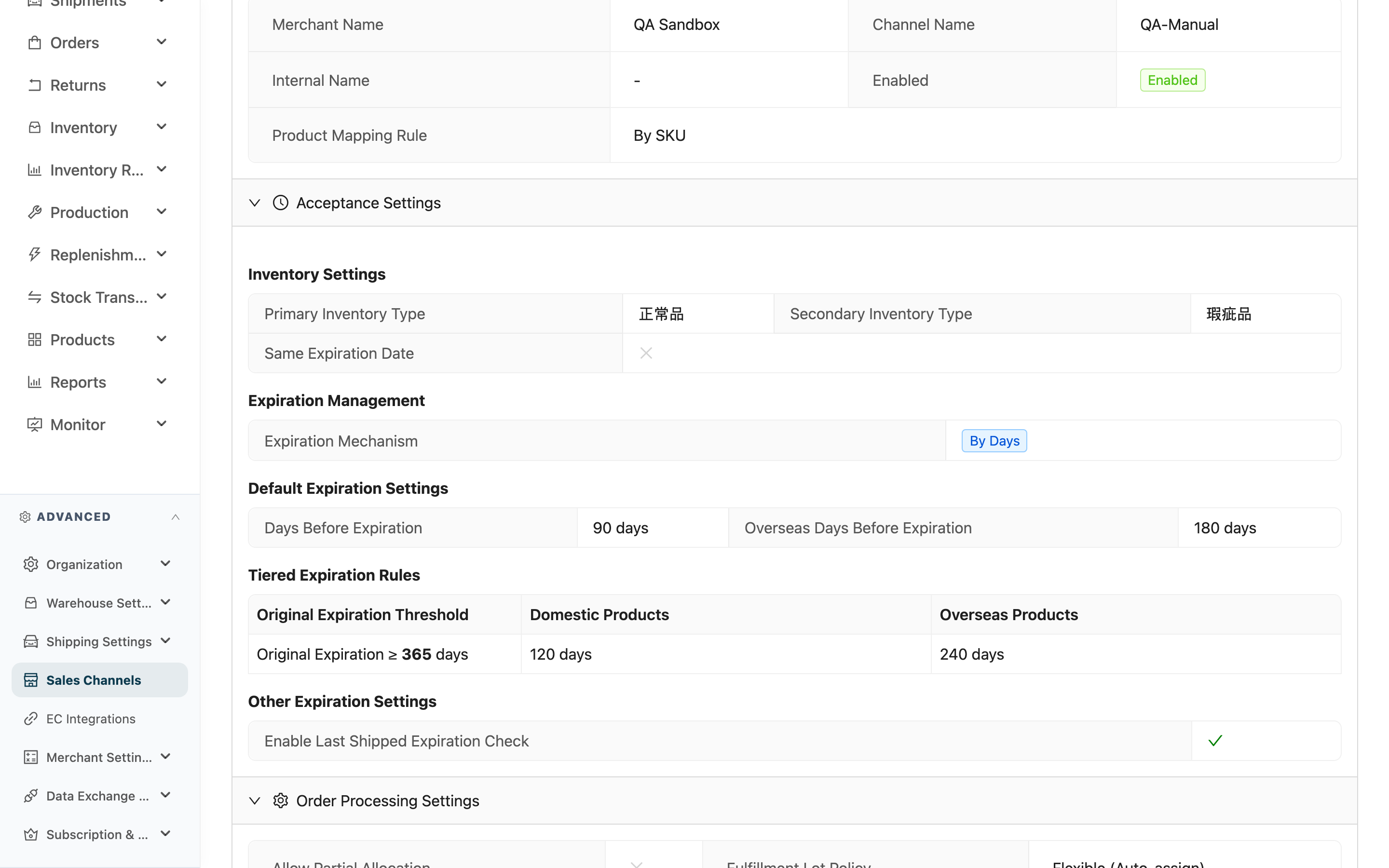
The page is laid out as four collapsible panels, all expanded by default. The "Edit" button in the top-right (requires sales_channels:write permission) takes you to the edit page to change settings. A Sales Channels cannot be deleted once created, so there is no delete button on the details page.
Quick jump: Basic Info | Acceptance Settings | Order Settings | Billing Settings
1.1 Basic Information
| Field | Description |
|---|---|
| Merchant Name | Which merchant this channel belongs to |
| Channel Name | The channel's name in the system |
| Channel Code | The external channel code; import and export files use it to identify the channel |
| Enabled | Enabled/Disabled. Disabled channels do not appear in the channel dropdown when creating an order |
| Product Mapping Rule | How items on an imported order are matched to system products: By SKU (the order SKU must exactly match the system product SKU) / By Barcode (matched against the product barcode, including primary and secondary barcodes) |
1.2 Acceptance Settings
Controls what kind of stock this channel ships out, split into inventory and expiration.
Inventory settings
| Field | Description |
|---|---|
| Primary Inventory Type | When an order locks stock, it deducts from this inventory type first (status categories such as good / defective / pending-inspection) |
| Secondary Inventory Type | When the primary inventory type runs short, the gap is made up automatically from here |
| Same Expiration Date | When checked, identical products within the same order must come from the same expiration batch |
Expiration management
The Expiration Mechanism determines how this channel enforces expiration:
- No Expiration Control: Remaining shelf life is not checked; anything not yet expired can ship.
- By Days: Remaining days must be ≥ the configured value to ship.
- By Ratio: Remaining shelf life must be ≥ the configured percentage of the original shelf life to ship.
When the mechanism is not "No Expiration Control", the Default Expiration Settings appear below, set separately for domestic and overseas (overseas is usually looser to allow for transit time):
| Mechanism | Fields shown |
|---|---|
| By Days | Days Before Expiration/Overseas Days Before Expiration (unit: days) |
| By Ratio | Expiration Ratio/Overseas Expiration Ratio (unit: %) |
Tiered Expiration Rules
When this channel has tiered rules configured and the expiration mechanism is not "No Expiration Control", an extra table appears. It lets "products with different original shelf life apply different acceptance standards" — for example, short-life products are held to a looser bar and long-life products to a stricter one. The table has three columns:
- Original Expiration Threshold: This row's rule applies to products with "Original Expiration ≥ N days".
- Domestic Products/Overseas Products: Shows days or a percentage depending on the mechanism.
Thresholds are sorted from small to large, and the system slots each product into the matching row by its original shelf life. See FAQ for how to read the whole table.
Other expiration settings
| Field | Description |
|---|---|
| Enable Last Shipped Expiration Check | Once checked, for a given product shipped to this channel the expiration can only stay the same or get longer, never shorter. The system remembers the "latest expiration ever shipped" for this product on this channel and automatically excludes any stock shorter than that during allocation |
1.3 Order Processing Settings
| Field | Description |
|---|---|
| models.sales_channel.allow_partial_allocation | Controls how shortages are allocated. Checked = items with stock have their full line locked while out-of-stock items keep the whole line reserved for replenishment (an item is never partially locked); unchecked = whole-order allocation, where any out-of-stock item releases the entire fulfillment and marks it as short. When the "Use Merchant Default" tag is shown, this channel has not set its own value and follows the merchant default (the check/cross next to it is the merchant default); see FAQ |
| Fulfillment Lot Policy | How batch attributes are matched during allocation. Flexible (Auto-assign) = auto-allocates by FEFO/FIFO, and an order with no specified batch attribute can still ship from stock that has batch attributes; Strict (Exact match) = only matches stock that "equally lacks" the corresponding batch attribute. When "Inherit from Merchant" is shown, it follows the merchant setting |
| Auto Complete Fulfillment | Once checked, completing picking automatically completes the fulfillment too, with no manual completion step |
| Auto Reallocate Orders | Once checked, whenever stock changes the system automatically re-checks this channel's short orders to see whether they can be filled |
| Auto Reallocate Priority | The smaller the number, the higher the priority. When stock is short and multiple channels compete for refill, this number decides who is refilled first |
1.4 shared.sales_channels.detail.sections.billing_settings
| Field | Description |
|---|---|
| models.sales_channel.check_fee | The inspection fee for this channel |
| models.sales_channel.picking_fee_per_item | Picking fee charged per item |
| models.sales_channel.picking_fee_box | Picking fee charged per box |
| models.sales_channel.picking_fee_pallet | Picking fee charged per pallet |
When any of the three picking-fee fields shows "-" (blank), it means this channel has not set its own value and follows the picking-fee default in the merchant's shipping rate card; see FAQ.
At the very bottom of the page are the created time and updated time, marking this Sales Channels's Created At and Updated At.
2. FAQ
2.1 FAQ
▪ Why is there no delete button for a Sales Channels?
A Sales Channels cannot be deleted once created (the system provides no delete button), because the channel is referenced by historical orders, expiration records, and other data — deleting it would break the traceability of existing documents. For a channel you no longer use, set Enabled in Basic Info to Disabled — once disabled it no longer appears in the channel dropdown when creating an order, but the old data is preserved.
▪ What do "Use Merchant Default" and "Inherit from Merchant" mean?
They mean this channel has not set the field itself and will follow the merchant-level setting. They appear on two fields:
- models.sales_channel.allow_partial_allocation: shows the "Use Merchant Default" tag, with the check/cross beside it being the merchant's current default.
- Fulfillment Lot Policy: shows "Inherit from Merchant".
The inheritance order is fixed as Sales Channels → merchant default: if the channel sets its own value it is used, otherwise the merchant's value is looked up. So under the same merchant, different channels can have different shortage / batch policies.
▪ Does a blank "-" billing field mean no charge?
No. A blank in the three picking-fee fields (item / box / pallet) means "follow the picking-fee default in the merchant's shipping rate card", not 0. Only fill in a number on the edit page to override when this channel needs a rate different from the rate card.
▪ How do I read the Tiered Expiration Rules?
Each row corresponds to an original-shelf-life band: that row's "Original Expiration Threshold" reads "Original Expiration ≥ N days", meaning products whose original shelf life reaches N days or more apply that row's standard. Thresholds are sorted from small to large, and the system slots a product in by its original shelf life. Each row's Domestic Products/Overseas Products field shows days or a percentage depending on this channel's expiration mechanism — when the mechanism is "No Expiration Control", the whole table is hidden.
2.2 Notes
⚠️ Important reminders
- A Sales Channels cannot be deleted — do not treat a channel as disposable scratch space; set unused ones to Disabled instead.
- The details page shows the currently effective settings: the warehouse's actual allocation, expiration enforcement, and shortage decisions all read from here. To change a setting, use "Edit", which requires the
sales_channels:writepermission.
💡 Tip: When allocation behaves unexpectedly (a batch was skipped, an order is stuck short, stock that should be expired is not), come back to this page and go field-by-field through Acceptance Settings and Order Settings — that usually reveals the cause.
3. Related Features
| Feature | Description | Link |
|---|---|---|
| Edit Sales Channels | Change this channel's fulfillment rule settings | Go |
| Sales Channels List | View all channels under a merchant | Go |
| Inventory Type | Configure the source for primary / secondary inventory types | Go |
| Shipping Rate Card | The default source when a picking fee is blank | Go |
| Order List | Orders processed under this channel's rules | Go |