
Shipping Rate Cards
目錄
一、使用情境
快速連結:Estimate shipping cost by weight and volume | Apply one rate card to multiple shipping types
情境 1:Estimate shipping cost for each shipment by weight and volume
狀況:The warehouse needs to charge the merchant a delivery fee for every shipment, but for the same box, heavy items are billed by weight and bulky items by volume, and the unit price differs across weight bands. Looking this up by hand is error-prone and easy to undercharge.
用這個功能:Create a Shipping Rate Cards here, setting up the price for each weight band and each volume band in one place (see Create a Shipping Rate Card). At shipping time the system looks up each parcel separately: every parcel uses its own weight and volume for one lookup each, takes the higher of the two amounts, and the parcels are then summed (see How tiers are billed).
結果:Each shipment's fee is calculated automatically from the tiers you set, with no manual lookup. Whichever of weight or volume yields the higher amount is charged, avoiding undercharging or miscalculation.
情境 2:Apply one quote to multiple shipping types
狀況:You and the merchant agreed on a single unified "weight/volume-to-fee" quote, but it has to apply to several shipping types (for example, different home-delivery and convenience-store pickup options). Setting each one up separately is tedious and inconsistent.
用這個功能:Build this quote into one rate card here, then go to Merchant Shipping Types and attach the same rate card to each merchant's shipping types. When the rate card's tiers change, every merchant and shipping type using it updates together.
結果:A single quote is maintained in one place and shared across multiple shipping types, so a price change never leaves some shipping types forgotten.
二、功能介紹
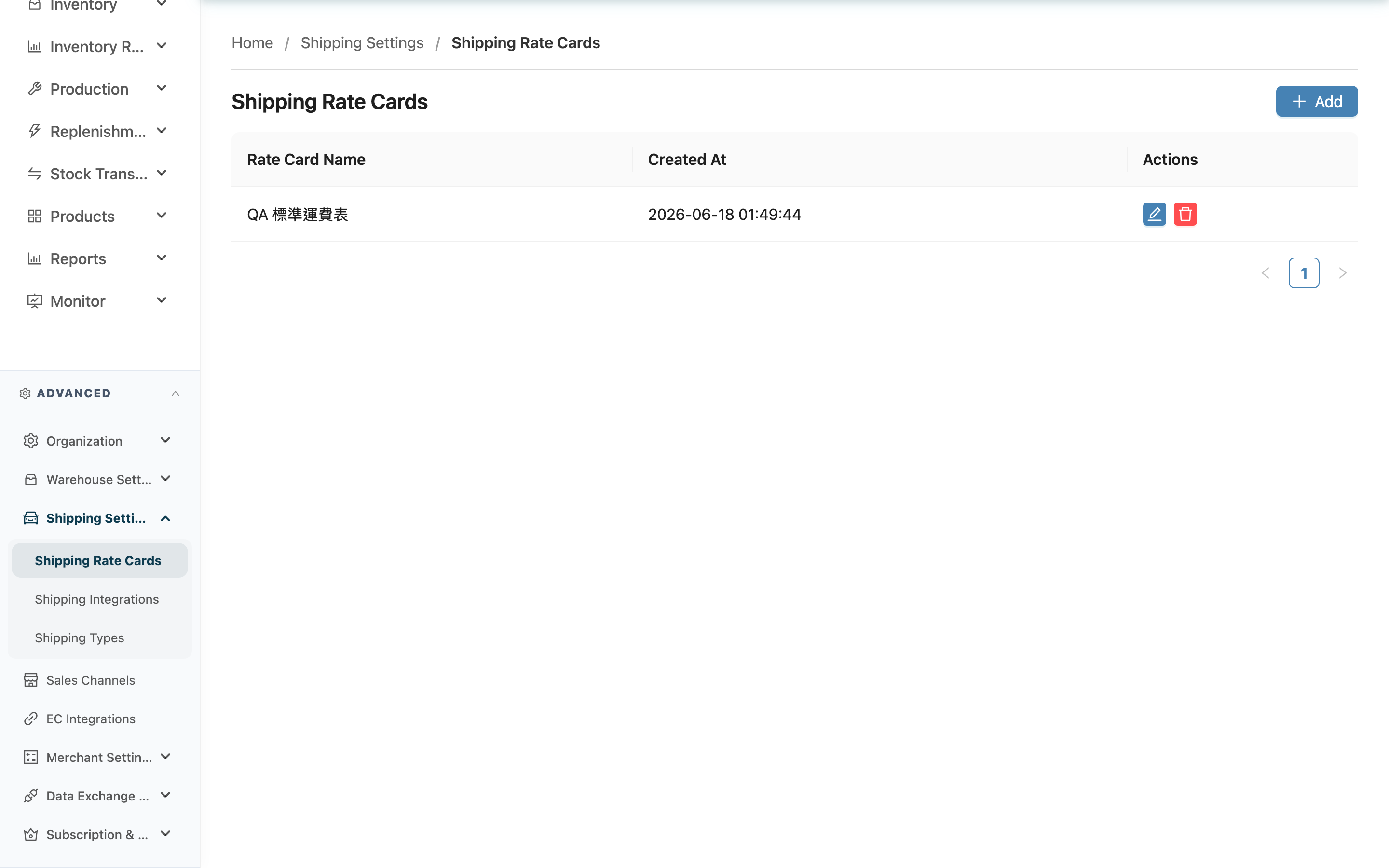
A Shipping Rate Cards defines a lookup table for "how much shipping fee to charge based on shipment weight or volume". A rate card consists of multiple tiers, split into Weight Tiers and Volume Tiers, each divided into ranges by start value with a corresponding "Price"; the first tier always starts at 0 and the last tier is always "and above", so there is never a case where no price can be found. The rate card also carries a "Return Shipping Fee" — a flat amount for return shipping that does not use tiers. Once created, go to Merchant Shipping Types to attach it to a merchant's shipping type; the system then looks up each parcel automatically at shipping time, saving manual estimation. This page is the entry point for all rate cards, where you can add, edit, and delete them.
快速跳轉:List Columns | How Weight and Volume Are Sourced | Add and Edit
2.1 List Columns and Tier Billing
The list is ordered by creation time, newest first. Each row is one rate card.
| 欄位名稱 | 說明 |
|---|---|
| Rate Card Name | The name you give this rate card, e.g. the quote target or shipping plan name |
| Created At | The time this rate card was created |
How tiers are billed (configured on the edit page; described here for how it works): each tier represents a coverage range and a "Price" (weight in kg, volume in cm³). A range is a half-open interval — "greater than or equal to this tier's start value, and less than the next tier's start value": the first tier always starts at 0, and the last tier is always "and above", covering all weight/volume above it, so there is never a case where no price can be found. The unit of pricing is the parcel, not the whole fulfillment: at shipping time the system takes each parcel's own weight and volume, looks each up once, charges the higher of that parcel's weight price and volume price, and then sums the parcels into the shipping fee for the fulfillment.
2.2 How Weight and Volume Are Sourced
Tiers can only be looked up accurately if the system can obtain each parcel's weight and volume. Each has its own source order; the first one with data is used:
| Source order | |
|---|---|
| Weight | ① The actual parcel weight recorded at packing → ② net weight of the products inside + weight of that parcel's packaging materials |
| Volume | ① The actual parcel dimensions recorded at packing → ② the L×W×H of the consumable in that parcel marked "Use as Shipping Volume Basis" → ③ the summed volume of the products inside |
The outer carton is determined by the "Use as Shipping Volume Basis" checkbox on the consumable record, not by guessing from "does this consumable have dimensions filled in" — a cushioning material that happens to have dimensions filled in is not treated as the carton unless it is checked.
⚠️ A fulfillment with no parcels at all is automatically counted as one parcel: its contents are the products and quantities actually shipped on that fulfillment, with no weight or dimensions recorded and no consumables. As a result, weight always falls to option ② (net product weight only) and volume always falls to option ③ (underestimated). These fulfillments used to be excluded from billing for lacking parcel data; they are now billed by the products' theoretical weight/volume. If the product master is missing weight or dimensions, both are handled under "What happens when weight or dimensions are missing" below and billed at the bottom tier of that dimension.
⚠️ Volume is underestimated when it falls to option ③: summing product volume measures the contents, excluding voids inside the box and the carton walls, so it is smaller than the actual box. Under the "take the higher" rule an underestimated volume almost never beats weight, which means the volume tiers you configured collect nothing — and this is invisible on the invoice. Check "Use as Shipping Volume Basis" on the carton consumable's record and scan it when packing so volume lands on option ②.
What happens when weight or dimensions are missing
⚠️ Whichever dimension cannot be obtained is treated as 0 and lands in the bottom tier of that dimension — it is not skipped — and the row is not flagged. Weight and volume follow the same rule, covering both cases:
- Nothing on the parcel has it (no product or consumable has a weight / no product has L×W×H)
- Only some items have it (the missing ones count as 0, understating the total, so the parcel may land in a cheaper tier)
Unfilled weight and dimensions are far too common; flagging them would bury the rows that actually need attention. The trade-off is that the invoice cannot tell you whether the parcel was genuinely light/small or simply had no data on file — you have to check the product and consumable masters.
⚠️ So check the price on the bottom tier of both ladders: those two prices are exactly what an unknown weight and an unknown volume will be billed at. If one side consists of a single tier (a flat price for that dimension), that tier is also its bottom tier — a parcel with no data is billed that full price, not something cheaper.
⚠️ A consumable with no weight on file is the easiest way to hit this: cartons, bubble wrap and cushioning all count toward the parcel's total weight, and if any one of them is blank (0 counts as blank) the total is understated with nothing on the invoice to tell you.
The invoice detail and the export both carry an "Issue" column that flags rows needing review; normal rows are left blank. A flag does not mean the fee was skipped — in most cases it is charged in full and the flag just tells you something needs filling in:
| Flag | Charged | What to do |
|---|---|---|
| Rate card has no tiers | $0 | Edit that rate card on this page and add tiers |
| No parcels to price | $0 | Only occurs in two cases: every item on the fulfillment was shorted to zero (nothing was actually shipped), or the fulfillment was completed on a handheld device (App) and was never packed at all. Any other fulfillment with no parcels is now auto-counted as one parcel and billed, so it will not carry this flag |
| Could not be priced: tiers incomplete (on older invoices, also missing measurement) | that dimension $0 | This now only appears when that dimension's tiers are missing the final "no upper limit" tier and the parcel's measured value exceeds every tier — a state you cannot produce from the settings screen, so seeing it means the rate card's tiers were changed by some other route. Re-check the tiers on this page. (On older invoices this flag also meant "weight or volume data missing".) |
| Some items missing weight or dimensions | — | Only appears on older invoices. Missing weight and dimensions are no longer flagged; see "What happens when weight or dimensions are missing" above. |
| Multiple consumables marked as the volume source | charged (priced from whichever has the larger volume; the amount is unaffected) | Check that parcel's consumables on the consumable master — cushioning materials should not be checked "Use as Shipping Volume Basis"; only the actual outer carton should be |
| No tracking number | charged | Fill in the tracking number. Assignment may be delayed by a print failure or asynchronous generation; the fee is unaffected, but this row cannot be traced back to a specific shipment |
⚠️ Shipping types that are not yet bound to a rate card do not appear in this column. Those fulfillments still show up on the invoice at $0, but carry no flag — shipping fees are a new feature and rate cards are configured one at a time; flagging every row during that rollout would bury the rows that actually need your attention. When you see $0 with no flag, first check whether that shipping type has a rate card bound — if not, bind one in Merchant Shipping Settings and billing is normal from the next period. (The other possibility is a tier you priced at $0 yourself, such as free shipping, which is a normal billing result.)
When a row matches several flags, only the topmost one in this table is shown — the ones above affect the amount, the ones below only affect traceability. So seeing "No tracking number" means the amount itself is fine.
⚠️ Filling in the data does not clear the flag on a row that is already invoiced. An invoice is a snapshot of the moment it was issued; the data you fill in takes effect from the next billing run. Correcting an amount that has already been invoiced requires re-issuing that period.
⚠️ Please fill in the weight when creating consumables. Cartons, bubble wrap and cushioning all count toward the parcel's total weight; leaving one blank understates the total and may land the parcel in a cheaper tier — and there is no flag on the invoice for it. Audit those from the consumable master.
2.3 Add and Edit
- Click Add at the top right to open Create a Shipping Rate Card, enter a name and set up weight/volume tiers.
- Click the edit button on a row to open Edit a Shipping Rate Card and adjust the name and tiers.
- Click the delete button on a row; after confirming, it is removed from the list. Deleting also removes all tiers of that rate card, and cannot be undone.
三、常見問題
3.1 FAQ
▪ Weight gives one price and volume gives another — what gets charged?
Each parcel looks up the table once by its own weight and once by its own volume, and the higher of the two amounts becomes that parcel's fee (not the sum); the parcels are then summed into the fulfillment's shipping fee. See How tiers are billed.
▪ A fulfillment ships as three parcels — how is the fee calculated?
The three parcels are looked up and priced separately, then summed; the three parcels' combined weight is not looked up as a single value. Carriers price per parcel, and tier upper bounds are normally set against a carrier's single-parcel limit, so looking up a combined weight would fall outside practical ranges.
▪ Can the same rate card be used by different merchants? Do changes affect each other?
Yes — rate cards are organization-level, and the same card can be attached to different merchants' shipping types. Changing one rate card therefore affects every merchant using it — confirm who is using it before adjusting prices. If a merchant's quote differs, create a separate rate card.
▪ Can one rate card have both weight tiers and volume tiers?
Yes. Within the same rate card, Weight Tiers and Volume Tiers are set up separately and independently. Setting just one is also fine; the system will only look up the one that has data.
▪ What happens if a shipment's weight or volume exceeds every configured range?
It cannot happen from this page. The last tier in each group is always "and above", covering all weight/volume above it, so a matching price is always found. The one exception is a rate card whose tiers were changed by some other route and lost that final tier — a parcel above every tier is then billed $0 on that dimension and flagged "could not be priced"; see the flag table above.
▪ What happens if I delete a rate card that is in use?
The rate card and all its tiers are removed from the list and cannot be recovered. Merchant shipping settings that were using it lose their lookup table, and subsequent shipments can no longer be billed by tier. Confirm no merchant is using it before deleting.
▪ Why does a created rate card not take effect on any shipment?
A rate card by itself is just a lookup table. To actually take effect, go to Merchant Shipping Types and attach it to one of the merchant's shipping types. If no merchant shipping setting uses it, it will not be applied to any shipment.
(The place to attach it is merchant shipping settings, not Shipping Types — shipping types themselves have no rate fields.)
▪ I can't find this feature, what should I do?
From the left menu, go to "Shipping Settings" → "Shipping Rate Cards". If you cannot see this feature, contact your administrator to confirm permissions.
3.2 注意事項
⚠️ 重要提醒
- Deleting a rate card removes all of its tiers along with it, and cannot be undone. Confirm no merchant shipping setting is using it before deleting.
- Tier start values must strictly increase with no duplicates; the save is rejected if this is violated. See Edit a Shipping Rate Card.
💡 提示:Include the quote target or plan info in the rate card name (e.g. merchant name, home delivery / convenience store) so it is easier to recognize when attaching it in merchant shipping settings later.
四、相關功能
| 功能 | 說明 | 連結 |
|---|---|---|
| Shipping Rate Cards | Create a rate card and set up tiers | 前往 |
| Merchant Shipping Types | Attach a rate card to a merchant's shipping type to make the fee take effect | 前往 |
| Shipping Integrations | Integrate shipping platform accounts | 前往 |