
Tote residual
Table of Contents
1. Use Cases
Quick Links: Clear stuck stock before end of shift | Track residuals left by terminated lists
Scenario 1: Confirm no stock is stuck in totes before end of shift
Situation: At the end of the day's work, warehouse staff worry that some stock was picked into totes but never shipped and was forgotten without being put back, leaving it stuck in the totes. This stock can neither ship out nor be used by other orders, and it also ties up the totes.
Use this feature: Open this overview to see, in one place, all the picking lists that are already done but still have residuals — no need to open each picking list one by one.
Result: Before end of shift, handle now each stuck item so that inventory does not end up mysteriously stuck in the totes.
Scenario 2: Terminated picking lists left residuals that need to be chased down and cleared
Situation: Some picking lists were terminated midway, but stock had already been picked into the totes. Termination does not automatically put the stock back, so these residuals stay there indefinitely if no one handles them.
Use this feature: Use this overview to find all picking lists that are terminated and still have residuals, and handle now each one.
Result: The stock left by terminated lists is put back on the shelves or processed further, returning both the floor and the books to a clean state.
2. Features
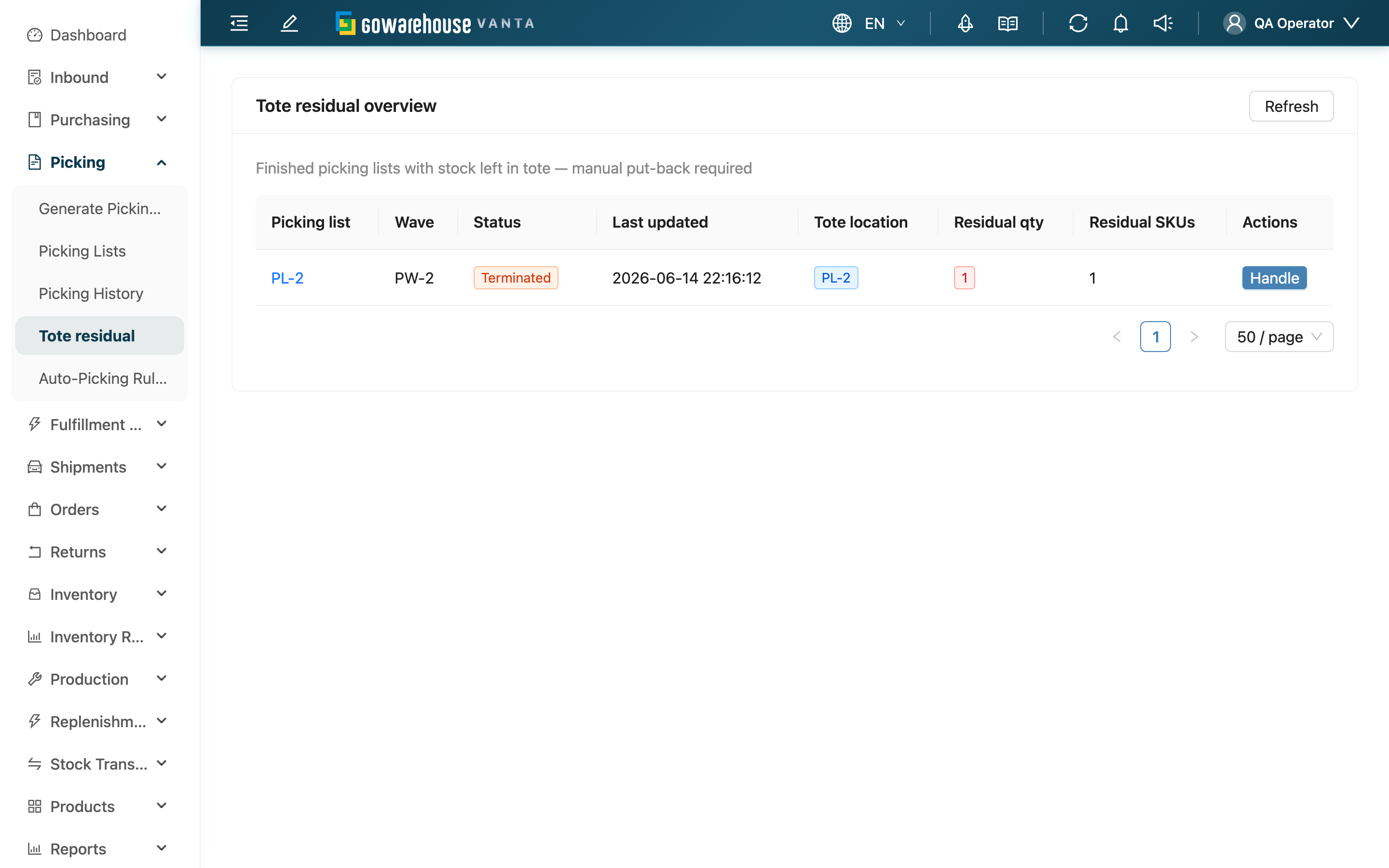
Picking lists that are already done (done or terminated) but still have residual stock in their totes are all gathered here. Stock that was picked into a tote but never shipped and not yet put back gets stuck in the tote; this overview lets you review them all at once and handle each one, without opening every picking list to check. After handling one, use refresh to update the list.
Quick Navigation: List Columns | Handle Now
2.1 List Columns
| Column | Description |
|---|---|
| Picking list | Picking list name; click to open the detail |
| Wave | The picking wave it belongs to |
| Status | Picking list status; only ever Done or Terminated |
| Last updated | Last update time |
| Tote location | Location of the tote |
| Residual qty | Total residual quantity in the tote |
| Residual SKUs | Number of residual item types in the tote |
2.2 Handle Now
Each row has Handle on the right; click it to open that picking list detail. On the detail page you can choose, depending on the situation: move the stock back to the shelves (put back tote), or reopen the picking list to keep picking (reopen). See the detail page for the differences and effects of the two.
3. FAQ
Quick Navigation: FAQ | Important Notes
3.1 FAQ
▪ Why does a tote have residuals?
Stock picked into a tote that has not yet been packed and shipped, when the picking list is already done, stays in the tote. This commonly happens when some fulfillments are temporarily not shipped, the picking list is terminated, or a single tote holds stock for several fulfillments and one of them is cancelled.
▪ How do I clear the residuals?
Click Handle on the row to open the detail, then use put back tote to move the stock back to the shelves, or use reopen to reopen the list.
▪ Why are picking lists still in progress not in this list?
This page only lists picking lists that are "done (done / terminated) but still have residuals". A picking list still in progress having stock in its tote is normal — it is not a residual, so it does not appear here.
▪ What is the difference between residual quantity and residual item types?
Residual quantity is the total amount of all stock in the tote (PCS); residual item types is how many different products (SKUs) there are.
▪ I've already handled it — why is it still showing in the list?
The list does not update automatically in real time. After handling, press refresh and the emptied picking list will disappear from the list.
3.2 Important Notes
⚠️ Important Reminders
- Residual totes mean stock is stuck in the tote: it can neither be used by other orders nor free up the tote, so handle it as soon as possible and don't let it pile up.
💡 Tip: Add clearing residual totes to your end-of-shift routine check to avoid mismatched inventory the next day or running short of totes.
4. Related Features
| Feature | Description | Link |
|---|---|---|
| Picking List Detail | Open a single picking list to handle residuals (put back or reopen) | Go |
| Picking Lists | Return to the list of all picking lists | Go |
| Picking Wave Detail | When you need to pull out an entire fulfillment, return it from the wave | Go |