
Edit Inventory Transformation
Table of Contents
1. Feature Overview
Modify an inventory transformation that has not yet been approved. Only entries in "Pending" status can be edited — once approved and in effect (or rejected), they can no longer be changed. Here you can adjust the number, the note, and add, remove, or modify transformation items, then hand it to someone with permission to approve once it is correct.
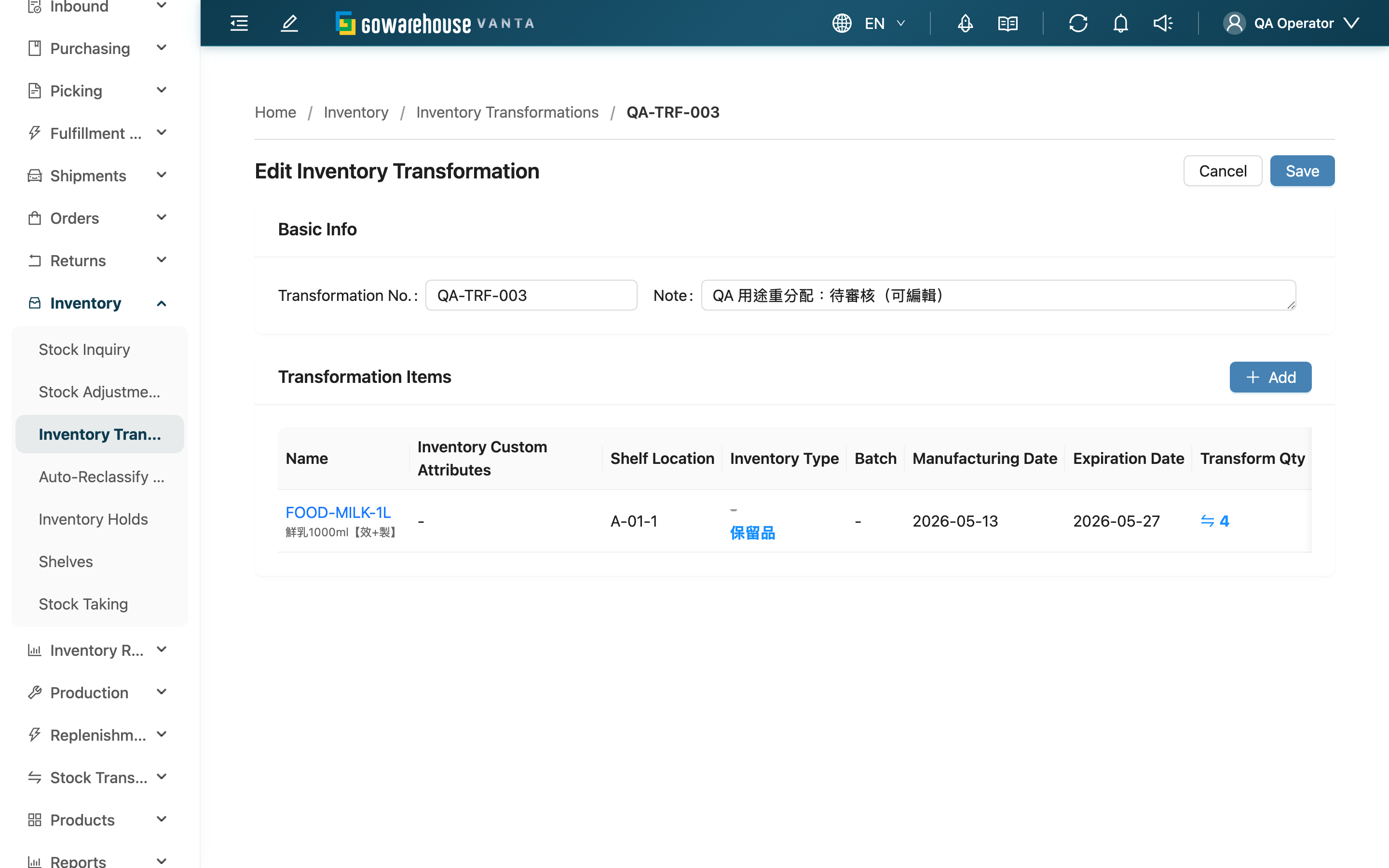
Quick jump: Basic Info | Adjust Transformation Items | Save
1.1 Basic Info
| Field | How to fill | Notes |
|---|---|---|
| Transformation No. | Modify this transformation's number | Cannot be duplicated under the same merchant |
| Note | Modify the note for the whole entry | Optional |
1.2 Adjust Transformation Items
The "Transformation Items" section lists all current items in this entry, each row showing the source-versus-target attribute diff. You can:
- Add an item: Click "Add" in the top right of the section, pick inventory, and set target attributes — the same flow as the New page.
- Remove an item: Click the delete button on that row.
- Edit a note: Type directly in the note field of that row.
After saving you must still keep at least one item, otherwise it cannot be saved.
Saving overwrites the original contents with your current item list as a whole. That is, on save the entry's items are rebuilt from exactly what is on screen rather than diffed row by row — make sure the list is the final version you want before saving.
1.3 Save
Once correct, click "Save". After a successful save you return to the list page. After saving the entry remains in "Pending" status and is not approved automatically and does not affect inventory — it must be approved separately by someone with approval permission before it takes effect.
2. FAQ
2.1 FAQ
▪ Why can't I click "Edit" on some entries?
Editing is only available for entries in "Pending" status. Entries already approved and in effect (Applied, Partially Applied, Failed) or rejected (Rejected) can no longer be edited — these have either already affected inventory or completed their flow.
▪ Does editing affect inventory?
No. Editing only changes what this pending entry "intends to transform"; inventory is only changed after approval. Edit it however you like before approval and inventory is untouched.
▪ Is it a problem if I delete the original items and add new ones?
No. On save the system rebuilds the items from your current on-screen list, so adds and removes are reflected faithfully. Just keep at least one item when saving.
▪ Is inventory transformed once I finish editing?
No. Saving only updates the pending entry; its status is still Pending. Return to the details page for someone with permission to approve it before the system executes the transformation item by item.
2.2 Notes
⚠️ Important Reminders
- Only entries in Pending status can be edited
- Saving overwrites the original items as a whole with the current on-screen list; make sure the list is the final content
- After saving there must be at least one item; the number cannot be duplicated under the same merchant
- Saving does not approve and does not affect inventory
3. Related Features
| Feature | Description | Link |
|---|---|---|
| Inventory Transformation List | View and track all transformations | Go |
| Inventory Transformation Details | Approve, reject, and review each item's execution result | Go |
| New Inventory Transformation | Create a brand-new transformation | Go |