
Value Added Services
目錄
This feature is exclusive to the Pro plan. If your plan does not include value-added services, this item will not appear in the menu. Contact your sales representative to upgrade.
一、使用情境
快速連結:Campaign gift wrapping | Inbound labeling service | Kitting / bundle packing
情境 1:Campaign gift wrapping
狀況:A merchant is launching a gift-box service for the Mother's Day campaign and asks the warehouse to add gift wrapping to selected orders at shipping time. Each wrap is billed to the merchant, so the warehouse needs to register this service and its rate up front, allowing floor staff to apply it directly on orders later instead of retyping the name and amount every time.
用這個功能:Create a service on this page, set the Service Name to "Gift Wrapping", set a Default Price (the suggested charge per wrap), and assign it to this merchant. Once registered, floor staff can pick this service on that merchant's orders and enter the actual quantity to bill.
結果:The merchant's value-added service list now holds "Gift Wrapping" as a fixed service with a standard rate. Billing at shipping is applied directly and consistently, and it reconciles cleanly at month-end settlement.
情境 2:Inbound labeling service
狀況:A merchant's goods arrive without barcode labels on the outer cartons and the warehouse is asked to label each piece at receiving. This is priced per piece — one charge per label applied. The warehouse supervisor wants to fix "Labeling" as a service with a per-unit price so receiving staff can bill straight by quantity when goods arrive.
用這個功能:Create a service on this page named "Product Labeling", set the Default Price to the suggested unit price per label, and assign it to this merchant. Later, apply this service on that merchant's inbound and enter how many labels were applied; the system computes the subtotal as "unit price × quantity".
結果:The labeling work now has a standard unit price, so every batch of arriving goods is billed at the same rate, avoiding ad-hoc verbal pricing or missed charges.
情境 3:Kitting / bundle packing
狀況:A merchant regularly sells a "buy three, pack as one box" bundle, requiring the warehouse to repack three loose items into one package before shipping. This assembly work is a long-running, repeatedly billable service, and the warehouse wants to manage its name and rate centrally so every related order can apply it.
用這個功能:Create a "Bundle Packing" service on this page with a Default Price and assign it to the corresponding merchant. Orders that need assembly then apply this service and enter the number of sets to bill.
結果:The assembly value-added service is maintained in one place. A price change only requires editing this single entry, and every subsequent order sees the latest suggested price when applying it.
二、功能介紹
Value-added services are the extra processing or handling services the warehouse offers a merchant beyond basic storage — such as gift wrapping, product labeling, and bundle assembly — billed to the merchant per occurrence or per piece. This page is the "catalog" for those services: here you register which value-added services each merchant has and their suggested prices, so floor staff can later pick and apply them directly on inbounds or orders and bill by actual quantity. Keeping services and prices maintained centrally here avoids retyping names, verbal pricing, or missed charges at billing time.
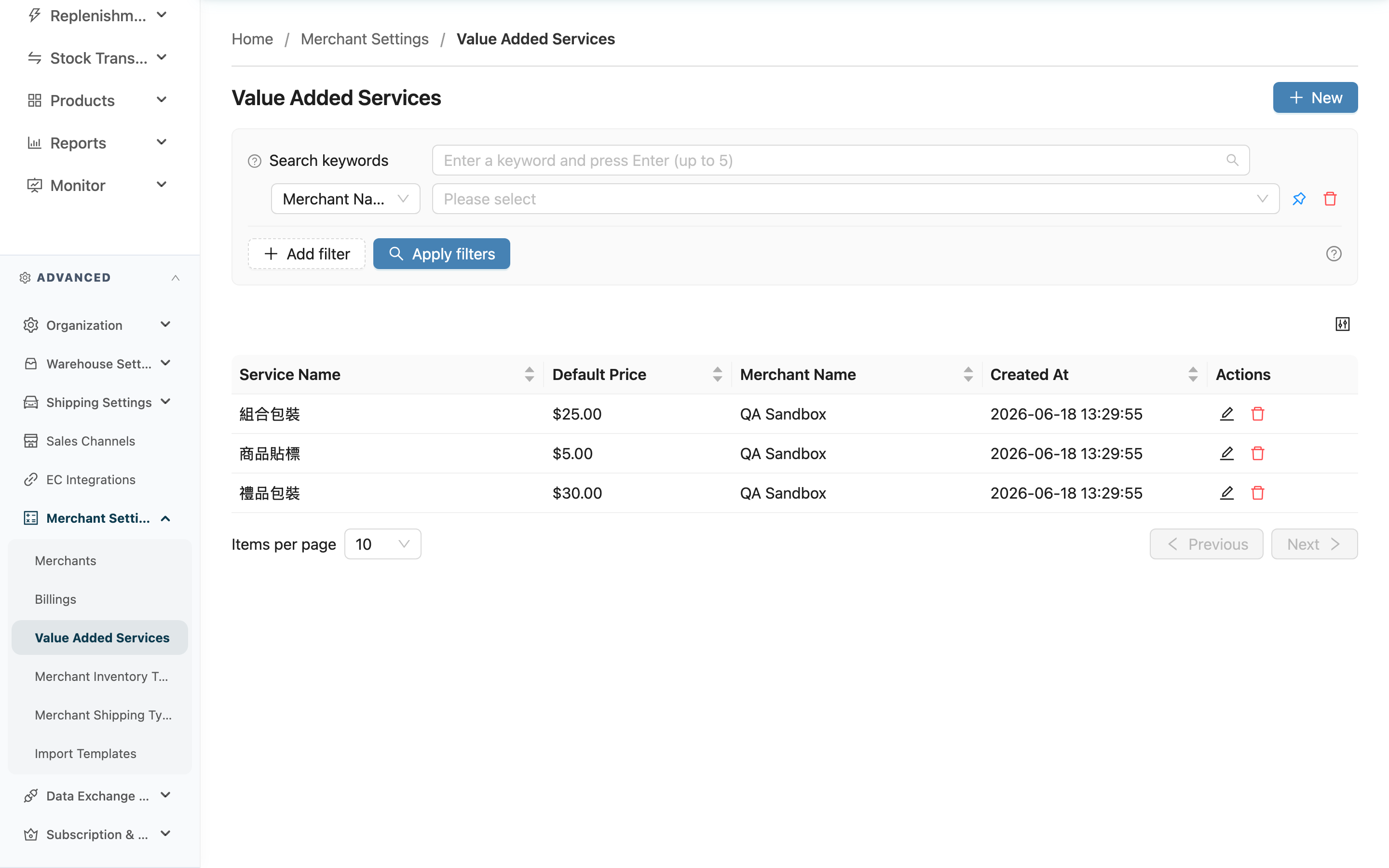
快速跳轉:Search & filter | List columns | Create & edit
2.1 Search & filter
The top of the page offers keyword search and filters to help you find a target quickly when there are many services:
| 條件 | 說明 |
|---|---|
| Keyword search | Enter part of a service name to match any service whose name contains that text |
| Merchant Name | Filter by merchant to see only the value-added services under one merchant (this filter is hidden in single-merchant mode) |
| Service Name | Filter by service name; multiple names can be selected at once |
2.2 List columns
Click a column header to sort by that column.
| 欄位 | 說明 |
|---|---|
| Service Name | The name of this value-added service, e.g. "Gift Wrapping" or "Product Labeling" — the option floor staff see when applying it |
| Default Price | The suggested unit price brought in when applying this service; floor staff can still adjust it on the inbound / order at billing time |
| Merchant Name | The merchant this service belongs to; only that merchant's documents can apply it |
| Created At | When this service was registered |
The rightmost "Actions" column on each row provides Edit and Delete buttons.
2.3 Create & edit
Click "New" at the top right to open the create dialog; click the edit button on any service to open the edit dialog. Both have the same fields:
Fields marked with * are required.
| 欄位名稱 | 如何填寫 | 注意事項 |
|---|---|---|
| *Merchant Name | Select the merchant this service belongs to from the list | Hidden in single-merchant mode; the system fills in your merchant automatically |
| *Service Name | Enter the service name; use a term floor staff understand at a glance, e.g. "Gift Wrapping" or "Product Labeling" | Required |
| *Default Price | Enter the suggested unit price for applying this service | Required, cannot be less than 0, up to two decimal places |
After filling in, click "Save" to save; the list updates immediately.
Deleting a service: Click the delete button in the "Actions" column. Once confirmed, the service is removed from the list and cannot be restored. Deleting only removes this entry from the catalog; records already applied on past inbounds or orders are unaffected and keep their name and amount at the time. After deletion, new documents can no longer pick this service.
三、常見問題
3.1 FAQ
▪ After creating a service here, how do I bill the merchant?
This page only builds the service catalog and suggested prices. Actual billing happens when the service is applied: go to that merchant's inbound or order, pick the service, and enter the actual quantity. The system computes each subtotal as "unit price × quantity", which then rolls up into billing.
▪ After setting the Default Price, can floor staff change it when applying?
Yes. The price set here is a "suggested unit price" that is brought in automatically when applying to an inbound or order, but floor staff can still adjust the actual unit price and quantity for an individual document.
▪ Why do I have to select a merchant when creating?
Each value-added service belongs to one specific merchant, and only that merchant's inbounds / orders can apply it. Selecting the merchant first lets the catalog be managed and priced per merchant.
▪ Why don't I see the merchant field when creating a service?
When your system serves only a single merchant, the service is automatically assigned to that merchant, so the merchant selection field is hidden. You only need to assign it manually when serving multiple merchants.
▪ I can't find the "Value Added Services" menu — what should I do?
Value-added services is a Pro-plan exclusive feature; plans without it will not show this menu. If you confirm your plan includes it but still cannot see it, contact your administrator to check permissions.
▪ If I delete a service, are documents that already applied it affected?
No. Deleting only removes this entry from the catalog; records already applied on past inbounds or orders keep their name and amount at the time. The difference is that after deletion, new documents can no longer pick this service.
3.2 Notices
⚠️ 重要提醒
- Deleting a service cannot be undone. Confirm the service is no longer needed for new documents before deleting.
- The Default Price cannot be less than 0; the price entered is only a suggested value and is not automatically applied to existing documents.
💡 提示:Use a service name that both floor staff and the merchant can understand at a glance, and include the pricing unit in the name (e.g. "Product Labeling (per label)") to make entering quantities more intuitive when applying.
四、相關功能
| 功能 | 說明 | 連結 |
|---|---|---|
| Inbounds | Apply value-added services on inbounds at receiving and bill by quantity | 前往 |
| Orders | Apply value-added services on orders at shipping and bill by quantity | 前往 |
| Billings | Roll up each merchant's value-added service charges and settle billing | 前往 |