
Edit Return Order
Table of Contents
1. Feature Overview
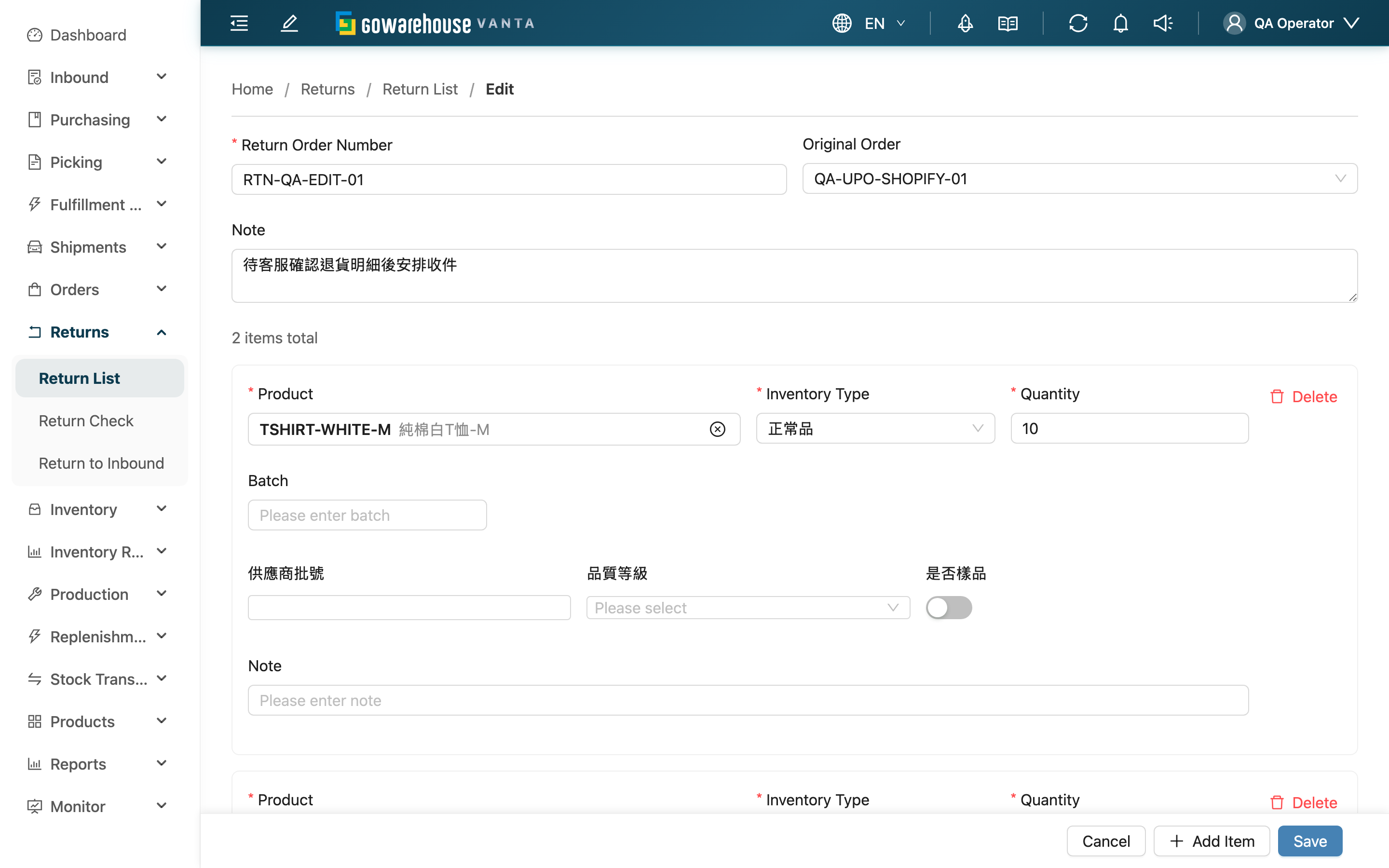
Before the parcel arrives and before verification begins, you can fix anything that was entered incorrectly or left out when the return order was created. You can edit the Return Order Number, the linked Original Order, and the Note, adjust each item's Quantity, Inventory Type, and inventory attributes, and add or remove items. The return order is the baseline used to verify the parcel on arrival, so it locks once verification starts — make your corrections while it is still in this state.
Quick Jump: Editing Prerequisites | Editable Fields | Steps
1.1 Editing Prerequisites
Only a return order in the "Pending" status can be edited. The "Edit" button appears on the return order detail page only in this status; once verification begins (the status becomes "Partial Received", "Received", "Done", or "Canceled"), the button disappears and this page can no longer be opened.
📌 Note: Verification uses the return order as its checking baseline, so the whole order locks together to prevent the baseline from changing midway through a count. To correct things after verification, you change the verification result (the receipt), not the return order itself — go back to the return order detail page and handle the matching receipt, see 2.1 FAQ.
1.2 Editable Fields
While in the "Pending" status, all of the fields below can be changed. The difference from New Return Order is that on the edit page the 貨主 is fixed to the order's original 貨主 and cannot be switched, and there are no "Suggest Name" or "Save and Add Another" buttons (those appear only when creating).
▸ Basic Information
| Field | How to Fill | Notes |
|---|---|---|
| Return Order Number | Edit the number directly | Cannot duplicate another return order under the same 貨主; submission fails if it duplicates |
| Original Order | Search and select the original order, or clear the link | Re-selecting an order overwrites the existing item list with that order's contents; clearing the link resets the list to a single blank item that must be re-entered |
| Note | Record the reason for the change or return notes | — |
▸ Item Details
Fields marked with * are required.
| Field | How to Fill | Notes |
|---|---|---|
| *Product | Click the clear button next to the product, then search again by name, SKU, or barcode | Only products already on file under the current 貨主 can be selected |
| *Inventory Type | Choose by product condition (e.g. good, defective) | Affects how the item is classified once verified and put away |
| *Quantity | Enter the expected return quantity | Minimum 1 unit; the actual stored quantity depends on the verification result |
| Expiration Date | Optional | Shown only for products under expiration management |
| Manufacturing Date | Optional | Shown only for products under expiration management or that require a manufacturing date |
| Batch | Optional, record the batch number of the returned item | — |
| Inventory Custom Attributes | Optional | Shown only when the 貨主 has configured inventory custom attributes |
| Note | Optional, record any special notes for the item | — |
1.3 Steps
▸ Open the Edit Page
- Open the Return Order Detail page for the order
- Confirm the status is "Pending"
- Click the "Edit" button in the top-right corner
▸ Modify Item Information
- Find the item you want to change
- Adjust the Quantity, Inventory Type, or other content directly in the fields
- Click "Save" to finish
▸ Add an Item
- Click the "Add Item" button
- Search and select the product, then fill in the Inventory Type and Quantity
- Click "Save"
▸ Remove an Item
- Find the item you want to remove
- Click the delete button on that item
- Click "Save"
⚠️ A return order must keep at least one item, otherwise it cannot be saved.
After editing and saving, the page shows a success message and returns to the return order detail page, where you can confirm the result.
2. FAQ
2.1 FAQ
▪ Why is there no "Edit" button on the return order detail page?
The edit button appears only in the "Pending" status. Once verification begins and the status leaves "Pending", the content locks and the button no longer appears. See 1.1 Editing Prerequisites.
▪ Verification has already started and I found the return order needs a change — what do I do?
The return order itself is locked and cannot be edited, but the verification result can be corrected: go back to the Return Order Detail page, click "Continue Verification" on the receipt to keep correcting, or click "Void Receipt" to void it and verify again.
▪ Can I change the return order number?
Yes. In the "Pending" status you can change the Return Order Number, but it cannot duplicate another return order under the same 貨主; an error appears on submission if it duplicates.
▪ Can I change or clear the linked order?
Yes. Re-selecting an order overwrites the existing item list with the new order's contents; clearing the link resets the item list to a single blank item that you must fill in again.
▪ Can I change a product?
Yes. Click the clear button next to the product to search again, or remove the item and use "Add Item" to add the correct one. Only products already on file under the current 貨主 can be selected.
▪ Does editing a return order affect inventory?
No. The return order records what is expected to be returned, and inventory updates only after verification is completed and converted to inbound. The editable "Pending" status has no verification records yet, so editing does not touch inventory.
▪ Can I delete all the items?
No. A return order must keep at least one item, and it cannot be saved if the count drops to zero. If the entire return does not need handling, follow your company's process for that return order instead of clearing out all items.
2.2 Notices
⚠️ Important Reminders
- Only the "Pending" status can be edited; once verification starts the content locks and cannot be reverted to an editable state
- Re-selecting the Original Order overwrites the existing item list, and clearing the link empties it — confirm before doing so
- The Return Order Number cannot duplicate another return order under the same 貨主
- A return order must keep at least one item to be saved
💡 Tip: Note the reason in the Note when editing, so it is easy to trace later why this return order was adjusted.
3. Related Features
| Feature | Description | Link |
|---|---|---|
| Return Order Detail | View full return order information and verification results, and enter edit mode | Go |
| Return List | View and manage all return orders | Go |
| New Return Order | Create a new return order | Go |
| Return Verification | Scan and check returned items after the parcel arrives | Go |