
Shipped Serial Numbers
Table of Contents
1. Use Cases
Quick Links: Trace who a unit shipped to | Recall a defective batch | Audit serial-controlled high-value shipments
Scenario 1: Trace Which Order a Serial Number Shipped With
Situation: A customer reports a quality issue or requests warranty service using the serial number on the unit in hand, and the warehouse needs to confirm whether it shipped from here and which order it went out with.
Use this feature: Every serial-controlled product has its serial number registered at shipping, and they are all collected here. Search by the serial number the customer gave you to find the matching order and product. See Search & Filters.
Result: You see which order and product the serial number shipped with; click the order to verify recipient details, confirm it shipped from this warehouse, and start the warranty or return process.
Scenario 2: Recall a Defective Batch
Situation: A supplier or brand owner reports that a batch of a product is defective, and you need to find every serial number of that product that has already shipped so you can contact each customer for recall.
Use this feature: Search by product SKU or product name to list all shipped serial numbers of that product, then sort by shipping time to isolate the ones that shipped within the problem window. See Search & Filters.
Result: You get a list of that product's shipped serial numbers, each linked to an order, to drive the unit-by-unit recall.
Scenario 3: Audit Serial-Controlled High-Value Shipments
Situation: For unit-tracked goods such as phones, appliances, or warranty-card-bound items, a supervisor wants to spot-check exactly which serial numbers were registered on a given order to confirm records match reality with nothing missed or mis-entered.
Use this feature: Search by order number to list all serial numbers registered for that order, then check each one against the actual product and serial shipped. See Search & Filters.
Result: You see every serial number registered for that order with its matching product, as a record of the unit-level shipping audit.
2. Features
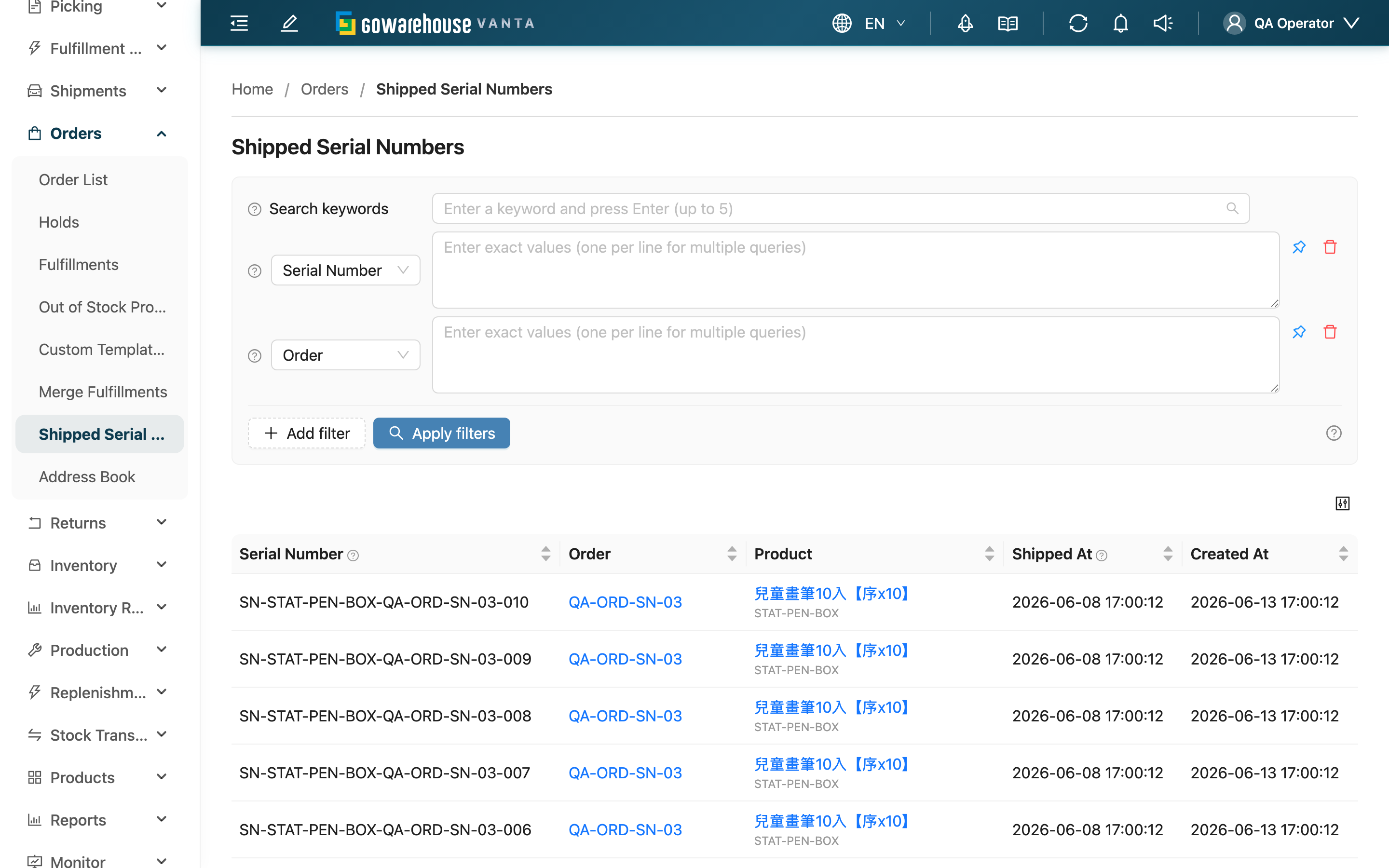
Every serial-controlled product gets its own serial number registered at shipping, and this page collects all the ones that have shipped so you can trace who any unit went to. When a customer brings a serial number for a complaint or warranty, or a brand owner orders a batch recall, you can look up the shipping record by serial number, order, or product, and trace each unit individually. This page is read-only; serial numbers are registered during shipping QC.
Quick Jump: Search & Filters | List Columns | Export Serial Number Records
2.1 Search & Filters
The search box at the top matches both "Serial Number" and "Order" with a fuzzy match; the filters below match exactly.
All filters below support multiple entries — enter one value per line to query several items at once.
| Filter | When to use |
|---|---|
| Serial Number | A customer gives one or more serial numbers; trace which order each shipped with |
| Order | Check which serial numbers were registered when an order shipped |
| SKU | Pin down a product and list all shipped serial numbers of that SKU (common for defect recalls) |
| Name | Same purpose as SKU, searched by product name |
| Sales Channel | Look at serial numbers shipped through one sales channel only, e.g. a single-marketplace recall |
| Shipped At | Isolate a shipping period, e.g. the window a problem batch went out in |
2.2 List Columns
Click the header of a column marked "Sortable" to toggle the sort direction.
| Column | Description | Sortable |
|---|---|---|
| Serial Number | The unit's own identifier — what you trace by | Yes |
| Order | The order this serial number shipped with; click to open order details | Yes |
| Product | The matching product name and SKU; click to open product details | Yes |
| Sales Channel | Which sales channel the order came from, used to tell marketplaces apart | No |
| Shipped At | The order's shipping time, used to isolate the problem window during recalls | Yes |
| Created At | When this serial number was registered in the system | Yes |
2.3 Export Serial Number Records
"Export" at the top right turns every serial number under your current filters into an Excel file — not just the current page, and with nothing to tick row by row. After submitting, check progress under "Background Jobs" and download it when it finishes.
The file has a single worksheet, one row per serial number, with the same columns as List Columns (Serial Number, Order, Name, SKU, Sales Channel, Shipped At, Created At) — ready for warranty lookups, recall lists, or reconciliation.
What lands in the file is decided entirely by the search and filters you have applied: narrow by product, channel, or shipping time first, then export, and you get exactly that range. The file likewise only contains merchants you may access and data belonging to your warehouse; if you have picked a specific merchant in the page header, both the list and the export cover only that merchant.
Two situations produce no file, and the system tells you on the spot rather than handing you something that looks complete: nothing matches your filters, and more than 50,000 records match (narrow the conditions and export again). If the export button is disabled, contact your administrator to confirm your export permission.
3. FAQ
3.1 FAQ
▪ When are these serial numbers registered?
During shipping QC. For serial-controlled products, QC staff enter or scan the serial number while scanning the product, and it appears in this record once the order ships. See Shipping QC for how registration works.
▪ Why are some serial numbers not found here?
This page only collects serial numbers that have shipped with an order. A serial number is usually missing because its order hasn't finished shipping QC, it was mistyped (check characters and case), or the product doesn't require serial control. Serial numbers still in the warehouse and not yet shipped won't appear here.
▪ Why don't serial numbers from transfers or relocations show up?
This record only tracks serial numbers shipped to customer orders, not serial changes from internal warehouse transfers or other internal operations, so every entry here corresponds to a customer order.
▪ Can I edit or delete a registered serial number here?
No. This page is read-only. Serial number records of shipped orders cannot be edited or deleted here; if a registration is wrong and needs correcting, contact your administrator.
▪ Why does one order with the same product have several serial numbers?
Because serial numbers are registered per unit. Every physical unit has its own serial number — even when several units of the same product are bought on the same order, each unit gets its own distinct serial number.
▪ What's the difference between "Shipped At" and "Created At" on a record?
"Shipped At" is the shipping time of the order this serial number belongs to; "Created At" is when the serial number was registered in the system. When tracing a problem batch, sorting by "Shipped At" stays closer to the actual shipping order.
▪ How do I find serial numbers shipped within a time range?
Use the "Shipped At" filter to pick a date range; both the start and end dates are covered in full. To take that period away for checking, export it once the filter is set.
3.2 Notices
⚠️ Important
- This page is read-only — you cannot register, edit, or delete serial numbers here; registration happens during shipping QC
- You only see shipped serial numbers for your current warehouse and for merchants you have access to; exports cover exactly the same scope
- Exporting needs a separate export permission; with read access only, the button appears disabled
💡 Tip: A serial number is the only handle for tracing a unit, so enter it correctly at registration; for complaints or recalls, searching by the customer's serial number directly is fastest.
4. Related Features
| Feature | Description | Link |
|---|---|---|
| Shipping QC | Where serial numbers are registered | Go |
| Order Detail | View full order information and recipient | Go |
| Product Detail | Check whether a product requires serial control | Go |