
Shelf Types
目錄
一、功能介紹
The shelf type detail page lets you review the full information of a single shelf type and edit its name and code, or delete the type when it is no longer needed. When the type is still used by shelves or merchant billing settings, deletion guides you to migrate the related shelves to a replacement type you specify, ensuring no shelf is left without a type.
快速跳轉:Detail fields | Edit a type | Delete a type
1.1 Detail fields
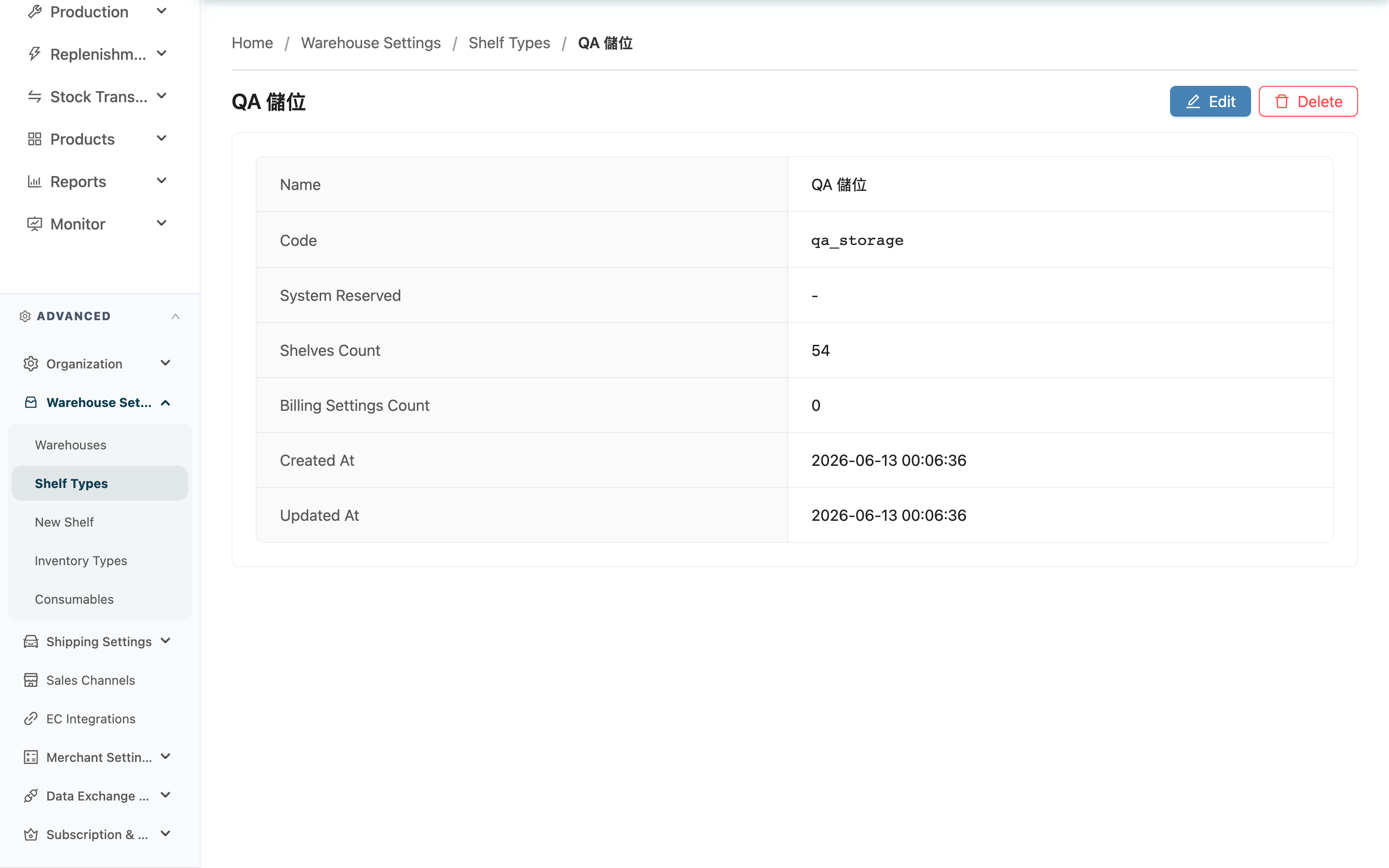
After opening the detail page, the type's information is shown in a list:
| 欄位名稱 | 說明 |
|---|---|
| Name | The type's display name |
| Code | The type code; shows "-" when not filled in |
| System Reserved | Whether this is a system-created reserved type; if so, this badge is shown |
| Description | Shown only for system-reserved types, describing this type's purpose in the warehouse flow |
| Shelves Count | How many shelves currently belong to this type |
| Billing Settings Count | How many merchant billing settings currently reference this type |
| Created At | When this type was created |
| Updated At | When this type was last updated |
1.2 Edit a type
Click "Edit" to enter edit mode, modify the fields below, and click "Save" to save.
Fields marked with * are required
| 欄位名稱 | 如何填寫 | 注意事項 |
|---|---|---|
| *Name | Enter an easy-to-recognize type name | Required |
| Code | Modify the type code; must be unique within your organization | The code of a system-reserved type cannot be modified; this field is locked when editing |
After a successful save, the page shows a success message and returns to view mode.
1.3 Delete a type
Click "Delete" to delete the type. System-reserved types do not offer a delete button. Deletion takes one of two paths depending on whether the type is in use:
- Not in use: If no shelf belongs to it and no merchant billing setting references it, a confirmation dialog appears; after confirming, it is deleted directly, removed from the list, and cannot be recovered.
- Still in use: If shelves or billing settings reference this type, the "Migrate and Delete Shelf Type" dialog opens instead, asking you to first choose a Replacement Shelf Type. After you confirm, the system migrates all shelves belonging to this type to the replacement type, removes the original type's merchant billing settings, and finally deletes this type. After migration, the related shelves adopt the replacement type's billing rules.
The replacement type cannot be the type currently being deleted. You cannot submit without choosing a replacement type.
二、常見問題
2.1 FAQ
▪ Why do some types have no "Delete" button?
System-reserved types (staging area, virtual warehouse stock pool, picking tote) cannot be deleted, so no delete button is shown. These types are required for warehouse inspection, virtual warehouse, and picking flows to operate.
▪ Why is the type code field locked when editing?
Because this is a system-reserved type. The name of a system-reserved type can be modified, but its type code is fixed and cannot be changed. The code of a regular custom type can be edited normally.
▪ When I delete a type in use, do the original shelves disappear?
No. The system migrates all shelves belonging to this type to the replacement type you specify. The shelves themselves still exist; they are simply reassigned to the new type.
▪ After migration, do the original merchant billing settings remain?
No. When a type is deleted, its original merchant billing settings are removed. The migrated shelves then adopt the replacement type's billing rules, so before deleting, confirm that the replacement type's billing settings meet your expectations.
▪ Why are some options missing from the replacement type list?
The replacement type list excludes the type currently being deleted; all other types in your organization can be selected. If the list is empty, there is currently no other type to migrate to — add one first on the Shelf type list.
▪ Can deletion be undone?
No. Once a type is deleted, it is removed from the list and cannot be recovered; if it was a migration deletion, the original type's billing settings are also removed and likewise cannot be recovered.
2.2 注意事項
⚠️ 重要提醒
- When deleting a type in use, the original type's merchant billing settings are removed and cannot be recovered; the migrated shelves switch to the replacement type's billing rules, so confirm the replacement type meets your expectations before deleting.
- System-reserved types cannot be deleted, and their type codes cannot be modified.
💡 提示:Before deleting, check the detail page's Shelves Count and Billing Settings Count. When both are 0, deletion is simplest and does not require specifying a replacement type.
三、相關功能
| 功能 | 說明 | 連結 |
|---|---|---|
| Shelf type list | View all types and add custom types | 前往 |
| Shelves | View and manage all shelves in the warehouse | 前往 |
| Batch create shelves | Create multiple shelves at once and assign their shelf type | 前往 |