
Inventory Hold Detail
Table of Contents
1. Features
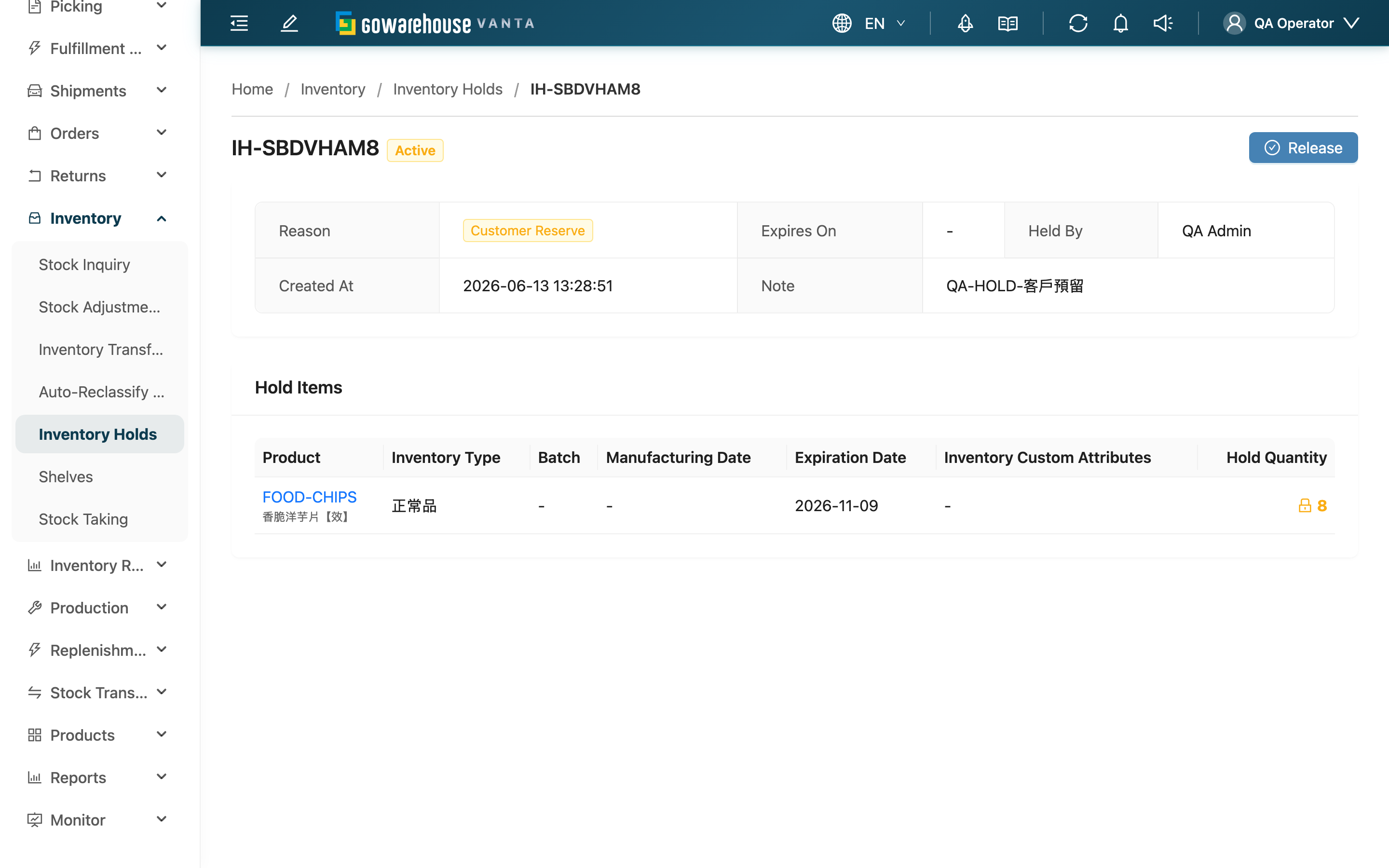
View the full content of a single inventory hold and release it here. The title at the top of the page shows, via a tag, whether this hold is currently "Active" or "Released".
Jump to: Hold Info | Hold Items | Release
1.1 Hold Info
The info card at the top shows this hold's basic data:
| Field | Description |
|---|---|
| Reason | Hold reason |
| Expires On | Expiry date; auto-released on that day by the system; shows "-" if unset |
| Held By | The person who created this hold |
| Created At | Created time |
| Note | The note entered at creation |
When the hold is released, it additionally shows "Released At", "Released By", and "Release Note".
1.2 Hold Items
The "Hold Items" table lists each stock item locked by this hold:
| Column | Description |
|---|---|
| Product | Product SKU and name; click to open the product detail |
| Inventory Type | The inventory type of this stock (e.g. good, defective) |
| Batch | Batch |
| Manufacturing Date | Manufacturing date |
| Expiration Date | Expiration date |
| Inventory Custom Attributes | The custom attributes of this stock |
| Hold Quantity | The quantity locked for this item |
1.3 Release
When the hold is "Active", a "Release" button appears in the top right.
Prerequisite: Only active holds can be released; released holds no longer show this button.
How to do it: Click "Release", then you may fill in a "Release Note" (optional) and confirm.
Side effects & reversibility: After release, the locked quantity of all stock on this hold is returned, and the stock immediately goes back to available and can be allocated to new orders. Release cannot be undone — once the hold becomes "Released", it can't be reactivated; if you still need to hold the stock, create a new hold.
2. FAQ
2.1 FAQ
▪ Can I still see this hold after it's released?
Yes. After release, the hold becomes "Released", stays in the system for lookup, and shows the release time, who released it, and the release note. To see it in the list, switch the "Status" filter to "Released".
▪ Can I undo a release?
No. Release cannot be undone and can't be reactivated. If you still need to hold the stock, create a new hold.
▪ Can I release just one of the stock items?
No. Release applies to the whole hold and returns all stock on it to available at once. To hold only part of it, release the whole hold and create a new hold containing only the items you need to keep.
▪ Can I edit the hold content on the detail page?
No. A hold can't be edited once created. To adjust the quantity or items, release it first and recreate.
▪ I can't see the "Release" button?
Either the hold is already released (only active holds have a release button), or you don't have release permission. If it's the latter, contact your administrator to confirm your permissions.
2.2 Notices
⚠️ Important
- Release returns all stock on the hold at once; you can't release just part of it
- Release cannot be undone; once released, it can't be reactivated
- A hold can't be edited; to change its content you must release and recreate
3. Related Features
| Feature | Description | Link |
|---|---|---|
| Inventory Holds | View and manage all holds | Go |
| New Inventory Hold | Create a new hold | Go |
| Stock Inquiry | View a product's available and held quantities | Go |