
Flexible Product Details
Table of Contents
1. Features
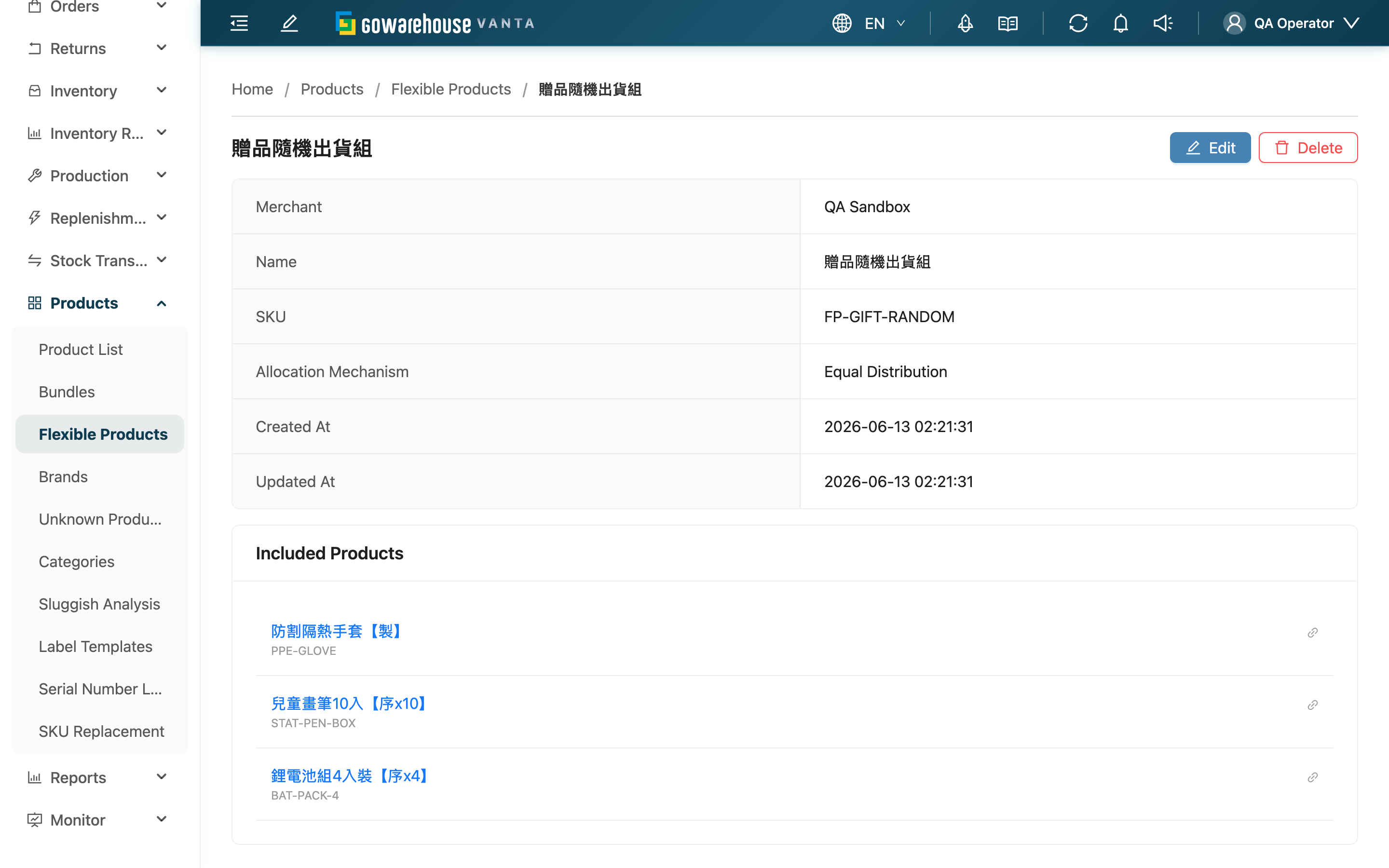
This shows the complete settings of a single flexible product: owning merchant, name, SKU, allocation mechanism, and which candidate real products are attached. Here you can confirm the settings are correct and go on to edit or delete.
Quick Jump: Basic Info | Included Products | Edit & Delete
1.1 Basic Info
| Field | Description |
|---|---|
| Merchant | The merchant this flexible product belongs to; cannot be changed after creation |
| Name | The flexible product's external display name |
| SKU | The flexible product's SKU; orders match this flexible product by this SKU |
| Allocation Mechanism | The rule the system uses to pick from candidates (equal distribution / most stock first / least stock first) |
| Created At | When this flexible product was created |
| Updated At | When it was last modified |
1.2 Included Products
Below are this flexible product's candidate real products (name and SKU) — these are what the system picks one of per the allocation mechanism when an order matches this flexible product. Click a product to go to its product detail. If "no included products" is shown, the candidate list is empty; add at least one as soon as possible.
1.3 Edit & Delete
The Edit button in the top-right opens the edit page to modify name, SKU, allocation mechanism, and candidate list (merchant excluded). Delete prompts for confirmation first, then removes this flexible product from the list; deletion only removes the flexible-product layer, leaving the real products and their stock unaffected.
2. FAQ
2.1 FAQ
▪ Are the candidate products shown here exactly what gets shipped?
The candidates are a list of what "might" ship. Which ones actually ship, and how many, is decided at order creation per the allocation mechanism and each candidate's stock at that time — it won't always be the same.
▪ If I change the settings here, will already-created orders change too?
No. A flexible product is already converted into real product line items and written into the order at order creation; later changes to the candidate list or mechanism only affect new orders, not already-created ones.
▪ What does "no included products" mean?
It means the candidate list is empty. In that case, order line items matching this SKU cannot be converted into a real product and are treated as an unmatched product. Go to the edit page and add at least one candidate.
▪ Does deleting this flexible product delete the underlying real products?
No. Deletion only removes the link between the flexible product and its candidates; the real products and their stock are unaffected. Once removed from the list, it cannot be restored.
▪ Can I change the merchant on this page?
No. The merchant is fixed at creation and cannot be changed on the edit page either. To change it, you must delete and recreate.
2.2 Notes
⚠️ Important
- Once deleted, the data is removed from the list and cannot be restored.
- Changing settings here does not affect already-created orders; it only takes effect for new orders.
💡 Tip: Before listing to a channel, verify on this page that the SKU matches the channel's external SKU and the candidate list is complete, to avoid orders not matching or allocation failing.
3. Related Features
| Feature | Description | Link |
|---|---|---|
| Edit Flexible Product | Modify name, SKU, allocation mechanism, and candidate list | Go |
| Flexible Product List | Return to the list to view all flexible products | Go |
| Product List | View or create candidate real products | Go |