
Vanta Connect Integrations
Contents
1. Use Cases
Quick links: Connect an in-house system to one warehouse | Let a cross-warehouse system read data | The integration vendor changed or credentials leaked | An external system needs shipments and stock changes in real time
Case 1: A custom-built picking system needs to connect to one of your warehouses
Situation: Warehouse A adopted a picking system built by an outside vendor. It needs an account so it can fetch picking lists and report picking results. You do not want this system to see data from other warehouses.
Use this feature: Create an integration for the system, bind it to Warehouse A, tick only the picking-list scopes, and hand the Client ID and Access Token to the vendor. Point them to the API Docs of these credentials for the specification.
Result: The other side only sees Warehouse A's picking lists and can only do what you ticked. When you need to revoke it later, you touch only this one integration and no other integration is affected.
Case 2: A cross-warehouse middleware system needs orders and stock from several warehouses
Situation: Your organization runs its own middleware that reads orders and merchant stock from every warehouse and consolidates them for internal reports or order routing.
Use this feature: When creating the integration, leave the bound warehouse empty so it can reach every warehouse in the organization. Tick only the scopes it needs to read, and enter the middleware server's fixed IP in the IP whitelist.
Result: The middleware reads data from all warehouses with one set of credentials, and only connections from the server you specified are accepted.
Case 3: The integration vendor changed or the credentials may have leaked
Situation: You switched integration vendors, or you found the Access Token pasted somewhere it should not be. These credentials can read and write warehouse data, so it has to be handled right away.
Use this feature: For a system that stays in use, open View Credentials and regenerate the token. To pause the partnership, disable the integration. If the system is gone for good, delete it. The differences are explained in the FAQ.
Result: The old credentials stop working immediately, and whoever holds them can no longer reach warehouse data.
Case 4: An external system needs to know right away which orders shipped and what stock changed
Situation: Your organization's ERP has to update its own records as soon as an order ships or is cancelled, or stock levels change. Polling on a timer is slow and wasteful, so you want the warehouse system to notify it.
Use this feature: Set up a webhook subscription on the integration the ERP uses: enter the ERP's receiving URL, pick the events, and give the signing secret to the ERP side so it can verify where requests come from.
Result: After an event happens, the warehouse system pushes a notification to the ERP, so the ERP no longer has to poll. If the integration is bound to a warehouse, only that warehouse's events are sent.
2. Features
Vanta Connect Integrations is where external systems (ERPs, WMS middleware, programs you build yourself) connect to the warehouse system through the organization-level Vanta Connect API. Each integration is a separate set of credentials: it is bound to one API version when created, and you decide which warehouse it can reach, what it may do, and which source IPs it accepts. Once the other side configures it, they can fetch picking lists, create orders, and query stock according to the API docs for that version. Create one per system, so a problem only ever involves that one.
Quick jump: Integration list | Creating and managing | Integration settings | View credentials and regenerate the token | Webhook subscription
2.1 Integration list
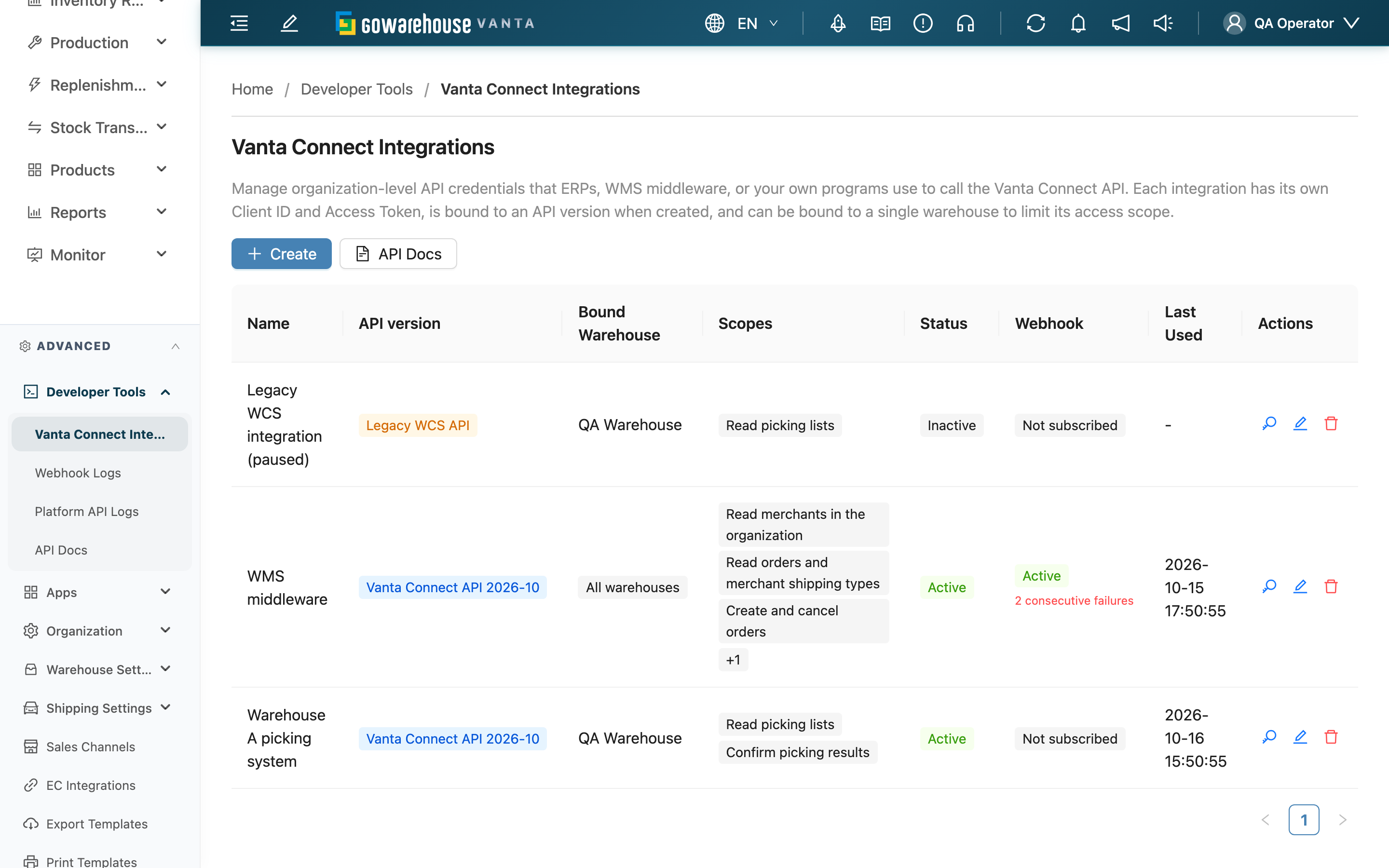
Open it from "Developer Tools" → "Vanta Connect Integrations". The list only shows integrations created manually on this page.
| Column | Description |
|---|---|
| API version | The API these credentials can call. A blue dated tag such as "Vanta Connect API 2026-10" marks credentials created on this page; an orange "Legacy WCS API" tag marks credentials created back in the WCS API days, which can only call the old API; see the FAQ |
| Bound Warehouse | The warehouse these credentials are limited to. An "All warehouses" tag means it is not bound and can reach every warehouse in the organization |
| Scopes | What these credentials are allowed to do. Only the first 3 are listed and "+number" shows how many more there are; hovering over "+number" lists the rest, so people with view-only access can see the full scope too. See Integration settings |
| Status | Every call made with inactive credentials is rejected |
| Webhook | The status of this integration's webhook subscription, based on whether anything is actually sent: "Active", "Inactive", or "Not subscribed". Nothing is sent while the integration itself is inactive, so even a switched-on subscription shows "Inactive" with the note "The integration is inactive, so nothing is delivered". When the integration lacks a scope a subscribed event needs, it shows "Some events not delivered" and lists the missing scopes. When deliveries keep failing, an extra line shows the failure count |
| Last Used | The last time the other side connected successfully; "-" means it has never connected. Calls rejected at the connection checks do not update it, for example when the integration is inactive, the source IP is not on the whitelist, or the path does not match the credential's API version. It updates at most once every 5 minutes per integration, so it can be up to 5 minutes earlier than the actual last call |
2.2 Creating and managing
| Action | Preconditions and side effects |
|---|---|
| Create | Choose the API version, fill in the integration settings, and confirm. To receive event notifications, set up the webhook subscription in the lower part of the same dialog. An "Integration Created" dialog then shows the API version, a link to that version's API docs, the Client ID, and the Access Token, which you can copy and hand over; you can still see them later under View Credentials. New integrations are active by default |
| View Credentials | Click the key icon in the Actions column to see the Client ID and Access Token and to regenerate the token; see View credentials and regenerate the token |
| Edit | Click the pencil icon to change every setting except the API version, and the status. Once you switch the status off, the next call from the other side is rejected; switching it back on restores access with the same token, with no change needed on the other side |
| Delete | Click the trash icon and confirm. The other side loses access immediately and this cannot be undone. To connect again you must create a new integration, with a different Client ID and token. If it has a webhook subscription, the subscription stops sending too; past deliveries can still be found under "Developer Tools" → "Webhook Logs" |
| API Docs | Opens the Vanta Connect API docs in a new tab: the specification the other side's engineer follows to connect. The sidebar entry "Developer Tools" → "API Docs" opens the same docs. The docs for each credential's own version open from the credentials dialog |
Creating, editing, deleting, regenerating tokens, and reactivating or testing the webhook subscription require Vanta Connect API integration management permission. For staff with view permission only, those buttons are locked, but they can still view credentials, subscription status, and the signing secret.
2.3 Integration settings
Fields marked * are required
| Field | How to fill it in | Notes |
|---|---|---|
| *Name | Name it by the system's purpose, such as "ERP order sync" | With one integration per system, the name tells you which one to act on |
| Description | Add the integration vendor, contact person, or go-live date | Optional |
| *API version | Choose the Vanta Connect API version the other side integrates with; the latest version is the default, and the text below the field explains which path it can call | Can only be chosen when creating and cannot be changed afterwards; if the other side needs another version, create a new integration. Editing shows only the version tag. Credentials for the legacy WCS API can no longer be created |
| Bound Warehouse | Choose the warehouse these credentials can reach; leave it empty for all warehouses | Once bound, picking lists, orders, and stock are limited to that warehouse and the warehouse list returns only that warehouse; orders, inbound receipts, and return orders can only be created there, and naming another warehouse is rejected. Merchants, products, e-commerce accounts, sales channels, and inventory types are not limited by the bound warehouse. Only your organization's warehouses can be chosen |
| *Scopes | Tick what the other side needs; a picking system, for example, only needs "Read picking lists" and "Confirm picking results" | Tick at least one. Calls for anything not ticked are rejected |
| IP Whitelist | One IP address or range per line, such as "192.168.1.100" or "10.0.0.0/24"; commas also work as separators | Optional. Empty means any source can connect; once filled in, only listed sources can connect. Invalid entries are listed below the field and must be fixed before saving |
| Status | Switch the integration on or off | Only shown when editing |
2.4 View credentials and regenerate the token
Clicking the key icon in the Actions column opens the credentials dialog:
- API version: the credentials' version tag and description. The "API Docs" button next to it opens the docs for that version: the Vanta Connect API docs of that release for a dated version, or the legacy WCS API docs for "Legacy WCS API".
- Client ID: the integration's identifier, ready to copy.
- Access Token: masked by default. Click the eye icon to reveal it and the copy icon to copy it.
- Regenerate Token: after you confirm, a new token is issued and the old token stops working immediately, with no overlap period; the Client ID stays the same. The new token is shown in the dialog right away, so update it on the other side's system.
The "Webhook subscription" block at the bottom of the dialog shows this integration's subscription status and actions; see Webhook subscription.
2.5 Webhook subscription
Each integration can have one webhook subscription: when an event happens, the warehouse system sends the event content by HTTP POST to the URL you specify, so the other side does not have to poll. Set it up in the "Webhook subscription" block at the bottom of the create or edit dialog:
| Field | How to fill it in | Notes |
|---|---|---|
| URL | The URL where the other side receives notifications, for example https://erp.example.com/hooks | Leaving it empty with no events selected means no subscription. Once a subscription exists the URL cannot be cleared; to pause it, switch off "Subscription active" |
| Webhook version | Choose the event content format the other side's program supports; the latest version is the default | Changing it only affects new events. This is the format version of the notifications and is unrelated to the credentials' "API version"; each is set on its own |
| Subscribed Events | Select the events to receive, at least one | Only the three events below are available, and the integration must have the matching scope. If it is missing, saving is rejected and the missing scopes are listed. Removing a scope from an integration that is already subscribed can still be saved, but a message lists the missing scopes, and events that need them are no longer sent; the list's subscription column lists the missing scopes too |
| Subscription active | Switch the subscription on or off | Only shown when editing an integration that already has a subscription. When off, nothing is sent; the credentials themselves are unaffected |
| Event | When it is sent | Scope the integration needs |
|---|---|---|
Inventory Updated (inventory.updated) | Any merchant's stock quantity changes. Several changes to the same product in the same warehouse within a short time are merged into one notification carrying the latest quantity at send time | Read merchant inventory levels |
Order Shipped (order.shipped) | Any merchant's order ships | Read orders and merchant shipping types |
Order Cancelled (order.cancelled) | Any merchant's order is cancelled | Read orders and merchant shipping types |
What gets sent follows the integration: an integration bound to a warehouse only receives that warehouse's events, while an unbound one receives events from every warehouse in the organization. Nothing is sent while the integration is inactive. After the integration is rebound to another warehouse, events from the old warehouse that were queued before the change and not yet sent (including those waiting to retry) are not sent; in the webhook log they show as failed, with a response noting they are not authorized. Every notification states which merchant the event belongs to.
Verifying where requests come from: Click the key icon to open the credentials dialog. In the "Webhook subscription" block, "Signing Secret" is masked by default and can be revealed and copied. Every request carries X-GW-Timestamp and X-GW-Signature headers. The signature is the HMAC-SHA256 of "the X-GW-Timestamp value + . + the raw body" computed with this secret (the header value is sha256= followed by a hex string). If the other side recomputes it and gets a match, the request came from the warehouse system.
Status and upkeep (all in the same block of the credentials dialog):
| Item | Description |
|---|---|
| Consecutive failures | An event counts as one failure only after automatic retries still cannot deliver it; a successful delivery resets the count. After 10 consecutive failures the subscription is deactivated automatically and warehouse staff are notified |
| Reactivate subscription | Shown when the subscription is off. Make sure the receiving end is fixed first. Reactivating resets the failure count and new events are sent again; events from while it was off are not resent. While the integration itself is inactive, pressing it asks you to activate the integration first. When the integration lacks a scope a subscribed event needs, pressing it is rejected and the missing scopes are listed; add the scope or untick that event first. Switching on "Subscription active" in the edit dialog runs the same check |
| Send test | Shown when the subscription is on. Sends one test notification right away (no retries) and shows the status code and time taken by the other side. If the URL points to an internal network or is invalid, nothing is sent and the screen says the URL is blocked, separately from "connection failed or timed out" (no response from the other side) |
| View deliveries | Opens "Webhook Logs" filtered to this subscription, where you can see each notification's content and the other side's response, and resend failed ones. The button appears only with log viewing permission, and resending needs log management permission. Stock and order event deliveries are visible only to operators assigned to the event's merchant, while test deliveries are visible to everyone in the organization who can view Webhook logs |
3. FAQ
Quick jump: FAQ | Important notes
3.1 FAQ
▪ Why aren't the credentials of an installed App listed here?
The credentials an App installed by your organization (such as a third-party POS) uses to connect to the warehouse system are created by the system when the App is installed and are managed by that App. They do not appear in this list and cannot be edited or regenerated here. These credentials and the App's webhook subscription are shown under "Apps" → "Manage apps" when you expand the App, which is also where an auto-deactivated subscription is reactivated; see App credentials and webhook. To stop an App from reaching warehouse data, go to "Apps" → "Manage apps" and choose "Uninstall"; once uninstalled, the App can no longer reach warehouse data.
▪ This page used to be called "WCS Integrations". Do the integrations created before still work?
Yes. Existing integrations, Client IDs, and Access Tokens keep working and are labeled "Legacy WCS API" in the list. The API path they call (/api/wcs/v1) is unchanged, and nothing needs to be reconfigured on the other side. Staff keep the view and management permissions they had before.
▪ How do I move a "Legacy WCS API" integration to the Vanta Connect API?
A credential's API version cannot be changed after creation, so create a new integration (new ones are always a dated Vanta Connect API version), hand the new Client ID and Access Token to the other side, and have them switch to /api/connect/… following the API Docs in the new credentials dialog. Once they have switched, disable or delete the old one. Legacy WCS API credentials can no longer be created, but existing ones can still be viewed, edited (other settings), disabled, have their token regenerated, and be deleted.
▪ The other side gets api_version_mismatch when calling the API?
The path they call does not match these credentials' version: dated credentials can only call /api/connect/ followed by that version (for example /api/connect/2026-10), and "Legacy WCS API" credentials can only call /api/wcs/v1. Have them fix the path using the version tag and docs link in the credentials dialog.
▪ What is the difference between disabling, deleting, and regenerating the token?
- Disable: the credentials remain but the other side cannot connect for now. Switching it back on restores access with the same token. Use it to pause a partnership or while troubleshooting.
- Delete: the credentials are gone for good and cannot be restored. Use it for systems that are no longer in use.
- Regenerate the token: the same integration gets a new token and the old one stops working immediately. Use it when the system stays in use but the token may have leaked, and agree on the switch-over time with the other side first.
▪ The other side is configured, but it still cannot connect. Why?
Check in this order: whether the integration is active; if the IP whitelist is filled in, whether the IP the other side's server actually connects from is on the list (behind a firewall or proxy the outbound IP often differs from the server's own IP); whether they hold the new token issued by the latest regeneration; and whether the path they call matches the credentials' API version. Also, if your organization's plan no longer includes the Vanta Connect integrations feature, every integration stops connecting immediately.
▪ What is the difference between binding a warehouse and not? Which should I choose?
Once bound, picking lists, orders, and stock are limited to that warehouse, and new documents can only be created there; unbound credentials can reach every warehouse in the organization. Binding does not limit organization-level data such as merchants, products, e-commerce accounts, sales channels, and inventory types: if the matching scope is ticked, the whole organization's data is visible, so control that part with scopes. Bind a system that serves only one warehouse to that warehouse and tick only the scopes it uses. Leave it unbound only for systems that need to consolidate data across warehouses.
▪ How is this IP whitelist different from the IP whitelist under Organization?
This IP whitelist only limits where this one integration can connect from, and each integration has its own. The IP Allowlist under Organization limits which networks warehouse staff can sign in to the warehouse system from, and does not affect Vanta Connect integrations.
▪ The webhook is set up but some events never arrive?
Check in order: the subscription and the integration are both active; if the integration is bound to a warehouse, whether the event happened in that warehouse; whether the integration still has the scope the event needs (if a scope is removed after setup, that event is skipped and not sent, while other events are unaffected; the list's subscription column shows "Some events not delivered" with the missing scopes). See Webhook subscription for the mapping. You can press "Send test" first to confirm the URL is reachable.
▪ Why can only these three events be subscribed? What about inbound completed, returns, and others?
Organization-level subscriptions only send events that have an organization-level delivery path: stock changes, order shipped, and order cancelled. Other events are currently sent only to subscriptions on a merchant's own API credentials, so subscribing here would never deliver anything, and they are not offered.
▪ Is this signing secret the same as an App's signing secret?
No. Each subscription here has its own signing secret, shown in the credentials dialog. Subscriptions that the system creates for Apps installed by your organization are signed with that App's signing secret instead, which the App developer holds and which is not shown on this page.
▪ Can several systems share one set of credentials?
They can, but it is not recommended. Creating one integration per system lets you set the bound warehouse, scopes, and IP whitelist separately, and revoking one system's access only means disabling that integration, leaving the other systems untouched.
▪ I can't see "Vanta Connect Integrations" in the sidebar.
This feature requires a plan that includes Vanta Connect integrations (Pro or Enterprise), and your account needs Vanta Connect API integration view permission. If either is missing, the menu does not appear. For permissions, ask an administrator to check in Operators.
3.2 Important notes
⚠️ Important
- Deleting an integration cannot be undone, and the other side loses access immediately. If you are only pausing the partnership, disable it instead.
- Regenerating the token invalidates the old token immediately, and the other side starts failing on its next call. Agree on the switch-over time first.
- The API version cannot be changed after creation; switching versions means creating a new integration.
- Events that happen while the webhook subscription is off are not resent. After reactivation only new events are sent; if the other side needs complete data, fill the gap through API queries.
- When your organization's plan no longer includes Vanta Connect integrations, every integration stops connecting immediately, and resumes only once the plan is restored.
💡 Tip: An integration whose "Last Used" has shown "-" for a long time, or stopped long ago, usually belongs to a system that is no longer in use. Once confirmed, disable or delete it so there is one less set of credentials that could leak.
4. Related Features
| Feature | Description | Link |
|---|---|---|
| Apps | Manage the Apps your organization has installed; view App-created credentials and webhook subscriptions and reactivate them | Go |
| IP Allowlist | Limit which networks warehouse staff can sign in from | Go |
| Operators | Adjust who can view and manage Vanta Connect integrations | Go |