
Inbound flow
Contents
1. Scenarios
Quick links: Your first receiving shift
Scenario 1: Your first receiving shift
Situation: You have joined the receiving team and are about to handle a supplier delivery. You need to know what comes after counting the goods.
Use this feature: Read the five-step flow to understand receiving, batch finalization and putaway, then open the page for your assigned work.
Result: You know what to check at each stage, can record actual deliveries clearly, and can follow through with storage and verification.
2. Features
Inbound flow explains five stages from preparing an inbound order to checking putaway results. Each stage has a short explanation and an operation link, helping new receiving staff understand how the work connects. This page provides guidance only; perform receiving and putaway on their operation pages.
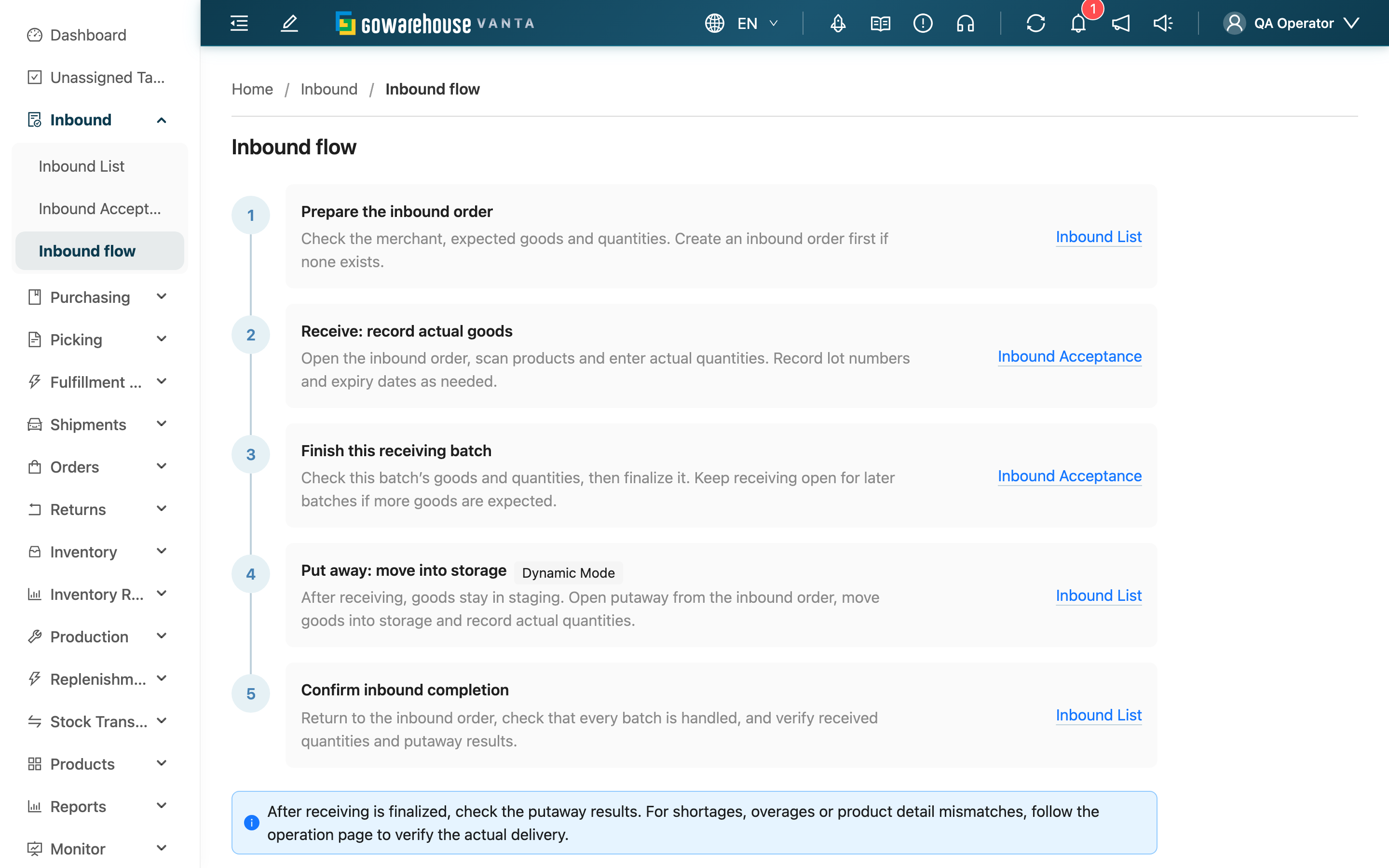
In both compact and full mode, this page is the last item under Inbound.
The putaway step automatically shows instructions for the current warehouse’s storage mode; you do not select a mode on this page.
2.1 Five-step flow
| Stage | Main task | Instructions |
|---|---|---|
| Prepare the inbound order | Check the merchant, products and expected quantities; create an order if needed | Inbound List |
| Receive goods | Scan products and record actual quantities, lots and expiry dates as required | Inbound Acceptance |
| Finalize this batch | Check the batch before finalizing; keep receiving open for later deliveries | Receiving batch operations |
| Put away | Open the batch's putaway operation from the inbound order and record locations and quantities; automatic putaway depends on warehouse mode | Inbound order detail |
| Confirm completion | Verify all batches, received quantities and putaway results | Inbound order detail |
3. FAQ
3.1 Questions
▪ Does reading this guide create an inbound order or increase inventory?
No. This page only displays instructions. Its links change pages without modifying records or quantities.
▪ Must I wait for the entire delivery before receiving goods?
No. One inbound order can have multiple receiving batches, each recording its actual delivery. If more goods are expected, do not close the whole inbound order. See receiving operations.
▪ Are goods put away automatically after receiving is finalized?
It depends on warehouse mode. Virtual-location warehouses handle putaway automatically, dedicated-location warehouses use each product's default location, and dynamic-location warehouses require manual putaway. If default locations are missing or automatic putaway fails, check and resolve the result in inbound order detail.
▪ Why is the receiving shortcut missing?
Shortcuts follow your permissions. Reading inbound information and performing receiving require different access. Contact your warehouse supervisor to check your operation permissions.
▪ Why does the putaway step link to the inbound order list?
Putaway must be linked to an actual inbound order and receiving batch. Find the order first, then open putaway from its details to work on the correct batch.
3.2 Notes
⚠️ Important reminder
- After finalizing receiving, check putaway results. For shortages, overages or product detail mismatches, verify the actual delivery and follow the operation page's instructions.
4. Related features
| Feature | Purpose | Link |
|---|---|---|
| Inbound Acceptance | Record actual deliveries and receiving batches | Open |
| Inbound List | Find inbound orders and check their progress | Open |