
Shipping flow
Contents
1. Scenarios
Quick links: Your first shipping shift
Scenario 1: Your first shipping shift
Situation: You have joined the shipping team and need to understand which stations handle goods from order receipt to carrier handoff.
Use this feature: Read the six-step flow to understand each station and the sequence, then open the operation page for your assigned work.
Result: You can distinguish picking, sorting, checking and packing, and carrier handoff, and know where the next station is.
2. Features
Shipping flow connects the six stages of a typical shipping workflow with quality checks. Each stage has a short explanation and a link to its operation page, from checking orders to physically handing parcels to the carrier. Use this guide to understand the sequence; perform scanning, packing and shipping completion on the relevant operation pages.
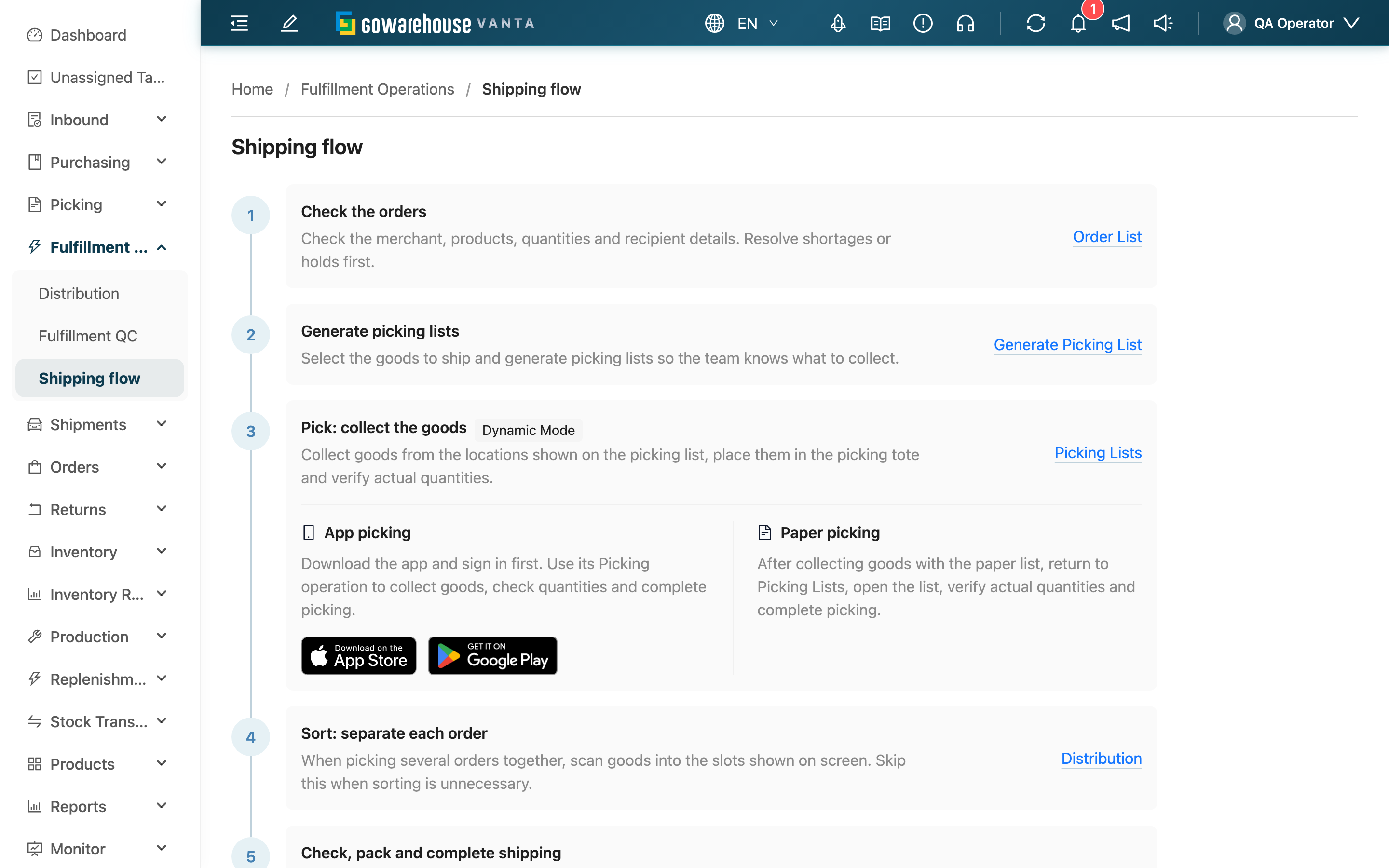
In both compact and full mode, this page is the last item under Fulfillment Operations.
2.1 Six-step flow
The sequence is checking orders, generating picking lists, picking, sorting, checking and packing with shipping completion, and carrier handoff. Follow the numbered steps along the continuous line from top to bottom; the links below explain each station in detail.
| Stage | Main task | Instructions |
|---|---|---|
| Check orders | Verify the merchant, products, quantities and recipient details; resolve shortages or holds first | Order List |
| Generate picking lists | Select the goods for this batch and hand the work to the picking team | Generate Picking List |
| Pick | Move goods from the indicated locations into picking totes, verify actual quantities and complete picking | Picking Lists |
| Sort | For orders picked together, scan goods into the indicated order slots; skip when sorting is unnecessary | Distribution |
| Check and pack | Check the goods, finish packing, handle labels as instructed and complete shipping | Fulfillment QC |
| Hand over | Attach labels and hand parcels to the carrier; track delivery when a shipment record exists | Shipment List |
2.2 Picking methods
The picking step separates App and paper instructions into two sections, side by side on desktop and stacked on mobile. Download links appear below the App instructions.
- App picking: Download the app and sign in, then use its Picking operation to collect goods, verify quantities and complete picking. The guide provides App Store and Google Play download links.
- Paper picking: After collecting goods with the paper list, return to Picking Lists, open the list, verify actual quantities and complete picking. See picking confirmation.
2.3 Current warehouse instructions
The picking step shows instructions for the current warehouse’s storage mode: dynamic warehouses use the locations on the list, dedicated warehouses store products at their default locations, and virtual warehouses use the onsite storage arrangement. App and paper are picking methods; both instructions remain visible. Follow the method assigned to the picking list.
3. FAQ
3.1 Questions
▪ Does opening this guide start shipping?
No. Reading the guide and following its links only changes pages. It does not create records or change shipping statuses.
▪ Does every order need sorting?
It depends on whether goods picked together need to be separated by order. See the sorting stage.
▪ Should I follow every step if automatic shipping is enabled?
This page shows the usual flow with quality checks. For channels configured to complete shipping automatically after picking, follow your team's assigned workflow. Do not complete an already shipped order again.
▪ Why can I read a step but cannot see its shortcut?
Shortcuts follow your permissions. Generating picking lists and performing quality checks require shipping operation access. Contact your warehouse supervisor to check your access.
▪ What should I do about a quantity mismatch or label error?
Follow the instructions on the operation page where the issue occurred. Use the instruction links in the flow table for details.
3.2 Notes
⚠️ Important reminder
- Even after the system shows shipped, parcels must still be physically handed to the carrier to avoid missed handoffs.
4. Related features
| Feature | Purpose | Link |
|---|---|---|
| Fulfillment QC | Check goods, pack and complete shipping | Open |
| Shipment List | View shipment and delivery progress | Open |