
Vanta Connect API Logs
Contents
1. Use Cases
Quick links: An external system says orders aren't getting through | A store app action had no effect | Check what an integration vendor actually does
Case 1: The ERP vendor says orders aren't getting through
Situation: A merchant reports that this morning's orders never showed up at the warehouse, and the ERP vendor insists "we sent them". You need to know whether they actually called and where the call was stopped.
Using this feature: Filter by credential and time for that ERP credential, check the status code of the create-order calls, and expand the row to see what they sent and the error the system returned.
Result: You can tell at a glance whether they never sent anything, sent bad data (for example a shipping type code that doesn't exist), or were blocked because the credential is disabled or the IP isn't on the allowlist — and pass the exact error back to the vendor.
Case 2: A store used the POS app to declare shipped, but nothing happened
Situation: A store clerk pressed "Ship" in the POS app your organization installed, but the order status didn't change. The store manager wants to know whether the app ever reached the warehouse system.
Using this feature: Filter by the app's credential (options marked "App"), then find the declare-shipped call. App calls don't store content, so expanding it shows the installation, the grant mode, and which staff member the call was made for.
Result: The status code tells you whether the call succeeded or was rejected, and the operator tells you which store account sent it — no need to ask the app vendor to dig through their own records.
Case 3: Review what an integration vendor actually did this month
Situation: You plan to change the scopes of a credential and want to confirm which functions the vendor really calls, so revoking a scope doesn't break their system.
Using this feature: Filter by credential, then use the action filter to check for write actions such as creating orders, cancelling orders, or warehouse transfers.
Result: You decide which scopes to keep based on real records, and come back after the change to confirm no new failed calls appear.
2. Features
This is the call history of Vanta Connect Integrations: every time an organization credential (credentials created on the warehouse side, plus credentials managed by installed organization apps) writes data, or any call fails, a record is kept here. When troubleshooting an integration, you can see what was sent, what the system replied, how long it took, and which IP it came from.
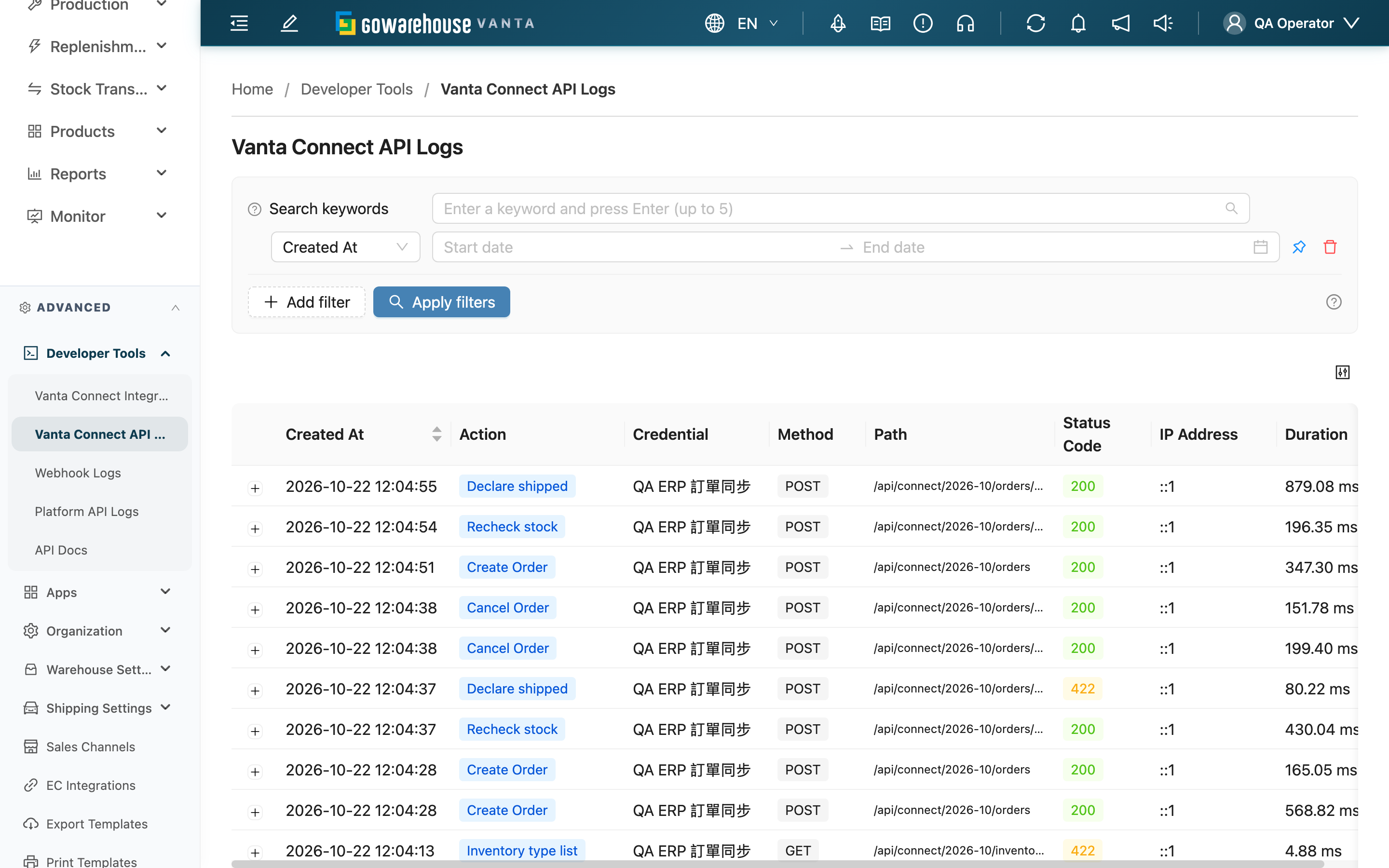
Quick jump: Which calls are recorded | Search and filters | List columns | Expanded details
2.1 Which calls are recorded
| Call | Recorded? |
|---|---|
| Write actions: create order, cancel order, declare shipped, recheck stock, cancel unshipped, transfer fulfillment warehouse, confirm picking result, create inbound, create return order | Recorded whether they succeed or fail |
| Read actions: look up orders, inventory, merchants / warehouses / shipping types, etc. | Only failures are recorded; successful reads are not |
| Calls blocked by integration settings: credential disabled, source IP not on the allowlist, path doesn't match the credential's API version, plan doesn't include Vanta Connect | Recorded, with status 401 or 403 |
| Calls with a wrong token or no token | Not recorded: the system can't tell which credential sent them |
Records are kept for about 2 months; older ones are removed.
2.2 Search and filters
The search box matches part of the request path or the action code (for example cancel_order), not the translated action name shown on screen; to find calls by action, use the "Action" filter below. Filters:
| Filter | How to use it |
|---|---|
| Created At | Pinned by default; narrow the date range first when investigating a specific period |
| Credential | Lists every credential in the organization, including disabled ones and organization app credentials (marked "App" after the name). Deleted credentials aren't listed, but their records can still be found with the other filters |
| Action | Filter by action, for example only "Create order" |
| Status Code | Enter full HTTP status codes such as 422; one per line to search several at once |
2.3 List columns
| Column | Description |
|---|---|
| Created At | When the call came in; click the header to switch between newest and oldest first |
| Credential | The credential that made the call; organization app credentials have an "App" tag. Shows "Deleted credential" when the credential has been deleted |
| Status Code | The HTTP status the system returned: green for success (2xx), orange for data or permission problems on the caller's side (4xx), red for system errors (5xx) |
| IP Address | The IP the caller connected from — useful for checking which address belongs on the IP allowlist |
| Duration | How long the system took to process the call |
2.4 Expanded details
Click the "+" on the left of a row to expand it:
- Regular credentials: the request the caller sent is on the left and the system's response is on the right; failed responses contain an error code you can pass straight to the vendor. Sensitive fields such as passwords and tokens are masked when the record is saved.
- Organization app credentials: app calls don't store request or response content. Instead you see "App authorization summary" — Installation ID, Authorization version, Grant mode (Online (on behalf of an operator) or Offline (App background task)) and Operator. No content doesn't mean the call failed; check the status code.
3. FAQ
Quick jump: FAQ | Important notes
3.1 FAQ
▪ Why can't I see "Vanta Connect API Logs"?
This page requires the "Vanta Connect Integrations - Read" permission, and your organization's plan must include Vanta Connect. The "Logs" permission alone isn't enough. Please contact your administrator to check your permissions.
▪ Why does it use the Vanta Connect permission instead of the logs permission?
Records contain the full request the caller sent, which can include orders and recipient details for any merchant in the organization. The people who can see them are the same people who can view Access Tokens on the Vanta Connect Integrations page — anyone holding a token can already call the whole organization's data, so access is limited to that same group.
▪ Will the list only show my warehouse or the merchants assigned to me?
No. This page lists every call in the organization, regardless of warehouse or assigned merchants. To look at one integration, use the credential filter.
▪ The vendor says they looked up orders, so why is there no record?
Successful reads aren't recorded — only failed ones are. See Which calls are recorded.
▪ The vendor can't connect at all, but there are no records?
The most common cause is a wrong token or no token. Those calls can't be matched to a credential, so nothing is recorded. Ask the vendor to confirm they're using the token from the latest regeneration.
▪ Why don't app records have request content?
Organization app calls never store request or response content. Only the installation, the authorization version, whether the grant is online or offline, and — for online grants — which staff member the call was made for are recorded. See Expanded details.
▪ The operator shows a code instead of a name?
That person is no longer in your organization (for example the account was deleted), so the system can't match a name and shows the code. Offline grants have no operator and show "-".
▪ How do I check the integration history of one order?
Open that order's detail page and go to the "Logs" tab. It lists the Vanta Connect API calls that were successfully processed for the order and its fulfillments, so you don't have to search here. Rejected calls (for example a declare-shipped that returned 422) aren't attached to the order; filter by time and action on this page to find them.
3.2 Important notes
⚠️ Important
- Records are kept for about 2 months; older records are removed and can't be recovered. Save the details elsewhere if you need to keep an integration issue on file longer.
- Expanded details can show recipient names, phone numbers, and addresses. Don't share screenshots with anyone unrelated to that merchant.
💡 Tip: When troubleshooting one vendor, filter by "Credential" plus "Status Code" to list only failed calls, then expand each one to read the error code — much faster than paging through everything.
4. Related Features
| Feature | Description | Link |
|---|---|---|
| Vanta Connect Integrations | Create and disable credentials, adjust scopes and the IP allowlist | Go |
| Order details | See one order's integration history in the "Logs" tab | Go |
| Webhook Logs | See notifications the system pushes to integrations | Go |