
Webhook Logs
Contents
1. Use Cases
Quick links: A merchant's system didn't get the shipped notification | Resend notifications after the receiver comes back online
Case 1: A merchant's order system says it never got the shipped notification
Situation: A merchant reports that orders shipped yesterday still show as unshipped in their order system, and suspects the warehouse never notified them.
Using this feature: Filter by event type and time for the order-shipped notifications in that period, check the delivery status and response code, and expand a row to see what the receiver actually replied.
Result: You can tell whether the warehouse never sent it, sent it but the receiver returned an error, or the receiver replied success but didn't process it — a clear answer instead of guesswork.
Case 2: The receiver was down overnight and missed notifications
Situation: The merchant's receiving server was down for maintenance last night and every notification in that window failed. Now it's back, and the merchant doesn't want to wait for automatic retries.
Using this feature: Filter by delivery status for failed or retrying notifications and press "Retry" on each.
Result: The notifications are sent again immediately, and the delivery status in the list updates to the latest result.
2. Features
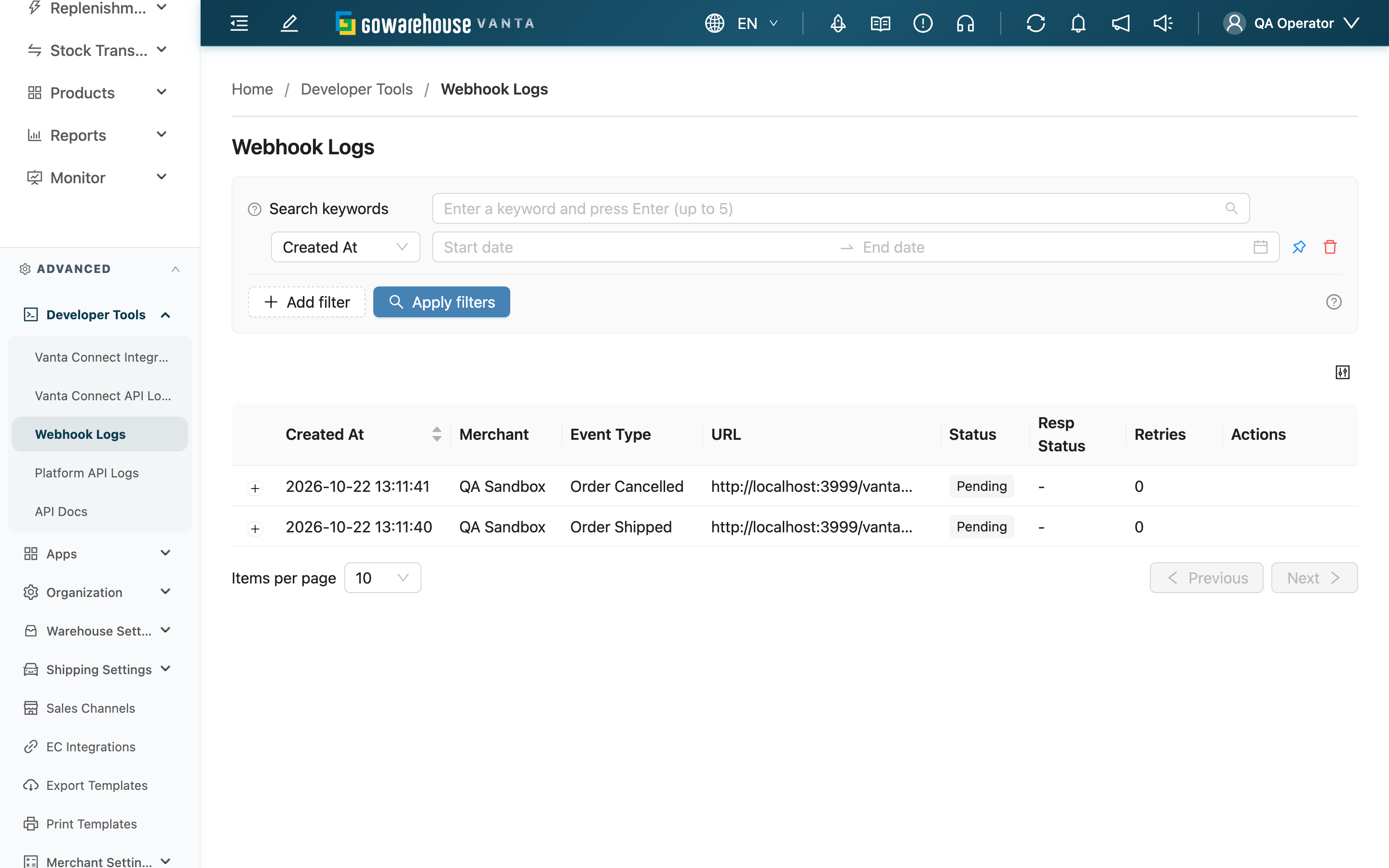
Once a merchant sets up a webhook under Integrations, or an organization credential or app subscribes to events, the system pushes a notification to the configured URL whenever orders are created, shipped, or cancelled, inventory changes, and so on. This page lists every notification with its content, the receiver's response, and retry progress. It's the first place to check when someone says "we didn't get the notification", and you can resend failed ones right here.
Quick jump: Search and filters | List columns | Expanded details | Resend
2.1 Search and filters
The list only shows notifications for merchants assigned to you; switching the merchant in the page header narrows the list to that merchant. The search box matches part of the event type or target URL.
| Filter | How to use it |
|---|---|
| Created At | Pinned by default |
| Event Type | Show only one kind of event, such as order shipped |
| Status | Show only "Failed" or "Awaiting Retry" notifications to find what needs attention |
When you arrive from "View deliveries" on the Vanta Connect Integrations or Apps page, the list shows only that subscription's notifications and displays "Showing deliveries for one subscription only." at the top. Press "Show all" to return to everything. This single-subscription view also lists the subscription's test deliveries: deliveries sent from an organization-level subscription with "Send test" (Vanta Connect Integrations page) or "Send test delivery" (Apps page) don't belong to any merchant, show "-" in the "Merchant" column, and appear only in this view, not in the regular list.
2.2 List columns
| Column | Description |
|---|---|
| Merchant | The merchant the event belongs to; organization-level subscriptions also show the event's merchant |
| URL | The URL the event was originally addressed to |
| Status | "Pending" and "Delivering" mean it's still being sent; "Delivered" means the receiver replied 2xx; "Awaiting Retry" means it failed and the next automatic retry is scheduled; "Failed" means all 5 automatic retries are used up and it won't be sent automatically again |
| Resp Status | The HTTP status of the receiver's last reply |
| Retries | How many automatic retries have run. After a failure, retries happen after 1 minute, 5 minutes, 30 minutes, 2 hours, and 8 hours |
2.3 Expanded details
Click the "+" on the left of a row: the notification content is on the left and the receiver's last response on the right. Below, "Attempts" lists each attempt's time, result, the URL it was sent to, and the receiver's response — so you can tell whether a failure was the receiver not responding or the notification going to an old, retired URL. Notifications waiting to retry show when the next automatic retry is due.
2.4 Resend
Notifications in "Failed" or "Awaiting Retry" have a "Retry" button in the actions column:
- Requirements: you need the "Logs - Write" permission, and the webhook must be active; disabled webhooks don't show the button.
- Effect: the notification is sent again immediately. A "Failed" notification starts a fresh round of automatic retries; a "Awaiting Retry" one is simply sent early and keeps its retry count. Manual or automatic, it goes to the webhook's current URL.
- Reversibility: a sent notification can't be taken back; if the receiver doesn't check for duplicates, it may process it twice.
3. FAQ
Quick jump: FAQ | Important notes
3.1 FAQ
▪ Why doesn't a notification have a "Retry" button?
Notifications that were delivered or are still being sent don't need resending, and the button is hidden when the webhook is disabled (for example after the system automatically disabled it following 10 consecutive failures). Re-enable the webhook on its settings page first. Without the logs edit permission, the button shows as locked.
▪ Why can't I see a merchant's notifications?
The list only shows merchants assigned to you; also check which merchant is selected in the page header.
▪ I changed the webhook URL. Where do old failed notifications go?
To the new URL. Ones still "Awaiting Retry" switch to the new URL on their next automatic retry; ones already "Failed" won't be sent automatically, so press "Retry".
▪ The receiver replied success but says it never got the data?
Expand the row: "Request Body" is exactly what was sent. A 2xx reply means their system accepted it, so ask them to check their own processing.
▪ The attempts section says "This delivery predates per-attempt records, so none were kept."?
That notification predates per-attempt history, so only the final result was kept.
▪ How long are notification records kept?
About 2 months; older records are removed.
3.2 Important notes
⚠️ Important
- Resending sends the same notification again and can't be undone; a receiver without duplicate checks will process it twice.
- "Failed" notifications are not retried automatically; unless you resend them, they won't be sent again.
💡 Tip: After a receiver has been down for a while, filter for "Failed" and "Awaiting Retry", confirm the receiver is back up, and then resend — so the resends don't fail again.
4. Related Features
| Feature | Description | Link |
|---|---|---|
| Vanta Connect Integrations | Set up webhook subscriptions for organization-level integrations | Go |
| Vanta Connect API Logs | See calls external systems made to the Vanta Connect API | Go |
| Order details | View and resend an order's notifications in its "Logs" tab | Go |